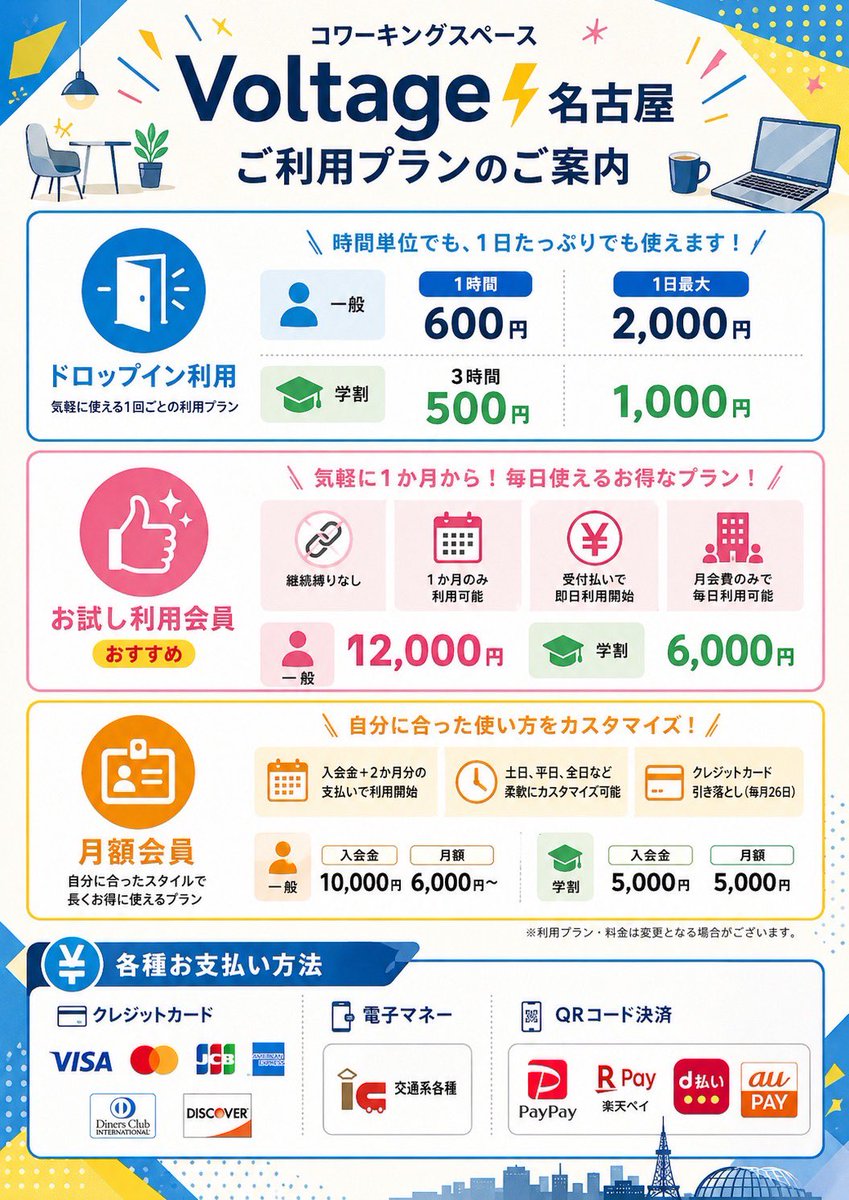
Volantino con i prezzi degli spazi di coworking in Giappone
Questo prompt genera un poster professionale per i prezzi di uno spazio di coworking giapponese, completo di diverse sezioni dedicate ai vari piani tariffari, metodi di pagamento e un'infografica pronta per la pubblicazione in negozio.
Questo è un esempio di prompt GPT Image 2 per Grafica e poster . Utilizza il prompt pronto per la copia qui sotto per generare immagini simili e verifica l'attribuzione Awesome GPT Image 2 Prompts e i diritti di utilizzo commerciale prima del riutilizzo.
Free 1K preview
Generate one preview image instantly, no sign-up required.
Richiesta
prompt pronto per la copia
{
  "type": "Japanese coworking space pricing flyer",
  "style": "clean flat vector infographic, corporate promotional poster, white background with bright blue, yellow, pink, green, and orange accent colors, rounded boxes, friendly icons, bold Japanese typography, high readability, print-ready vertical A4 poster design",
  "brand": {
    "name": "{argument name=\"brand name\" default=\"Voltage Nagoya\"}",
    "category": "coworking space",
    "headline": "coworking space",
    "subheadline": "ご利用プランのご案内"
  },
  "layout": {
    "orientation": "portrait",
    "sections": [
      {
        "title": "header",
        "position": "top",
        "count": 6,
        "labels": [
          "coworking space",
          "Voltage Nagoya",
          "ご利用プランのご案内",
          "small cafe table and chair illustration",
          "coffee mug icon",
          "open laptop icon"
        ]
      },
      {
        "title": "ドロップイン利用",
        "position": "upper middle",
        "count": 6,
        "labels": [
          "door icon",
          "General",
          "Student",
          "1 hour 600 JPY",
          "Up to 2,000 yen per day",
          "500 yen / 1,000 yen for 3 hours"
        ]
      },
      {
        "title": "お試し利用会員",
        "position": "middle",
        "count": 8,
        "labels": [
          "thumbs up icon",
          "おすすめ",
          "継続縛りなし",
          "1か月のみ利用可能",
          "受付払いで即日利用開始",
          "月会費のみで毎日利用可能",
          "General: 12,000 yen",
          "Student: 6,000 yen"
        ]
      },
      {
        "title": "Monthly membership",
        "position": "lower middle",
        "count": 9,
        "labels": [
          "ID card icon",
          "入会金+2か月分の支払いで利用開始",
          "土日、平日、全日など柔軟にカスタマイズ可能",
          "クレジットカード引き落とし(毎月26日)",
          "General",
          "Membership fee: 10,000 JPY",
          "Monthly fee: starting from 6,000 JPY",
          "Student",
          "Membership fee: 5,000 JPY / Monthly fee: 5,000 JPY"
        ]
      },
      {
        "title": "各種お支払い方法",
        "position": "bottom",
        "count": 12,
        "labels": [
          "クレジットカード",
          "電子マネー",
          "QRコード決済",
          "VISA",
          "Mastercard",
          "JCB",
          "AMERICAN EXPRESS",
          "Diners Club INTERNATIONAL",
          "DISCOVER",
          "Various transportation cards",
          "PayPay",
          "R Pay / d払い / au PAY"
        ]
      }
    ],
    "footer": "small disclaimer text and Nagoya skyline silhouette with tower and dome"
  },
  "visuals": {
    "background_elements": [
      "blue diagonal corner shapes",
      "yellow geometric confetti",
      "small starbursts and lines",
      "light dotted patterns",
      "city skyline silhouette at bottom"
    ],
    "icon_style": "simple flat rounded icons inside colored circles or soft rectangular cards",
    "section_colors": [
      "blue drop-in section",
      "pink trial membership section",
      "orange monthly membership section",
      "blue payment methods section"
    ]
  },
  "text_language": "Japanese",
  "image_goal": "a polished promotional price guide poster for a coworking space branch in Nagoya, suitable for storefront display or social media announcement",
  "customizable_fields": {
    "location": "{argument name=\"location name\" default=\"Nagoya\"}",
    "main headline": "{argument name=\"main headline\" default=\"ご利用プランのご案内\"}",
    "accent color": "{argument name=\"accent color\" default=\"bright blue and yellow\"}",
    "poster size": "{argument name=\"poster size\" default=\"vertical A4\"}"
  }
}
Variabili di richiesta
Segnaposto per gli argomenti modificabili presenti nel prompt, con i relativi valori predefiniti.
Best for
- - Grafica e poster visual exploration
- - Image generation and reference-image edits
- - Reusable briefs that keep source attribution visible
Change these parts
- - Subject, product, character, or scene
- - Aspect ratio, camera, lighting, and background
- - Brand, text, color, and output constraints
Recommended model and settings
- - Model: gpt-image-2
- - Input mode: Testo in immagine
- - Aspect ratio: source
- - Commercial status: review original source
How to use this prompt
- 1. Copy the prompt and preserve its structure for the first test.
- 2. Replace the subject, context, and publishing channel.
- 3. Change one camera, lighting, or style variable per iteration.
- 4. Inspect the output, source, text, and rights before reuse.
Limitations, source, and reuse cautions
- - Generated output is an editable draft, not factual, legal, or rights evidence.
- - Review the linked source, people, brands, logos, text, and third-party media before commercial use.
Altri casi in questa categoria
Prioritizzazione in base a categoria, compatibilità della modalità di input, qualità e minor rischio.






Note sul riutilizzo e sulla fonte
Utilizza questo prompt in tutta sicurezza dopo aver visualizzato in anteprima il caso.
- 1.Copia il prompt oppure aprilo direttamente in Dovoo tramite il pulsante di generazione.
- 2.Regola le variabili, le proporzioni e le immagini di riferimento in base alle tue esigenze.
- 3.Prima della pubblicazione o dell'utilizzo a pagamento, verificare i diritti di fonte, i requisiti di attribuzione e i rischi relativi al marchio o all'immagine.