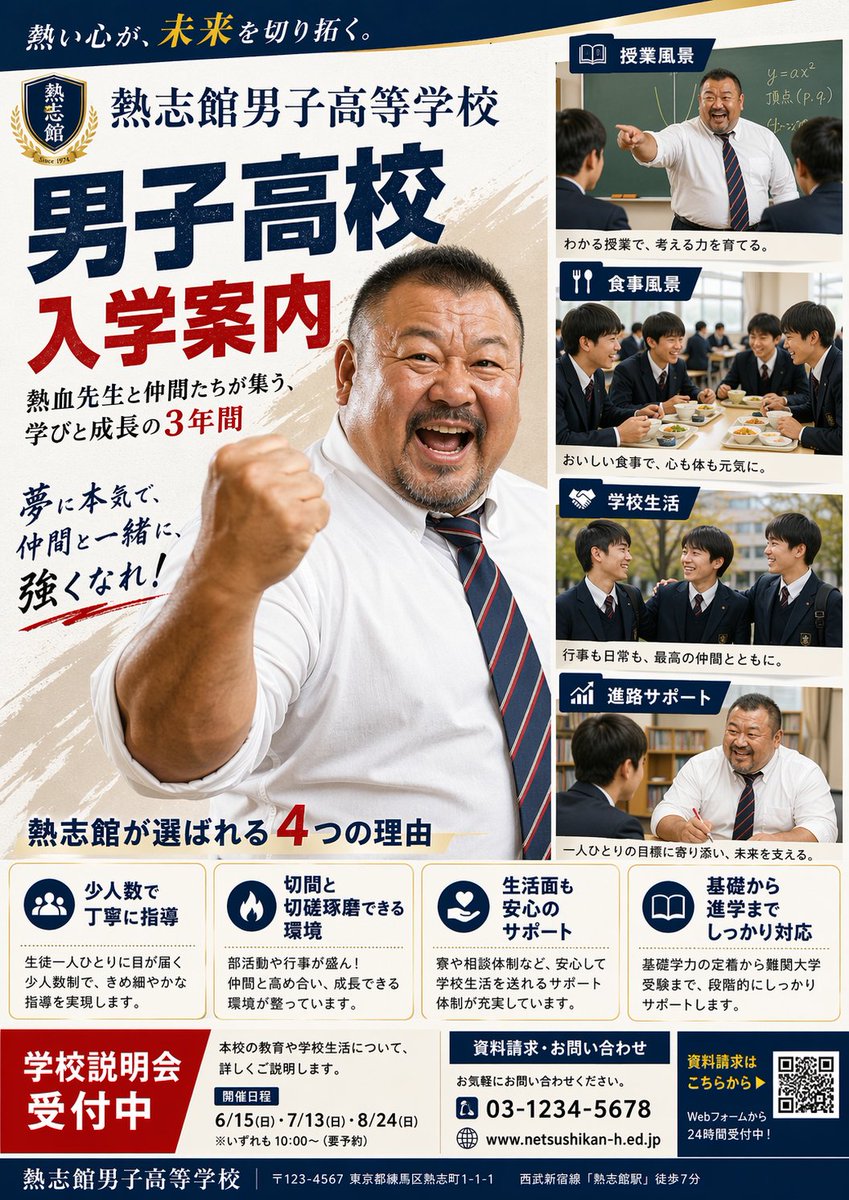
Manifesto di ammissione alla scuola superiore maschile giapponese
Un poster realistico per una brochure scolastica giapponese, con un insegnante motivazionale, pannelli fotografici che ritraggono la vita studentesca e informazioni dettagliate sulle ammissioni, ideale per l'utilizzo nei materiali di reclutamento delle scuole superiori.
Questo è un esempio di prompt GPT Image 2 per Grafica e poster . Utilizza il prompt pronto per la copia qui sotto per generare immagini simili e verifica l'attribuzione Awesome GPT Image 2 Prompts e i diritti di utilizzo commerciale prima del riutilizzo.
Free 1K preview
Generate one preview image instantly, no sign-up required.
Richiesta
prompt pronto per la copia
{
  "type": "Japanese high school admissions poster",
  "style": "formal school promotional flyer, clean editorial layout, realistic photography collage, bold Japanese typography, navy blue and red color scheme with gold accents, portrait-oriented A4 poster design",
  "subject": {
    "institution": "{argument name=\"school name\" default=\"Retsushikan Boys' High School\"}",
    "theme": "boys high school entrance guide",
    "slogan_top": "熱い心が、未来を切り拓く。",
    "main_headline_1": "Boys' High School",
    "main_headline_2": "Admission Guide",
    "subheadline": "熱血先生と仲間たちが集う、学びと成長の3年間",
    "calligraphy_copy": "夢に本気で、仲間と一緒に、強くなれ!",
    "hero": "a large, muscular, passionate male teacher in a white dress shirt with rolled sleeves and a navy-and-red striped tie, standing in the center-left foreground, raising one clenched fist toward the camera in an encouraging pose, cropped from mid torso upward, energetic and motivational expression",
    "crest": {
      "position": "top left",
      "shape": "shield emblem with laurel wreath",
      "text": "Ketsushikan",
      "detail": "Since 1974"
    }
  },
  "layout": {
    "background": "off-white paper texture with diagonal beige brush-stroke accents",
    "sections": [
      {
        "title": "Classroom Scenery",
        "position": "top right",
        "count": 1,
        "labels": [
          "teacher pointing in front of a chalkboard with equations while two male students listen"
        ]
      },
      {
        "title": "Dining Scenery",
        "position": "upper mid-right",
        "count": 1,
        "labels": [
          "five male students in school uniforms eating lunch together in a cafeteria"
        ]
      },
      {
        "title": "Campus Life",
        "position": "lower mid-right",
        "count": 1,
        "labels": [
          "three male students in uniforms talking outdoors on campus"
        ]
      },
      {
        "title": "進路サポート",
        "position": "bottom right",
        "count": 1,
        "labels": [
          "one-on-one counseling between a teacher and a male student at a desk"
        ]
      },
      {
        "title": "熱志館が選ばれる4つの理由",
        "position": "bottom center",
        "count": 4,
        "labels": [
          "少人数で丁寧に指導",
          "切磋と切磋琢磨できる環境",
          "生活面も安心のサポート",
          "基礎から進学までしっかり対応"
        ]
      },
      {
        "title": "School Information Session Registration Open",
        "position": "bottom left",
        "count": 1,
        "labels": [
          "large red registration block"
        ]
      },
      {
        "title": "Event Date",
        "position": "bottom lower-left center",
        "count": 3,
        "labels": [
          "6/15 (Sun)",
          "7/13 (Sun)",
          "8/24 (Sun)"
        ]
      },
      {
        "title": "資料請求・お問い合わせ",
        "position": "bottom center-right",
        "count": 3,
        "labels": [
          "03-1234-5678",
          "www.netsushikan-h.ed.jp",
          "お気軽にお問い合わせください。"
        ]
      },
      {
        "title": "資料請求はこちらから",
        "position": "bottom right",
        "count": 2,
        "labels": [
          "QR code",
          "Webフォームから24時間受付中!"
        ]
      }
    ],
    "composition": "very large main headline on the left half, dominant hero teacher overlapping the center, four stacked rectangular photo panels on the right with blue title tabs and white icons, four rounded feature boxes in a horizontal row near the bottom, footer bar spanning the width"
  },
  "details": {
    "feature_boxes": [
      {
        "icon": "group of people",
        "heading": "少人数で丁寧に指導",
        "body": "生徒一人ひとりに目が届く少人数制で、きめ細やかな指導を実現します。"
      },
      {
        "icon": "flame",
        "heading": "切磋と切磋琢磨できる環境",
        "body": "部活動や行事が盛ん!仲間と高め合い、成長できる環境が整っています。"
      },
      {
        "icon": "heart in hand",
        "heading": "生活面も安心のサポート",
        "body": "寮や相談体制など、安心して学校生活を送れるサポート体制が充実しています。"
      },
      {
        "icon": "open book",
        "heading": "基礎から進学までしっかり対応",
        "body": "基礎学力の定着から難関大学受験まで、段階的にしっかりサポートします。"
      }
    ],
    "footer_text": [
      "Retsushikan Boys' High School",
      "〒123-4567 Nerima-ku, Tokyo 1-1-1 Atsushi-cho",
      "7-minute walk from Seibu Shinjuku Line \"Atsushi-kan Station\""
    ],
    "photo_style": "realistic Japanese school brochure photography, adult teacher and male high school students in dark navy uniforms with white shirts and striped ties, warm natural lighting",
    "graphic_elements": "blue ribbon-like section headers with white pictogram icons, bold serif Japanese display text for the main title, red emphasis numerals, neat grid alignment, brochure-like professionalism"
  },
  "customization": {
    "headline": "{argument name=\"headline text\" default=\"Admission Guide\"}",
    "phone": "{argument name=\"phone number\" default=\"03-1234-5678\"}",
    "website": "{argument name=\"website\" default=\"www.netsushikan-h.ed.jp\"}",
    "event_banner": "{argument name=\"event banner text\" default=\"School Information Session Registration Open\"}"
  }
}
Variabili di richiesta
Segnaposto per gli argomenti modificabili presenti nel prompt, con i relativi valori predefiniti.
Best for
- - Grafica e poster visual exploration
- - Image generation and reference-image edits
- - Reusable briefs that keep source attribution visible
Change these parts
- - Subject, product, character, or scene
- - Aspect ratio, camera, lighting, and background
- - Brand, text, color, and output constraints
Recommended model and settings
- - Model: gpt-image-2
- - Input mode: Testo in immagine
- - Aspect ratio: source
- - Commercial status: review original source
How to use this prompt
- 1. Copy the prompt and preserve its structure for the first test.
- 2. Replace the subject, context, and publishing channel.
- 3. Change one camera, lighting, or style variable per iteration.
- 4. Inspect the output, source, text, and rights before reuse.
Limitations, source, and reuse cautions
- - Generated output is an editable draft, not factual, legal, or rights evidence.
- - Review the linked source, people, brands, logos, text, and third-party media before commercial use.
Altri casi in questa categoria
Prioritizzazione in base a categoria, compatibilità della modalità di input, qualità e minor rischio.






Note sul riutilizzo e sulla fonte
Utilizza questo prompt in tutta sicurezza dopo aver visualizzato in anteprima il caso.
- 1.Copia il prompt oppure aprilo direttamente in Dovoo tramite il pulsante di generazione.
- 2.Regola le variabili, le proporzioni e le immagini di riferimento in base alle tue esigenze.
- 3.Prima della pubblicazione o dell'utilizzo a pagamento, verificare i diritti di fonte, i requisiti di attribuzione e i rischi relativi al marchio o all'immagine.