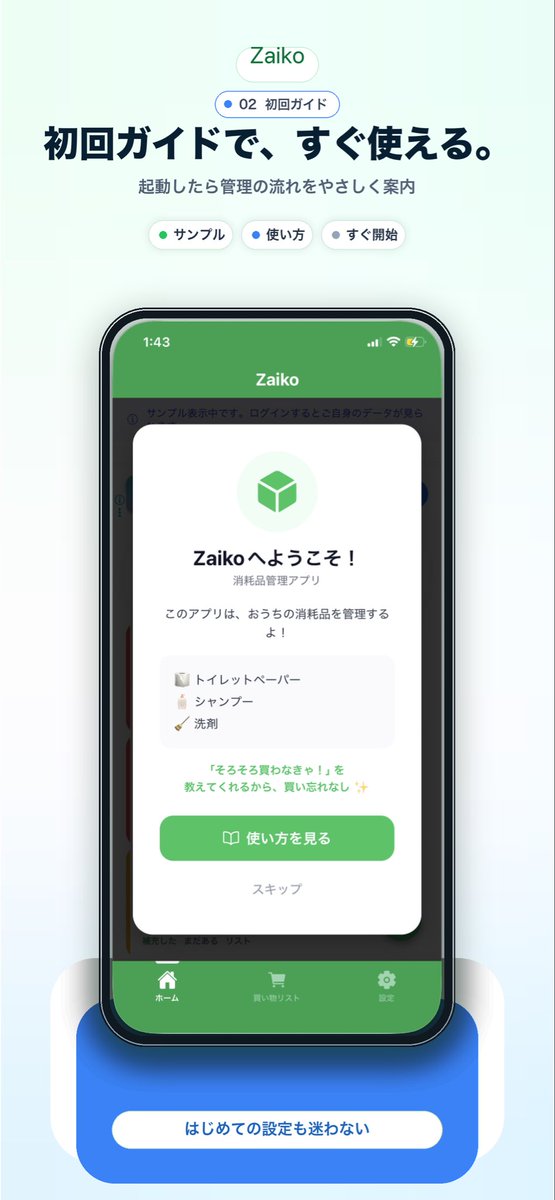
Mockup promozionale per l'onboarding di un'app giapponese
Questo strumento genera un'immagine di marketing per app mobile giapponese, curata nei minimi dettagli, con un mockup di smartphone e una schermata di onboarding, ideale per landing page, contenuti per app store o promozione sui social media.
Questo è un esempio di prompt GPT Image 2 per Prodotto e commerciale . Utilizza il prompt pronto per la copia qui sotto per generare immagini simili e verifica l'attribuzione Awesome GPT Image 2 Prompts e i diritti di utilizzo commerciale prima del riutilizzo.
Free 1K preview
Generate one preview image instantly, no sign-up required.
Richiesta
prompt pronto per la copia
A clean modern app-promo poster on a very pale mint-blue background, centered and vertically composed like a landing page screenshot for a Japanese inventory app. At the top, place a small rounded white pill logo with soft shadow reading {argument name="app name" default="Zaiko"} in green. Beneath it, add a smaller rounded outlined badge with a blue dot and the text "02 初回ガイド". Below that, set a large bold Japanese headline in dark navy: {argument name="headline text" default="初回ガイドで、すぐ使える。"}, followed by a smaller gray subtitle: "起動したら管理の流れをやさしく案内". Under the subtitle, show exactly 3 small rounded white category chips with soft shadows, evenly spaced: "サンプル" with a green dot, "使い方" with a blue dot, and "すぐ開始" with a dark dot. In the center, show a realistic modern smartphone mockup front view with a black bezel, slightly rounded corners, subtle reflections, and a dramatic soft blue glow under it. The phone screen displays the app UI with a green top bar and the title "Zaiko" in white, iPhone-style status icons at top, and a dimmed app interface behind a centered onboarding modal card. The white modal has rounded corners and a soft drop shadow, with a pale green circular icon area containing a green cube symbol at top. Then a bold welcome title in Japanese, "Zaikoへようこそ!", a smaller subtitle "消耗品管理アプリ", and body text "このアプリは、おうちの消耗品を管理するよ!". Add a light gray rounded list box containing exactly 3 sample inventory items on separate lines with tiny icons: "トイレットペーパー", "シャンプー", and "洗剤". Below that, add a small green-highlighted sentence: "『そろそろ買わなきゃ!』を教えてくれるから、買い忘れなし ✨". At the bottom of the modal, include a large rounded green primary button labeled {argument name="button text" default="使い方を見る"} with a small book icon, and below it a muted text link "スキップ". Behind the modal, the app UI should be visible but subdued: a green header, side category strips, and a bottom tab bar with exactly 3 tabs labeled "ホーム", "買い物リスト", and "設定", each with simple white icons. Beneath the phone, place a large rounded blue callout card with soft shadow and a centered white pill label reading {argument name="footer text" default="はじめての設定も迷わない"}. Use a polished Apple-style SaaS marketing aesthetic, soft gradients, subtle shadows, rounded UI elements, crisp typography, and a friendly trustworthy feel.Variabili di richiesta
Segnaposto per gli argomenti modificabili presenti nel prompt, con i relativi valori predefiniti.
Best for
- - Prodotto e commerciale visual exploration
- - Image generation and reference-image edits
- - Reusable briefs that keep source attribution visible
Change these parts
- - Subject, product, character, or scene
- - Aspect ratio, camera, lighting, and background
- - Brand, text, color, and output constraints
Recommended model and settings
- - Model: gpt-image-2
- - Input mode: Testo in immagine
- - Aspect ratio: source
- - Commercial status: review original source
How to use this prompt
- 1. Copy the prompt and preserve its structure for the first test.
- 2. Replace the subject, context, and publishing channel.
- 3. Change one camera, lighting, or style variable per iteration.
- 4. Inspect the output, source, text, and rights before reuse.
Limitations, source, and reuse cautions
- - Generated output is an editable draft, not factual, legal, or rights evidence.
- - Review the linked source, people, brands, logos, text, and third-party media before commercial use.
Altri casi in questa categoria
Prioritizzazione in base a categoria, compatibilità della modalità di input, qualità e minor rischio.






Note sul riutilizzo e sulla fonte
Utilizza questo prompt in tutta sicurezza dopo aver visualizzato in anteprima il caso.
- 1.Copia il prompt oppure aprilo direttamente in Dovoo tramite il pulsante di generazione.
- 2.Regola le variabili, le proporzioni e le immagini di riferimento in base alle tue esigenze.
- 3.Prima della pubblicazione o dell'utilizzo a pagamento, verificare i diritti di fonte, i requisiti di attribuzione e i rischi relativi al marchio o all'immagine.