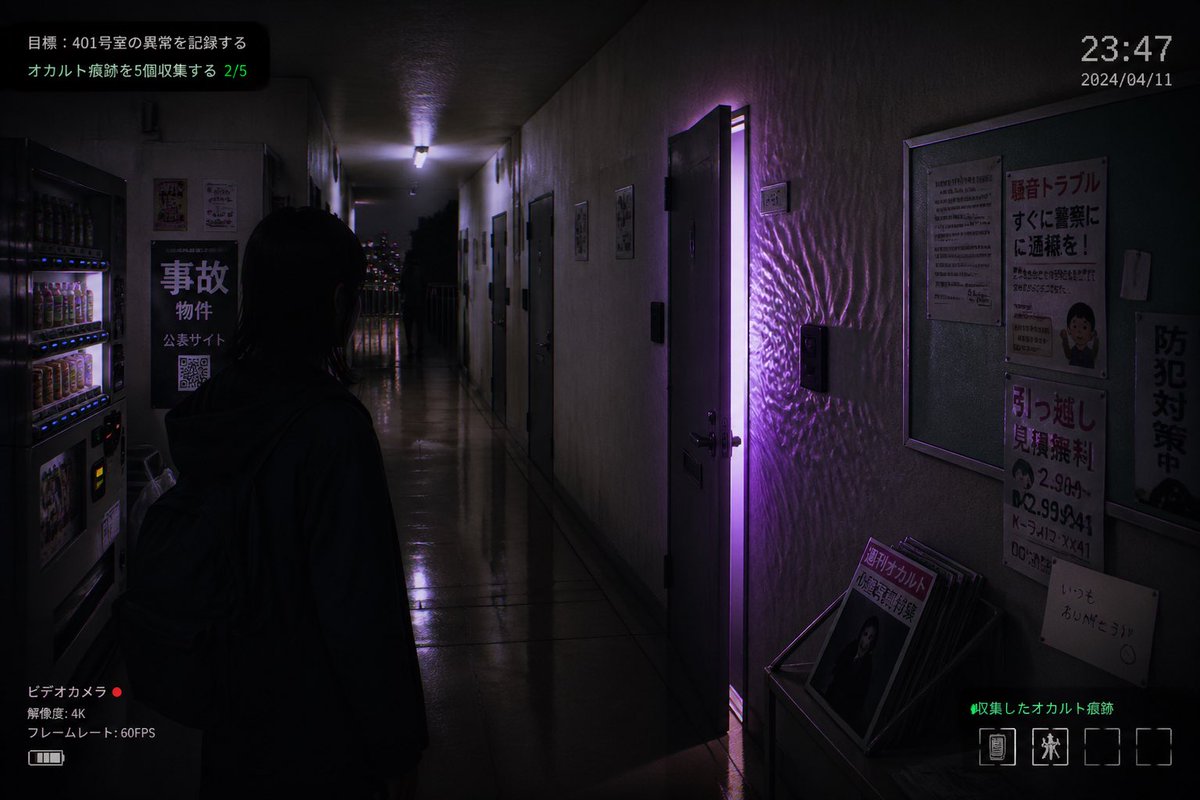
Screenshot del gioco horror "Appartamento giapponese"
Questo prompt genera uno screenshot fotorealistico in stile videogioco horror indipendente di un corridoio di un appartamento giapponese infestato, con una porta illuminata di viola e un'interfaccia utente completa sovrapposta, ideale per la grafica di finti videogiochi o per inquietanti illustrazioni promozionali.
Questo è un esempio di prompt GPT Image 2 per Anime e videogiochi . Utilizza il prompt pronto per la copia qui sotto per generare immagini simili e verifica l'attribuzione Awesome GPT Image 2 Prompts e i diritti di utilizzo commerciale prima del riutilizzo.
Free 1K preview
Generate one preview image instantly, no sign-up required.
Richiesta
prompt pronto per la copia
A realistic first-person horror game screenshot set in a narrow, dimly lit Japanese apartment corridor at night, viewed from slightly behind a lone human figure standing in the hallway. The figure is a young woman with straight dark shoulder-length hair, seen mostly in silhouette from the back, wearing a dark hoodie and a backpack, facing forward toward the end of the corridor. The setting is an older concrete apartment building interior with glossy reflective floor tiles, stained off-white walls, multiple apartment doors on both sides, and a cold fluorescent ceiling light receding into the distance. One apartment door on the right side is slightly open, emitting a vivid supernatural purple glow that spills into the hallway and creates rippling light patterns across the wall and floor. On the left foreground, include 2 beverage vending machines with illuminated rows of drinks. Also on the left wall, place a black sign with large Japanese text reading "事故物件", smaller text beneath, and a visible QR code. On the right wall, include a bulletin board and 4 posted notices: a warning-style poster with large red Japanese text, a dense text notice, a moving-service flyer with bold red text and phone numbers, and a vertical anti-crime sign. At the lower right, place a small magazine rack or stand holding several pamphlets, with the front magazine showing Japanese text including "月刊オカルト". Through the far end of the corridor, show a balcony railing and distant city lights. Add an in-game HUD overlay to make it look like a captured indie horror game screen: top left mission text in Japanese with 2 lines, including a green progress counter "2/5"; top right a digital time display "23:47" and date "2024/04/11"; bottom left a camcorder interface with Japanese text, a red recording dot, "4K", and "60FPS"; bottom right green Japanese collection text and a row of 4 inventory slots with only 2 occupied icons. Cinematic composition, moody shadows, photorealistic textures, subtle film grain, surveillance-camera and found-footage atmosphere, ominous supernatural tension, purple and blue-black color palette, realistic Japanese typography, ultra-detailed indie survival horror aesthetic.
Best for
- - Anime e videogiochi visual exploration
- - Image generation and reference-image edits
- - Reusable briefs that keep source attribution visible
Change these parts
- - Subject, product, character, or scene
- - Aspect ratio, camera, lighting, and background
- - Brand, text, color, and output constraints
Recommended model and settings
- - Model: gpt-image-2
- - Input mode: Testo in immagine
- - Aspect ratio: source
- - Commercial status: review original source
How to use this prompt
- 1. Copy the prompt and preserve its structure for the first test.
- 2. Replace the subject, context, and publishing channel.
- 3. Change one camera, lighting, or style variable per iteration.
- 4. Inspect the output, source, text, and rights before reuse.
Limitations, source, and reuse cautions
- - Generated output is an editable draft, not factual, legal, or rights evidence.
- - Review the linked source, people, brands, logos, text, and third-party media before commercial use.
Altri casi in questa categoria
Prioritizzazione in base a categoria, compatibilità della modalità di input, qualità e minor rischio.






Note sul riutilizzo e sulla fonte
Utilizza questo prompt in tutta sicurezza dopo aver visualizzato in anteprima il caso.
- 1.Copia il prompt oppure aprilo direttamente in Dovoo tramite il pulsante di generazione.
- 2.Regola le variabili, le proporzioni e le immagini di riferimento in base alle tue esigenze.
- 3.Prima della pubblicazione o dell'utilizzo a pagamento, verificare i diritti di fonte, i requisiti di attribuzione e i rischi relativi al marchio o all'immagine.