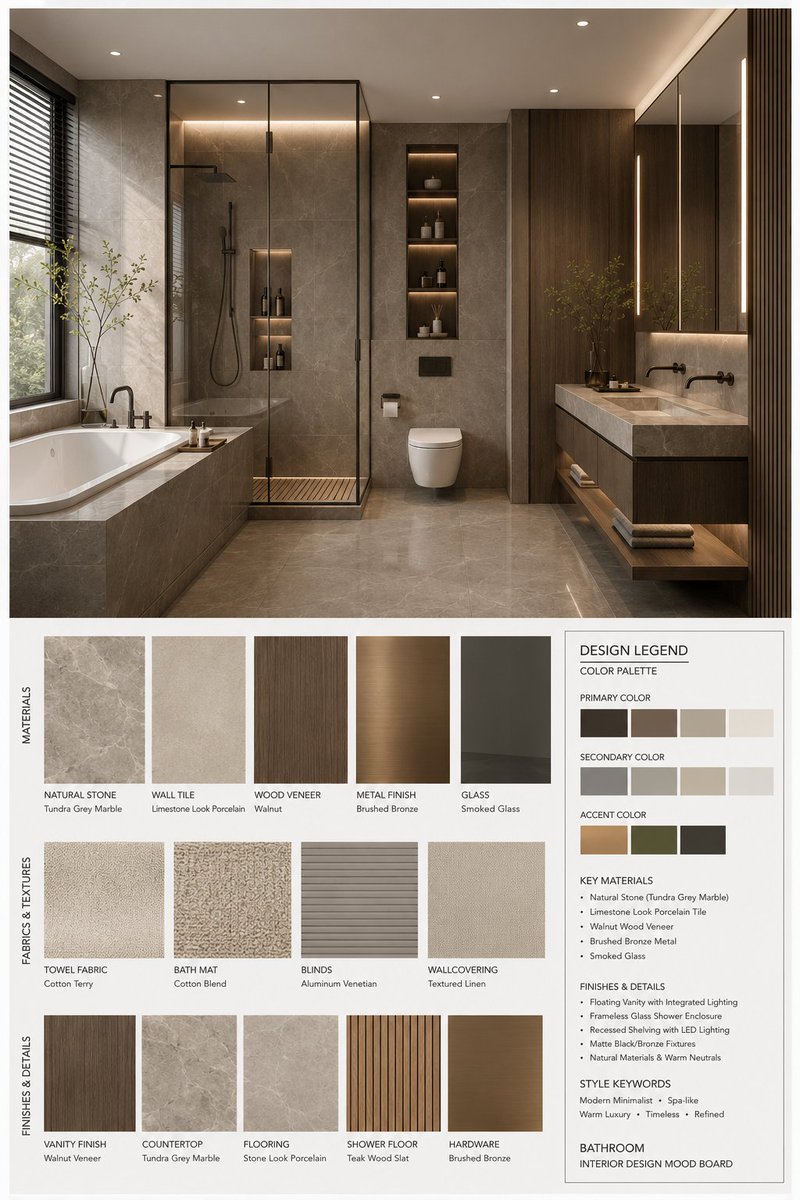
Generatore di mood board per l'interior design
Uno strumento completo per la creazione di moodboard professionali per l'arredamento d'interni. Permette di realizzare un layout strutturato con un rendering 3D ad alta risoluzione di uno spazio, abbinato a campioni di materiali, texture di tessuti e una legenda dettagliata con palette di colori e specifiche dei materiali.
Questo è un esempio di prompt GPT Image 2 per Interni e architettura . Utilizza il prompt pronto per la copia qui sotto per generare immagini simili e verifica l'attribuzione Awesome GPT Image 2 Prompts e i diritti di utilizzo commerciale prima del riutilizzo.
Free 1K preview
Generate one preview image instantly, no sign-up required.
Free text preview doesn’t preserve reference-image consistency.
Richiesta
prompt pronto per la copia
You are a professional interior design Mood Board creator. Based on the provided {argument name="space type" default="bedroom"} design photo, generate a high-end vertical 3:4 mood board. The overall visual should reference professional design proposals, showing {argument name="style name" default="Modern Mid-century"} aesthetic features, possessing a [Mood Keywords] atmosphere, and conforming to [Branding Tone] design expression.
Space Type: {argument name="space type" default="bedroom"}
Layout Requirements:
Upper section: A high-resolution, photorealistic {argument name="space type" default="bedroom"} interior rendering. It must be consistent with the user's photo in structure, furniture, materials, colors, and lighting, but refined for a professional proposal. Focus on: [Key Furniture Elements], [Material Keywords], [Color Palette], [Lighting Style].
Lower section: Display material and furnishing samples strictly corresponding to the upper design, including: Material samples, fabric samples, color swatches, finish samples, and related wood/stone/metal/glass/leather samples. All must reflect the core material and color logic of the plan.
Bottom right: A Design Legend / Color Palette info box showing: Primary color, secondary color, accent color, core materials, finish descriptions, and style keywords.
Style and Output:
Professional firm-level layout; minimalist, clean, restrained, and orderly; clear visual hierarchy and white space control; material/color labels clear and modern; overall vibe matching {argument name="style name" default="Modern Mid-century"}; Render Quality: 4K Ultra HD, hyper-detailed, photorealistic rendering. Vertical 3:4 composition.
Label Requirements:
Each sample must have a clear label organized by [Label Language] material/color/finish names in a concise, professional, and well-aligned style.
Variabili di richiesta
Segnaposto per gli argomenti modificabili presenti nel prompt, con i relativi valori predefiniti.
Best for
- - Interni e architettura visual exploration
- - Image generation and reference-image edits
- - Reusable briefs that keep source attribution visible
Change these parts
- - Subject, product, character, or scene
- - Aspect ratio, camera, lighting, and background
- - Brand, text, color, and output constraints
Recommended model and settings
- - Model: gpt-image-2
- - Input mode: Immagine in immagine
- - Aspect ratio: source
- - Commercial status: review original source
How to use this prompt
- 1. Copy the prompt and preserve its structure for the first test.
- 2. Replace the subject, context, and publishing channel.
- 3. Change one camera, lighting, or style variable per iteration.
- 4. Inspect the output, source, text, and rights before reuse.
Limitations, source, and reuse cautions
- - Generated output is an editable draft, not factual, legal, or rights evidence.
- - Review the linked source, people, brands, logos, text, and third-party media before commercial use.
Altri casi in questa categoria
Prioritizzazione in base a categoria, compatibilità della modalità di input, qualità e minor rischio.






Note sul riutilizzo e sulla fonte
Utilizza questo prompt in tutta sicurezza dopo aver visualizzato in anteprima il caso.
- 1.Copia il prompt oppure aprilo direttamente in Dovoo tramite il pulsante di generazione.
- 2.Regola le variabili, le proporzioni e le immagini di riferimento in base alle tue esigenze.
- 3.Prima della pubblicazione o dell'utilizzo a pagamento, verificare i diritti di fonte, i requisiti di attribuzione e i rischi relativi al marchio o all'immagine.