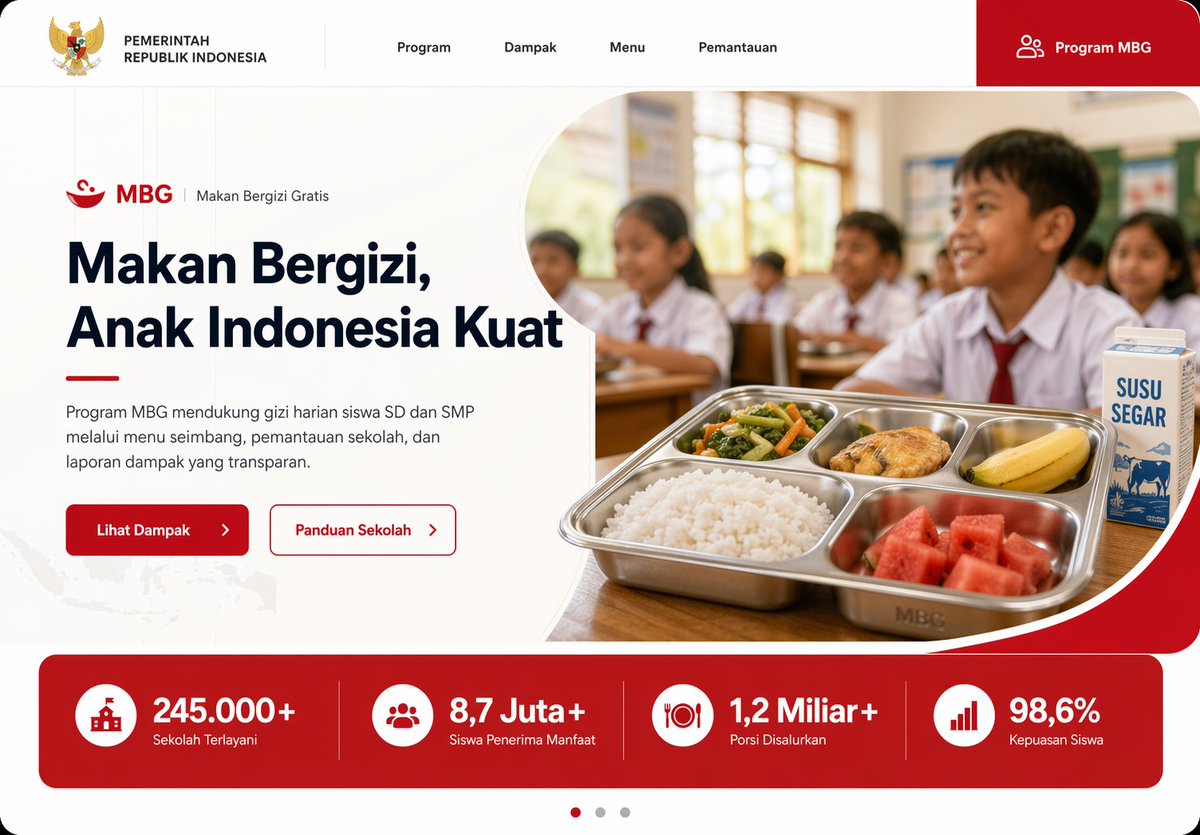
Pagina di destinazione sull'alimentazione scolastica indonesiana
Un mockup desktop di alta qualità per il programma di nutrizione scolastica MBG indonesiano, ideale per presentazioni governative, di tecnologia civica o di design front-end.
Questo è un esempio di prompt GPT Image 2 per Grafica e poster . Utilizza il prompt pronto per la copia qui sotto per generare immagini simili e verifica l'attribuzione Awesome GPT Image 2 Prompts e i diritti di utilizzo commerciale prima del riutilizzo.
Hai bisogno del set completo di prompt? Usa il Grafica e poster hub tematico per ulteriori esempi correlati oppure apri il GPT Image 2 catalogo rapido per l'indice completo degli esempi, le strutture riutilizzabili e l'attribuzione delle fonti.
Free 1K preview
Generate one preview image instantly, no sign-up required.
2701/4000
Richiesta
prompt pronto per la copia
Create a modern government program landing page UI mockup for Indonesia in a clean, professional web design style, desktop widescreen aspect ratio. The page uses a white background with bold red accents, soft rounded corners, subtle gray dividers, and a polished frontend-dribbble presentation look. At the very top, build a horizontal navigation bar with 6 visible elements: the Indonesian Garuda emblem and the text "PEMERINTAH REPUBLIK INDONESIA" on the left, then 4 centered menu items labeled "Program", "Dampak", "Menu", and "Pemantauan", and on the far right a large red rounded button labeled "Program MBG" with a small people icon. Below it, design a hero section split into two columns. On the left, show a small program label line with a red bowl icon, the text "MBG", a vertical divider, and "Makan Bergizi Gratis". Under that, place a large bold headline reading "{argument name="headline text" default="Makan Bergizi, Anak Indonesia Kuat"}" in dark navy, spanning 3 lines. Add a short paragraph in Indonesian below: "Program MBG mendukung gizi harian siswa SD dan SMP melalui menu seimbang, pemantauan sekolah, dan laporan dampak yang transparan." Then place 2 call-to-action buttons side by side: a solid red button labeled "Lihat Dampak" with a right arrow, and an outlined white button with red border labeled "Panduan Sekolah" with a right arrow. On the right side of the hero, place a rounded large photo-style image framed by a sweeping white curved divider and red corner background. The image shows an Indonesian elementary classroom with 5 visible schoolchildren in white uniforms with red ties, seated at desks, warm daylight from windows, shallow depth of field, documentary-photo realism. In the foreground, on a wooden desk, show a stainless steel compartment tray meal with exactly 5 food items: white rice, mixed vegetables, a piece of fried chicken, a banana, and watermelon cubes. Beside the tray, place 1 milk carton labeled "SUSU SEGAR". Under the hero, add a full-width red statistics band with 4 equally spaced metric cards separated by thin vertical dividers. Each card has a white circular icon and bold white text. The 4 metrics are: "245.000+" with label "Sekolah Terlayani", "8,7 Juta+" with label "Siswa Penerima Manfaat", "1,2 Miliar+" with label "Porsi Disalurkan", and "98,6%" with label "Kepuasan Siswa". At the bottom center, add a 3-dot carousel indicator with the left dot active in red and the other 2 dots gray. Include a faint Indonesia map texture in the lower-left background. Use crisp typography, generous whitespace, high-end fintech/government website aesthetics, realistic UI proportions, and a production-ready landing page mockup appearance.Variabili di richiesta
Segnaposto per gli argomenti modificabili presenti nel prompt, con i relativi valori predefiniti.
Variabile
headline text
Predefinito
Makan Bergizi, Anak Indonesia Kuat
Best for
- - Grafica e poster visual exploration
- - Image generation and reference-image edits
- - Reusable briefs that keep source attribution visible
Change these parts
- - Subject, product, character, or scene
- - Aspect ratio, camera, lighting, and background
- - Brand, text, color, and output constraints
Recommended model and settings
- - Model: gpt-image-2
- - Input mode: Testo in immagine
- - Aspect ratio: source
- - Commercial status: review original source
How to use this prompt
- 1. Copy the prompt and preserve its structure for the first test.
- 2. Replace the subject, context, and publishing channel.
- 3. Change one camera, lighting, or style variable per iteration.
- 4. Inspect the output, source, text, and rights before reuse.
Limitations, source, and reuse cautions
- - Generated output is an editable draft, not factual, legal, or rights evidence.
- - Review the linked source, people, brands, logos, text, and third-party media before commercial use.
Importato da Awesome GPT Image 2 Prompts . È richiesta l'attribuzione. Lo stato di utilizzo commerciale è allowed ; verificare i diritti della fonte prima dell'utilizzo a pagamento.
Altri casi in questa categoria
Prioritizzazione in base a categoria, compatibilità della modalità di input, qualità e minor rischio.

Pink Hijab Mirror Selfie Portrait
Testo in immagine

Fashion Studio Portrait with Blue Rim Lighting
Testo in immagine

Spring Editorial Fashion Collage
Testo in immagine

New Chinese-Style Editorial Portrait
Testo in immagine

Transparent Earbuds on Stone Pedestal
Testo in immagine

Surreal 3D Chess Match Artwork
Testo in immagine
Note sul riutilizzo e sulla fonte
Utilizza questo prompt in tutta sicurezza dopo aver visualizzato in anteprima il caso.
- 1.Copia il prompt oppure aprilo direttamente in Dovoo tramite il pulsante di generazione.
- 2.Regola le variabili, le proporzioni e le immagini di riferimento in base alle tue esigenze.
- 3.Prima della pubblicazione o dell'utilizzo a pagamento, verificare i diritti di fonte, i requisiti di attribuzione e i rischi relativi al marchio o all'immagine.