GTA5
Source-attributed Nano Banana Pro image prompt from the Awesome Nano Banana Pro Prompts repository with preview image and reuse review notes.
Questo è un esempio di prompt Nano Banana Pro per Portrait Photography . Utilizza il prompt pronto per la copia qui sotto per generare immagini simili e verifica l'attribuzione Awesome Nano Banana Pro Prompts e i diritti di utilizzo commerciale prima del riutilizzo.
Hai bisogno del set completo di prompt? Usa il Portrait Photography hub tematico per ulteriori esempi correlati oppure apri il Nano Banana Pro catalogo rapido per l'indice completo degli esempi, le strutture riutilizzabili e l'attribuzione delle fonti.
Richiesta
prompt pronto per la copia
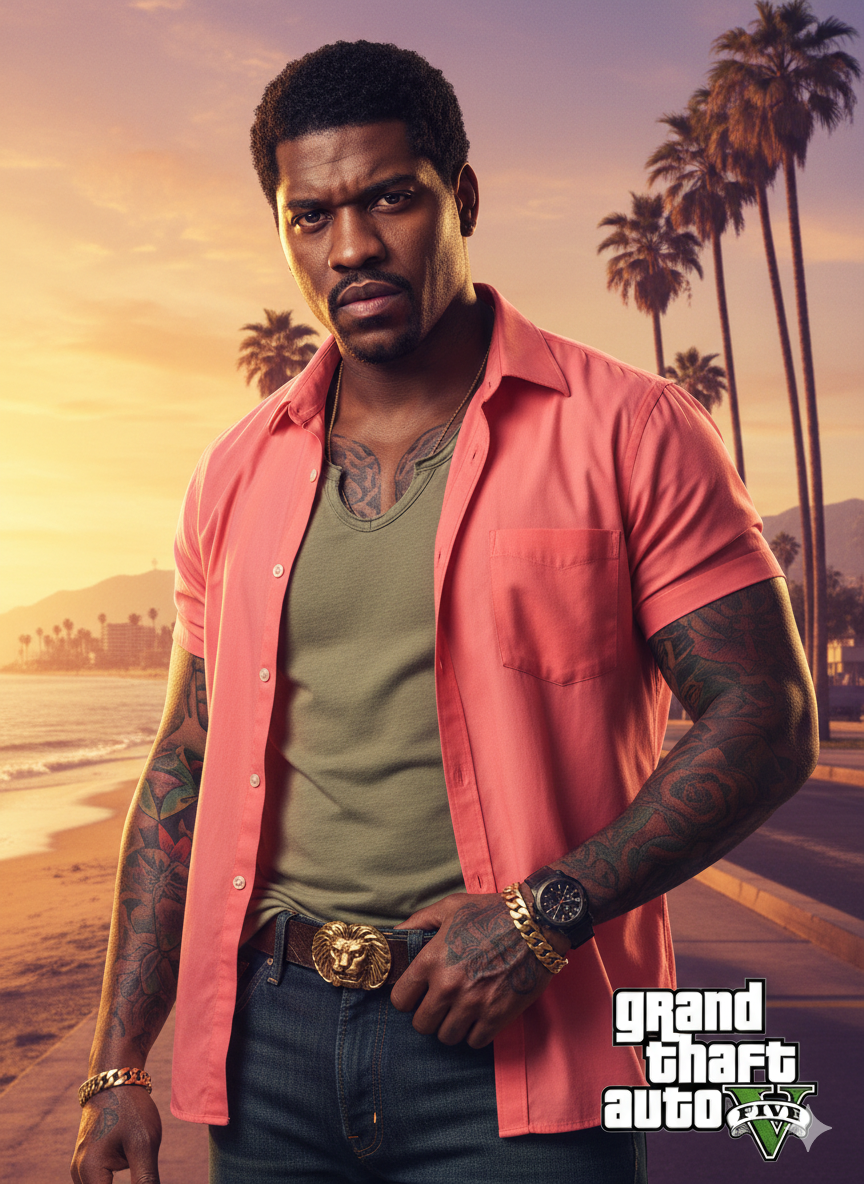
A close-up of a man (as in the uploaded image) looking directly at the viewer. He is heavily tattooed on both arms, neck, and chest. He wears an unbuttoned, bright coral-pink (or salmon) short-sleeved collared shirt over a loose-fitting, V-neck light olive-green T-shirt.
He is wearing dark blue denim jeans held up by a brown leather belt with a large, ornate, gold-colored buckle (possibly featuring an animal or symbol). A black pistol is tucked into his waistband, partially obscured by his right hand, which is resting on the grip. He also wears a black watch on his left wrist and a gold bracelet on his right.
The background is a vibrant, sunny, coastal scene reminiscent of Southern California or Miami. It features tall palm trees, a sandy beach, and the ocean. In the distance, there are some houses or low-rise buildings and mountains. The lighting is golden, suggesting either sunrise or sunset, casting a warm glow over the scene.
hard shadows, and a distinct color palette typical of GTA loading screens and cover.

Highly detailed and rendered. Vibrant, cinematic.

Optional Text Overlay (for added authenticity): Include the 'Grand Theft Auto V' logo in the middle right.
Altri casi in questa categoria
Prioritizzazione in base a categoria, compatibilità della modalità di input, qualità e minor rischio.

Note sul riutilizzo e sulla fonte
Utilizza questo prompt in tutta sicurezza dopo aver visualizzato in anteprima il caso.
- 1.Copia il prompt oppure aprilo direttamente in Dovoo tramite il pulsante di generazione.
- 2.Regola le variabili, le proporzioni e le immagini di riferimento in base alle tue esigenze.
- 3.Prima della pubblicazione o dell'utilizzo a pagamento, verificare i diritti di fonte, i requisiti di attribuzione e i rischi relativi al marchio o all'immagine.