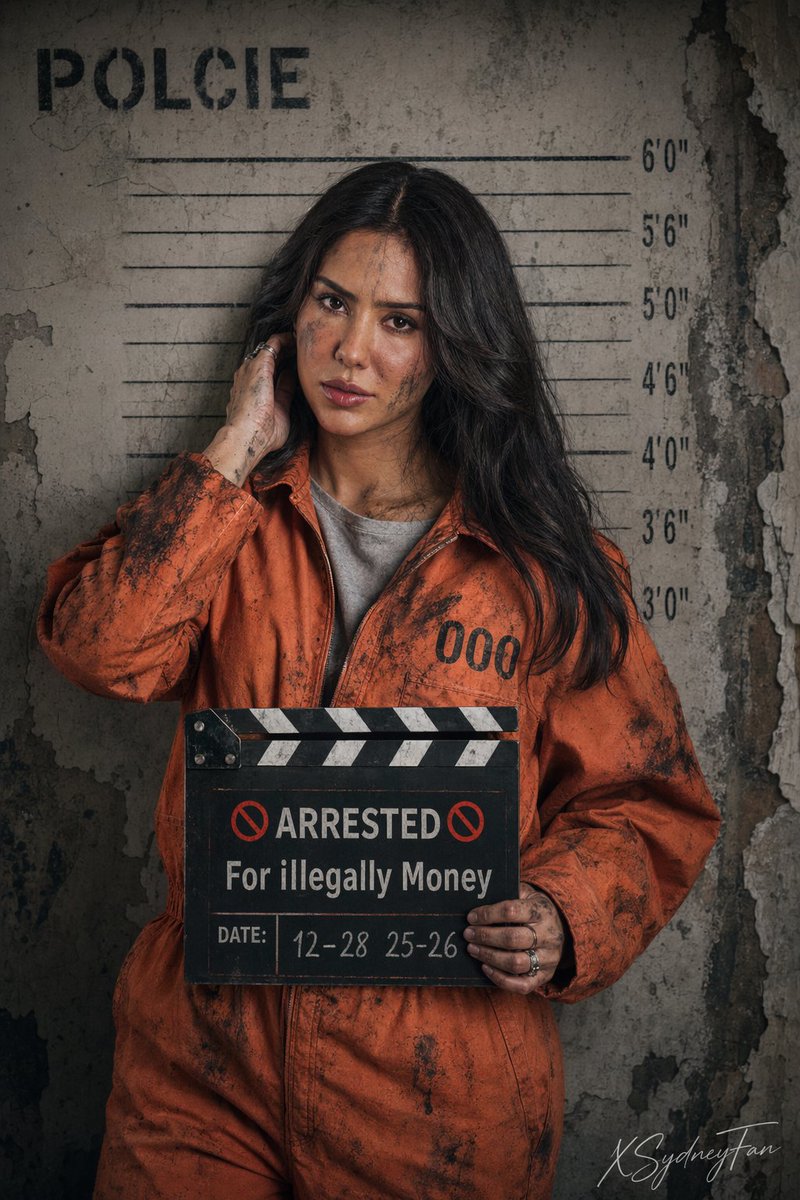
Ritratto segnaletico crudo e realistico in prigione
Una richiesta dettagliata in formato JSON per una foto segnaletica realistica e cinematografica di un prigioniero con indosso una tuta arancione.
Questo è un esempio di prompt GPT Image 2 per Ritratto e personaggio . Utilizza il prompt pronto per la copia qui sotto per generare immagini simili e verifica l'attribuzione Awesome GPT Image 2 Prompts e i diritti di utilizzo commerciale prima del riutilizzo.
Hai bisogno del set completo di prompt? Usa il Ritratto e personaggio hub tematico per ulteriori esempi correlati oppure apri il GPT Image 2 catalogo rapido per l'indice completo degli esempi, le strutture riutilizzabili e l'attribuzione delle fonti.
Free 1K preview
Generate one preview image instantly, no sign-up required.
1724/4000
Richiesta
prompt pronto per la copia
{
  "parameters": {
    "aspect_ratio": "2:3",
    "version": "6.0",
    "style_type": "Realistic photograph, cinematic lighting, high detail, gritty texture"
  },
signature: “ XSydneyFan " in corner Cursive style
  "subject_description": {
    "demographics": "Beautiful young woman, fair skin.",
    "hair": "Dark long length black hair, some strands falling over her forehead.",
    "details": "Some smudges of black soot and dirt on her face, neck, and hand (not in much amount)."
  },
  "attire": {
    "outerwear": "Bright orange prisoner jumpsuit (boiler suit), slightly oversized. Distressed and dirty, covered in black soot stains.",
    "details": "The number '000' is printed in large black font on the right side of the chest.",
    "under_layer": "Grey crew-neck t-shirt visible underneath.",
    "accessories": "Silver rings on fingers."
  },
  "pose_and_expression": {
    "stance": "Standing in a mugshot lineup stance. Making direct eye contact with the camera.",
    "expression": "Deadpan, serious, nonchalant, looking unimpressed or bored.",
    "right_hand_action": "Raised casually, fingers touching the hair behind her right ear/neck area.",
    "left_hand_action": "Holding a black and white clapperboard/slate in front of her chest."
  },
  "props": {
    "slate_board_content": {
      "main_text": "🚫 ARRESTED 🚫 For illegally Money",
      "date": "12-28 25-26"
    }
  },
  "environment": {
    "setting": "A gritty, dilapidated room. The wall behind is peeling, cracked, and textured, resembling an abandoned concrete building or a ruined police station.",
    "background_elements": [
      "Height chart on the wall.",
      "The word 'POLCIE' written at the top left of the wall."
    ]
  }
}
Best for
- - Ritratto e personaggio visual exploration
- - Image generation and reference-image edits
- - Reusable briefs that keep source attribution visible
Change these parts
- - Subject, product, character, or scene
- - Aspect ratio, camera, lighting, and background
- - Brand, text, color, and output constraints
Recommended model and settings
- - Model: gpt-image-2
- - Input mode: Testo in immagine
- - Aspect ratio: source
- - Commercial status: review original source
How to use this prompt
- 1. Copy the prompt and preserve its structure for the first test.
- 2. Replace the subject, context, and publishing channel.
- 3. Change one camera, lighting, or style variable per iteration.
- 4. Inspect the output, source, text, and rights before reuse.
Limitations, source, and reuse cautions
- - Generated output is an editable draft, not factual, legal, or rights evidence.
- - Review the linked source, people, brands, logos, text, and third-party media before commercial use.
Importato da Awesome GPT Image 2 Prompts . È richiesta l'attribuzione. Lo stato di utilizzo commerciale è allowed ; verificare i diritti della fonte prima dell'utilizzo a pagamento.
Altri casi in questa categoria
Prioritizzazione in base a categoria, compatibilità della modalità di input, qualità e minor rischio.

Greyscale Puzzle Portrait with Color Accent
Testo in immagine

Female Clown Cyborg Portrait
Testo in immagine

Glitch Aesthetic Surreal Portrait
Testo in immagine

Asymmetrical Realistic Human Face
Testo in immagine

Split Face Horror Transformation
Immagine in immagine

Natural Face Realism Modifier
Testo in immagine
Note sul riutilizzo e sulla fonte
Utilizza questo prompt in tutta sicurezza dopo aver visualizzato in anteprima il caso.
- 1.Copia il prompt oppure aprilo direttamente in Dovoo tramite il pulsante di generazione.
- 2.Regola le variabili, le proporzioni e le immagini di riferimento in base alle tue esigenze.
- 3.Prima della pubblicazione o dell'utilizzo a pagamento, verificare i diritti di fonte, i requisiti di attribuzione e i rischi relativi al marchio o all'immagine.