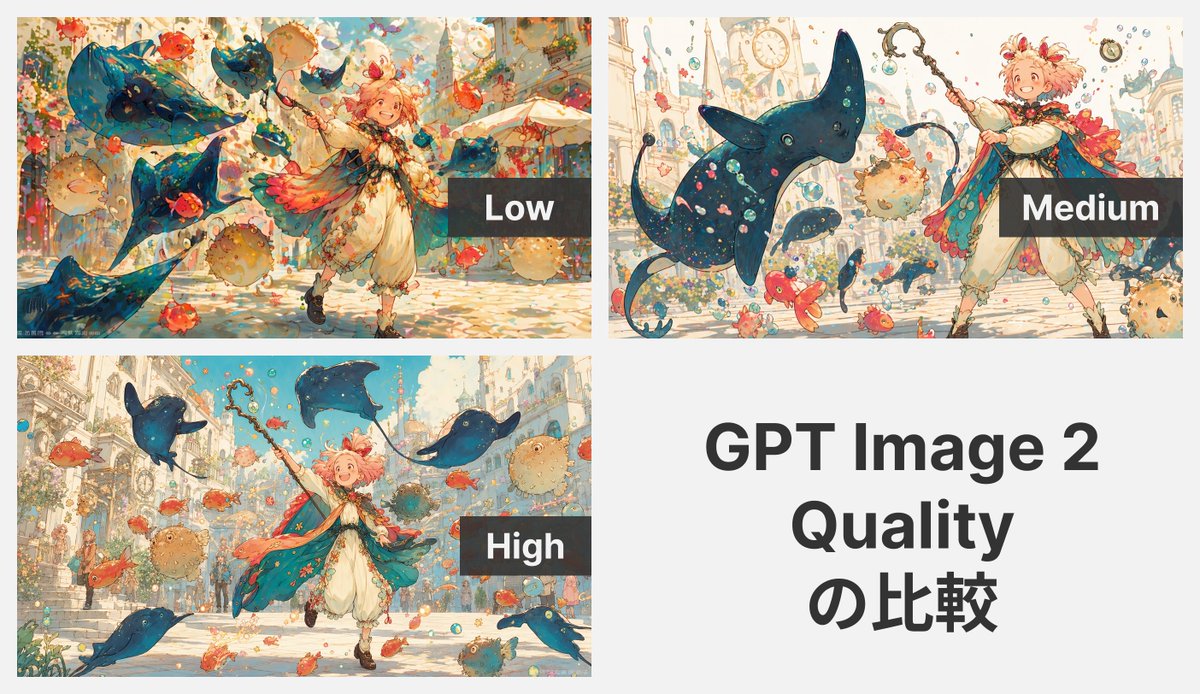
Griglia di confronto della qualità dell'immagine GPT 2
Un grafico comparativo a quattro pannelli che mostra la stessa stravagante scena anime fantasy a bassa, media e alta qualità, comunemente utilizzato per dimostrare le differenze di qualità nella generazione delle immagini.
Questo è un esempio di prompt GPT Image 2 per Grafica e poster . Utilizza il prompt pronto per la copia qui sotto per generare immagini simili e verifica l'attribuzione Awesome GPT Image 2 Prompts e i diritti di utilizzo commerciale prima del riutilizzo.
Questo prompt è pensato per più immagini di riferimento. Apriremo Dovoo con il prompt e l'immagine di anteprima disponibile; aggiungeremo i riferimenti rimanenti in Dovoo prima di generare.
Free 1K preview
Generate one preview image instantly, no sign-up required.
Free text preview doesn’t preserve reference-image consistency.
Richiesta
prompt pronto per la copia
{
  "canvas": {
    "aspect_ratio": "16:9 presentation slide",
    "background": "light gray overall background"
  },
  "character": {
    "count": 1,
    "description": "young fantasy child mage or adventurer, cheerful, dynamic pose, short fluffy {argument name=\"hair color\" default=\"pink\"} hair, ornate wand or staff, flowing teal-blue cape with coral and gold accents, cream outfit with puffed pants, whimsical storybook design"
  },
  "environment": {
    "floating_elements_count": "4 large manta ray creatures plus numerous small fish, several pufferfish, and many bubbles",
    "mood": "playful, magical, celebratory",
    "setting": "sunlit fantastical European-inspired city street or plaza"
  },
  "layout": {
    "grid": "2 by 2 collage with 3 image panels and 1 text panel",
    "margins": "thin gutters between panels",
    "sections": [
      {
        "count": 1,
        "image": "a lively fantasy street scene with 1 youthful androgynous child mage in motion, smiling and raising a wand, surrounded by 4 large blue manta ray–like flying creatures, multiple orange-red goldfish, several round pufferfish, floating bubbles and confetti, with ornate European-style buildings in the background; the composition is busy and colorful but slightly less refined",
        "labels": [
          "Low"
        ],
        "overlay": "dark translucent rectangle near the right side with large white sans-serif text 'Low'",
        "position": "top-left",
        "title": "Low"
      },
      {
        "count": 1,
        "image": "the same prompt rendered again with 1 child mage positioned on the right side, Show every face clearly with natural, detailed facial features, holding a staff upward, with 1 dominant large blue manta ray creature in the foreground, smaller blue fish-like creatures, orange-red fish, pufferfish, bubbles, and a pale fantasy city with towers and clock details in the background; cleaner spacing and more readable forms than the low version",
        "labels": [
          "Medium"
        ],
        "overlay": "dark translucent rectangle near the lower-right with large white sans-serif text 'Medium'",
        "position": "top-right",
        "title": "Medium"
      },
      {
        "count": 1,
        "image": "the same fantasy scene rendered with the highest polish: 1 cheerful child mage running forward with wand raised, wearing a flowing teal cape with warm pink-orange featherlike accents, cream tunic and bloomers, brown boots, and short fluffy pink hair; surrounded by 4 blue manta ray–like flying creatures, many orange-red fish, several tan pufferfish, bubbles and sparkles, in a sunlit ornate city street with stairs and elegant architecture; the image is crisp, balanced, richly detailed, and luminous",
        "labels": [
          "High"
        ],
        "overlay": "dark translucent rectangle near the right-center with large white sans-serif text 'High'",
        "position": "bottom-left",
        "title": "High"
      },
      {
        "count": 1,
        "image": "text-only panel on a plain light gray background",
        "labels": [
          "GPT Image 2",
          "Quality",
          "の比較"
        ],
        "position": "bottom-right",
        "title": "GPT Image 2 Quality の比較",
        "typography": "large bold black sans-serif centered text over 3 lines reading '{argument name=\"headline text\" default=\"GPT Image 2 Quality の比較\"}'"
      }
    ]
  },
  "rendering_notes": {
    "comparison_purpose": "show visual differences among 3 quality levels using the same prompt",
    "quality_labels_count": 3,
    "text_panels_count": 1
  },
  "style": "airy watercolor-and-ink storybook anime, soft pastel palette, detailed linework, painterly textures, bright magical atmosphere",
  "subject": "whimsical fantasy anime illustration generated at three quality settings",
  "type": "quality comparison collage"
}
Variabili di richiesta
Segnaposto per gli argomenti modificabili presenti nel prompt, con i relativi valori predefiniti.
Best for
- - Grafica e poster visual exploration
- - Image generation and reference-image edits
- - Reusable briefs that keep source attribution visible
Change these parts
- - Subject, product, character, or scene
- - Aspect ratio, camera, lighting, and background
- - Brand, text, color, and output constraints
Recommended model and settings
- - Model: gpt-image-2
- - Input mode: Da immagine multipla a immagine
- - Aspect ratio: source
- - Commercial status: review original source
How to use this prompt
- 1. Copy the prompt and preserve its structure for the first test.
- 2. Replace the subject, context, and publishing channel.
- 3. Change one camera, lighting, or style variable per iteration.
- 4. Inspect the output, source, text, and rights before reuse.
Limitations, source, and reuse cautions
- - Generated output is an editable draft, not factual, legal, or rights evidence.
- - Review the linked source, people, brands, logos, text, and third-party media before commercial use.
Altri casi in questa categoria
Prioritizzazione in base a categoria, compatibilità della modalità di input, qualità e minor rischio.






Note sul riutilizzo e sulla fonte
Utilizza questo prompt in tutta sicurezza dopo aver visualizzato in anteprima il caso.
- 1.Copia il prompt oppure aprilo direttamente in Dovoo tramite il pulsante di generazione.
- 2.Regola le variabili, le proporzioni e le immagini di riferimento in base alle tue esigenze.
- 3.Prima della pubblicazione o dell'utilizzo a pagamento, verificare i diritti di fonte, i requisiti di attribuzione e i rischi relativi al marchio o all'immagine.