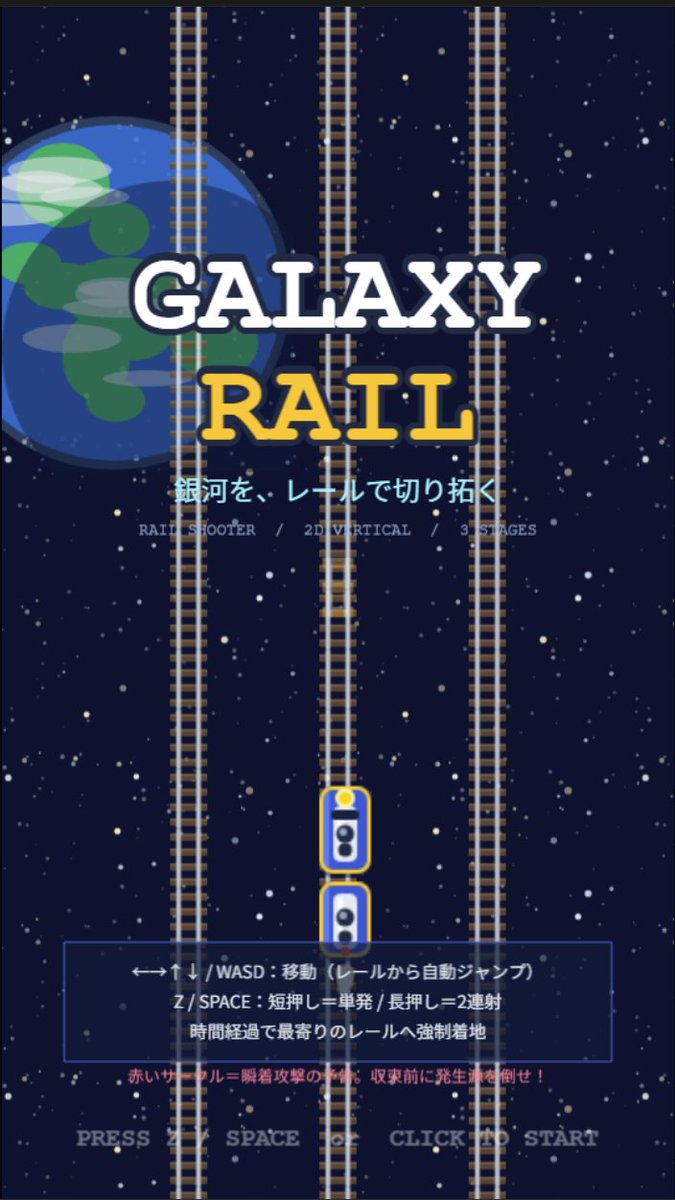
Galaxy Rail Title Screen
Creates a portrait retro arcade rail-shooter title screen with space rails, Japanese instructions, and a mobile game splash layout.
Questo è un esempio di prompt GPT Image 2 per Anime e videogiochi . Utilizza il prompt pronto per la copia qui sotto per generare immagini simili e verifica l'attribuzione Awesome GPT Image 2 Prompts e i diritti di utilizzo commerciale prima del riutilizzo.
Hai bisogno del set completo di prompt? Usa il Anime e videogiochi hub tematico per ulteriori esempi correlati oppure apri il GPT Image 2 catalogo rapido per l'indice completo degli esempi, le strutture riutilizzabili e l'attribuzione delle fonti.
Free 1K preview
Generate one preview image instantly, no sign-up required.
2353/4000
Richiesta
prompt pronto per la copia
Goal: Create a retro 2D vertical arcade game title screen for a rail shooter called {argument name="game title" default="GALAXY RAIL"}, with a space-and-railroad theme and Japanese UI text.

Canvas: Portrait mobile game splash screen, 9:16 aspect ratio, pixel-art inspired but clean vector-like illustration, dark navy outer-space background filled with many small white and pale yellow stars.

Layout: Center the title in the upper-middle. Place a large partially cropped Earth-like blue planet on the left behind the title, occupying about one third of the image height, with simple green landmasses and translucent cloud streaks. Add exactly 3 vertical railroad tracks running from top to bottom: one left track partly over the planet, one center track, and one right track; each track has gray rails and many brown sleepers. Put exactly 2 small train/player cars on the lower center track, stacked vertically with rounded white bodies, blue windows, yellow outlines, and a yellow headlight on the top car.

Text content: Main title text is two lines: “GALAXY” in large white slab-serif letters with a dark navy outline, and “RAIL” below in large golden yellow slab-serif letters with a dark navy outline. Under the title, show the Japanese tagline {argument name="tagline" default="銀河を、レールで切り拓く"} in bright cyan. Beneath it, add small gray feature text: “RAIL SHOOTER / 2D VERTICAL / 3 STAGES”. In the lower third, add a translucent dark blue rectangular instruction panel with a thin blue border. Inside the panel, show three Japanese instruction lines: “←→↑↓ / WASD:移動(レールから自動ジャンプ)”, “Z / SPACE:短押し=単発 / 長押し=2連射”, and “時間経過で最寄りのレールへ強制着地”. Below the panel, add a small red warning line: “赤いサークル=瞬着攻撃の予兆。収束前に発生源を倒せ!” At the very bottom, centered, show pale gray prompt text: {argument name="start prompt" default="PRESS Z SPACE OR CLICK TO START"}.

Visual style: Retro arcade title screen, simple 2D game mockup, crisp shapes, slightly pixelated typography, high contrast, deep-space palette of navy, white, cyan, yellow, gray, and red. The composition should feel like a vertical rail shooter prototype splash screen.

Constraints: Use exactly 3 full-height vertical tracks, exactly 2 train cars, one planet on the left, one instruction panel, and no characters or extra UI windows. Keep all text legible and centered, with no logos or watermarks.
Variabili di richiesta
Segnaposto per gli argomenti modificabili presenti nel prompt, con i relativi valori predefiniti.
Variabile
game title
Predefinito
GALAXY RAIL
Variabile
tagline
Predefinito
銀河を、レールで切り拓く
Variabile
start prompt
Predefinito
PRESS Z SPACE OR CLICK TO START
Best for
- - Anime e videogiochi visual exploration
- - Image generation and reference-image edits
- - Reusable briefs that keep source attribution visible
Change these parts
- - Subject, product, character, or scene
- - Aspect ratio, camera, lighting, and background
- - Brand, text, color, and output constraints
Recommended model and settings
- - Model: gpt-image-2
- - Input mode: Testo in immagine
- - Aspect ratio: source
- - Commercial status: review original source
How to use this prompt
- 1. Copy the prompt and preserve its structure for the first test.
- 2. Replace the subject, context, and publishing channel.
- 3. Change one camera, lighting, or style variable per iteration.
- 4. Inspect the output, source, text, and rights before reuse.
Limitations, source, and reuse cautions
- - Generated output is an editable draft, not factual, legal, or rights evidence.
- - Review the linked source, people, brands, logos, text, and third-party media before commercial use.
Importato da Awesome GPT Image 2 Prompts . È richiesta l'attribuzione. Lo stato di utilizzo commerciale è allowed ; verificare i diritti della fonte prima dell'utilizzo a pagamento.
Altri casi in questa categoria
Prioritizzazione in base a categoria, compatibilità della modalità di input, qualità e minor rischio.

Anime Girl Heterochromia Portrait
Testo in immagine

Hell Hound Character Sheet Infographic
Testo in immagine

Boisterous Shrimpers Entering Pub
Testo in immagine

MotoGP POV Cornering Shot
Testo in immagine

Cute Speech Bubble Mascot Profile Icon
Testo in immagine

Tuxedo Cat Photo and Line Art Diptych
Testo in immagine
Note sul riutilizzo e sulla fonte
Utilizza questo prompt in tutta sicurezza dopo aver visualizzato in anteprima il caso.
- 1.Copia il prompt oppure aprilo direttamente in Dovoo tramite il pulsante di generazione.
- 2.Regola le variabili, le proporzioni e le immagini di riferimento in base alle tue esigenze.
- 3.Prima della pubblicazione o dell'utilizzo a pagamento, verificare i diritti di fonte, i requisiti di attribuzione e i rischi relativi al marchio o all'immagine.