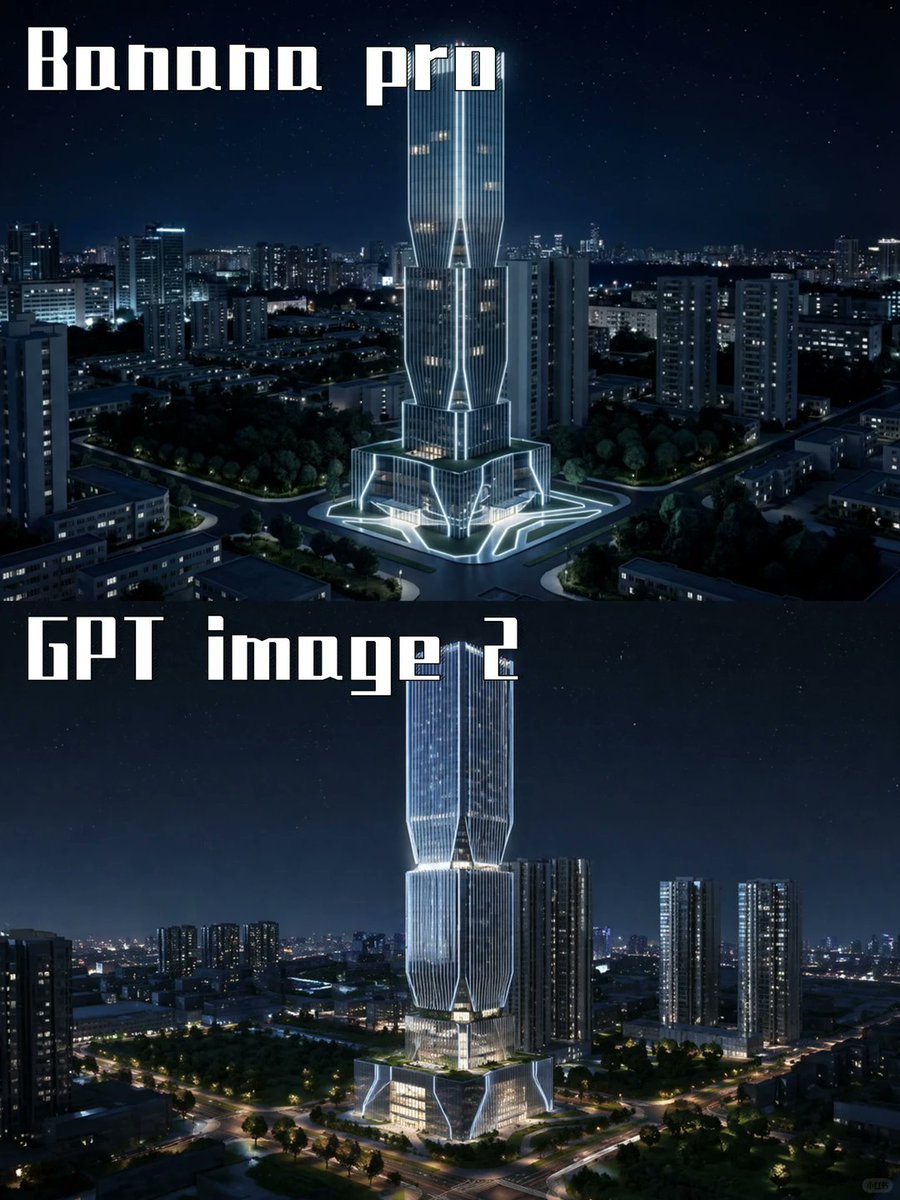
Confronto tra modelli di intelligenza artificiale per grattacieli notturni
Crea un rendering architettonico a due pannelli sovrapposti che confronta i risultati di due modelli di intelligenza artificiale con grattacieli futuristici illuminati in una città notturna.
Questo è un esempio di prompt GPT Image 2 per Interni e architettura . Utilizza il prompt pronto per la copia qui sotto per generare immagini simili e verifica l'attribuzione Awesome GPT Image 2 Prompts e i diritti di utilizzo commerciale prima del riutilizzo.
Hai bisogno del set completo di prompt? Usa il Interni e architettura hub tematico per ulteriori esempi correlati oppure apri il GPT Image 2 catalogo rapido per l'indice completo degli esempi, le strutture riutilizzabili e l'attribuzione delle fonti.
Free 1K preview
Generate one preview image instantly, no sign-up required.
2186/4000
Richiesta
prompt pronto per la copia
Goal: Create a two-panel vertical comparison image showing the same futuristic skyscraper concept rendered by two different image models at night.

Canvas: Portrait 3:4 aspect ratio, 768×1024 feel, split horizontally into exactly 2 equal stacked panels with no visible border line. Both panels show a dark blue nighttime cityscape with a starry sky and glowing urban lights.

Panel 1: Top half labeled {argument name="top label" default="Banana pro"} in large white blocky stencil/gothic display lettering at the upper left. Show a futuristic illuminated skyscraper centered in a dense city district, surrounded by mid-rise apartment towers, roads, trees, and a plaza. The tower has a tall twin-volume form with vertical ribbed glass, bright white outline lighting, warm lit windows, angular cutouts, and a glowing geometric base/plaza. Camera angle is elevated aerial view, looking slightly downward, crisp cinematic night lighting.

Panel 2: Bottom half labeled {argument name="bottom label" default="GPT image 2"} in the same large white blocky display lettering at the upper left. Show a similar but more refined futuristic skyscraper centered in a nighttime urban landscape, taller and sleeker, with stacked faceted glass sections, luminous vertical lines, bright white edge lighting, warm interior floors, and a glowing multi-level podium. Surround it with high-rise residential towers, tree-lined roads, intersections, and distant city lights. Camera angle is elevated aerial view, cinematic and realistic.

Visual style: Photorealistic architectural visualization, dramatic blue-black night palette, crisp high contrast, cool white neon accents, realistic city depth, subtle stars, polished glass reflections, high detail, no people visible.

Text content: Use exactly 2 visible text labels: {argument name="top label" default="Banana pro"} and {argument name="bottom label" default="GPT image 2"}. Keep the typography large, white, angular, and slightly retro-futuristic.

Constraints: Include exactly 2 comparison panels, exactly 2 central skyscraper subjects, and exactly 2 large labels. Do not add logos, watermarks, captions, UI elements, arrows, or extra explanatory text.
Variabili di richiesta
Segnaposto per gli argomenti modificabili presenti nel prompt, con i relativi valori predefiniti.
Variabile
top label
Predefinito
Banana pro
Variabile
bottom label
Predefinito
GPT image 2
Best for
- - Interni e architettura visual exploration
- - Image generation and reference-image edits
- - Reusable briefs that keep source attribution visible
Change these parts
- - Subject, product, character, or scene
- - Aspect ratio, camera, lighting, and background
- - Brand, text, color, and output constraints
Recommended model and settings
- - Model: gpt-image-2
- - Input mode: Testo in immagine
- - Aspect ratio: source
- - Commercial status: review original source
How to use this prompt
- 1. Copy the prompt and preserve its structure for the first test.
- 2. Replace the subject, context, and publishing channel.
- 3. Change one camera, lighting, or style variable per iteration.
- 4. Inspect the output, source, text, and rights before reuse.
Limitations, source, and reuse cautions
- - Generated output is an editable draft, not factual, legal, or rights evidence.
- - Review the linked source, people, brands, logos, text, and third-party media before commercial use.
Importato da Awesome GPT Image 2 Prompts . È richiesta l'attribuzione. Lo stato di utilizzo commerciale è allowed ; verificare i diritti della fonte prima dell'utilizzo a pagamento.
Related prompt packs
Altri casi in questa categoria
Prioritizzazione in base a categoria, compatibilità della modalità di input, qualità e minor rischio.

MotoGP POV Cornering Shot
Testo in immagine

Luxury Travel Fashion Portrait Prompt
Testo in immagine

Street Selfie with Cat in Matching Cap
Testo in immagine

Cinematic Blue Backlit Portrait
Testo in immagine

Orange Rooftop Fashion Photo Prompt
Testo in immagine

GPT Image 2 Real-Life Character Street Snap
Testo in immagine
Note sul riutilizzo e sulla fonte
Utilizza questo prompt in tutta sicurezza dopo aver visualizzato in anteprima il caso.
- 1.Copia il prompt oppure aprilo direttamente in Dovoo tramite il pulsante di generazione.
- 2.Regola le variabili, le proporzioni e le immagini di riferimento in base alle tue esigenze.
- 3.Prima della pubblicazione o dell'utilizzo a pagamento, verificare i diritti di fonte, i requisiti di attribuzione e i rischi relativi al marchio o all'immagine.