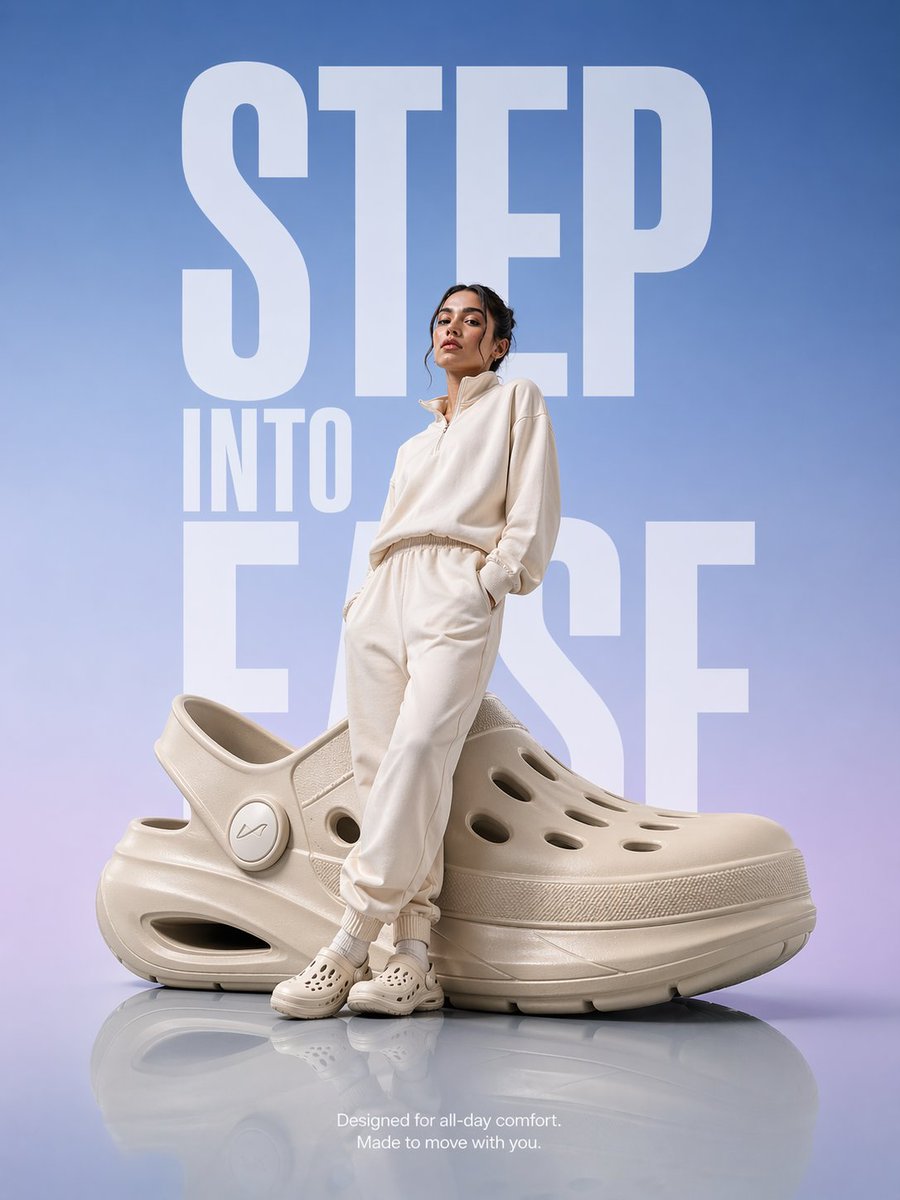
Pubblicità di calzature futuristiche
Una richiesta di annuncio pubblicitario dettagliata per calzature alla moda, con illuminazione da studio di alta qualità ed elementi tipografici audaci.
Questo è un esempio di prompt GPT Image 2 per Prodotto e commerciale . Utilizza il prompt pronto per la copia qui sotto per generare immagini simili e verifica l'attribuzione Awesome GPT Image 2 Prompts e i diritti di utilizzo commerciale prima del riutilizzo.
Hai bisogno del set completo di prompt? Usa il Prodotto e commerciale hub tematico per ulteriori esempi correlati oppure apri il GPT Image 2 catalogo rapido per l'indice completo degli esempi, le strutture riutilizzabili e l'attribuzione delle fonti.
Free 1K preview
Generate one preview image instantly, no sign-up required.
1164/4000
Richiesta
prompt pronto per la copia
A hyper-realistic premium product advertisement featuring an oversized {argument name="footwear type" default="futuristic comfort clog"} placed on a smooth glossy reflective floor. A modern model dressed in {argument name="clothing colors" default="soft neutral-toned athleisure (off-white / beige)"} stands slightly leaning against the giant shoe with a relaxed, confident posture. Background: clean gradient blending soft sky blue into subtle lavender tones, with massive bold typography in the background reading “{argument name="headline" default="STEP INTO EASE"}” in a modern sans-serif font, stretched vertically and partially behind the subject. Lighting: high-end studio lighting with soft highlights, gentle reflections on the floor, and subtle rim light outlining the model and product for depth. Composition: editorial magazine layout, perfectly centered subject, strong negative space, luxury branding feel. Additional text (small, minimal placement at bottom): “Designed for all-day comfort. Made to move with you.” Style: ultra-clean, Apple-style minimalism meets fashion campaign, hyper-realistic, premium commercial photography, 8K, sharp details.Variabili di richiesta
Segnaposto per gli argomenti modificabili presenti nel prompt, con i relativi valori predefiniti.
Variabile
footwear type
Predefinito
futuristic comfort clog
Variabile
clothing colors
Predefinito
soft neutral-toned athleisure (off-white / beige)
Variabile
headline
Predefinito
STEP INTO EASE
Best for
- - Prodotto e commerciale visual exploration
- - Image generation and reference-image edits
- - Reusable briefs that keep source attribution visible
Change these parts
- - Subject, product, character, or scene
- - Aspect ratio, camera, lighting, and background
- - Brand, text, color, and output constraints
Recommended model and settings
- - Model: gpt-image-2
- - Input mode: Testo in immagine
- - Aspect ratio: source
- - Commercial status: review original source
How to use this prompt
- 1. Copy the prompt and preserve its structure for the first test.
- 2. Replace the subject, context, and publishing channel.
- 3. Change one camera, lighting, or style variable per iteration.
- 4. Inspect the output, source, text, and rights before reuse.
Limitations, source, and reuse cautions
- - Generated output is an editable draft, not factual, legal, or rights evidence.
- - Review the linked source, people, brands, logos, text, and third-party media before commercial use.
Importato da Awesome GPT Image 2 Prompts . È richiesta l'attribuzione. Lo stato di utilizzo commerciale è allowed ; verificare i diritti della fonte prima dell'utilizzo a pagamento.
Altri casi in questa categoria
Prioritizzazione in base a categoria, compatibilità della modalità di input, qualità e minor rischio.

Transparent Earbuds on Stone Pedestal
Testo in immagine

Overhead Pepperoni Pizza Photo
Testo in immagine

Wet Transparent Earbud Macro
Testo in immagine

Fashion Studio Portrait with Blue Rim Lighting
Testo in immagine

Spring Editorial Fashion Collage
Testo in immagine

New Chinese-Style Editorial Portrait
Testo in immagine
Note sul riutilizzo e sulla fonte
Utilizza questo prompt in tutta sicurezza dopo aver visualizzato in anteprima il caso.
- 1.Copia il prompt oppure aprilo direttamente in Dovoo tramite il pulsante di generazione.
- 2.Regola le variabili, le proporzioni e le immagini di riferimento in base alle tue esigenze.
- 3.Prima della pubblicazione o dell'utilizzo a pagamento, verificare i diritti di fonte, i requisiti di attribuzione e i rischi relativi al marchio o all'immagine.