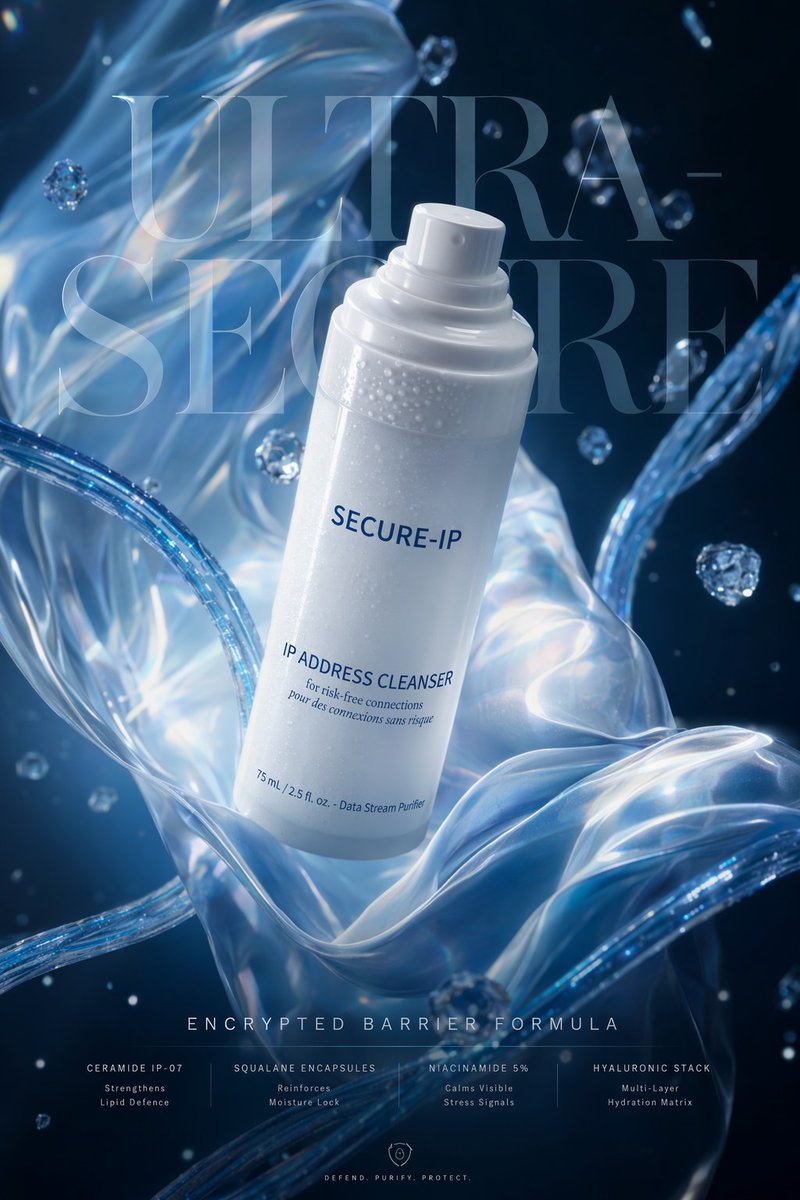
Poster pubblicitario futuristico per la cura della pelle tramite tecnologia cibernetica.
Questo prompt genera un annuncio pubblicitario verticale di prodotto premium che unisce l'estetica dei prodotti di lusso per la cura della pelle al branding della sicurezza informatica, adatto ai social media, alla stampa o ai mockup delle campagne.
Questo è un esempio di prompt GPT Image 2 per Prodotto e commerciale . Utilizza il prompt pronto per la copia qui sotto per generare immagini simili e verifica l'attribuzione Awesome GPT Image 2 Prompts e i diritti di utilizzo commerciale prima del riutilizzo.
Free 1K preview
Generate one preview image instantly, no sign-up required.
Richiesta
prompt pronto per la copia
A luxury futuristic skincare advertisement in a vertical 4K poster format, centered on a sleek matte-white spray bottle floating diagonally in the middle of the frame, slightly tilted to the right, with a soft cylindrical cap and fine condensation droplets across the upper body. The bottle label reads "{argument name="brand name" default="SECURE-IP"}" in clean navy sans-serif text, and below it: "{argument name="product name" default="IP ADDRESS CLEANSER"}" with smaller subtext "for risk-free connections" and "pour des connexions sans risque," plus tiny footer text "75 mL / 2.5 fl. oz. - Data Stream Purifier." Behind the bottle, enormous translucent serif typography fills most of the background, reading "{argument name="headline text" default="ULTRA-SECURE"}", split across two lines and partially obscured by the product. The environment is deep midnight blue with glowing translucent fabric-like liquid ribbons curling around the bottle from top left to bottom right and from the lower foreground upward, mixed with 2 prominent glassy tubular arcs and multiple floating crystal-like droplets or bubbles. Lighting is cold, cinematic, glossy, and high-end, with luminous icy blue highlights, soft bloom, refractive reflections, and a pristine premium beauty-campaign look. At the bottom center, elegant spaced-out small caps text reads "{argument name="tagline" default="ENCRYPTED BARRIER FORMULA"}". Beneath that is a row of 4 ingredient callouts separated evenly across the width: 1) "CERAMIDE IP-07" with two lines "Strengthens" and "Lipid Defence"; 2) "SQUALANE ENCAPSULES" with "Reinforces" and "Moisture Lock"; 3) "NIACINAMIDE 5%" with "Calms Visible" and "Stress Signals"; 4) "HYALURONIC STACK" with "Multi-Layer" and "Hydration Matrix". At the very bottom center, add a small shield icon and the words "DEFEND. PURIFY. PROTECT." The overall style should blend luxury skincare product photography with cyber-security branding, ultra-polished commercial lighting, shallow depth of field, premium editorial composition, and production-ready ad design.Variabili di richiesta
Segnaposto per gli argomenti modificabili presenti nel prompt, con i relativi valori predefiniti.
Best for
- - Prodotto e commerciale visual exploration
- - Image generation and reference-image edits
- - Reusable briefs that keep source attribution visible
Change these parts
- - Subject, product, character, or scene
- - Aspect ratio, camera, lighting, and background
- - Brand, text, color, and output constraints
Recommended model and settings
- - Model: gpt-image-2
- - Input mode: Testo in immagine
- - Aspect ratio: source
- - Commercial status: review original source
How to use this prompt
- 1. Copy the prompt and preserve its structure for the first test.
- 2. Replace the subject, context, and publishing channel.
- 3. Change one camera, lighting, or style variable per iteration.
- 4. Inspect the output, source, text, and rights before reuse.
Limitations, source, and reuse cautions
- - Generated output is an editable draft, not factual, legal, or rights evidence.
- - Review the linked source, people, brands, logos, text, and third-party media before commercial use.
Altri casi in questa categoria
Prioritizzazione in base a categoria, compatibilità della modalità di input, qualità e minor rischio.






Note sul riutilizzo e sulla fonte
Utilizza questo prompt in tutta sicurezza dopo aver visualizzato in anteprima il caso.
- 1.Copia il prompt oppure aprilo direttamente in Dovoo tramite il pulsante di generazione.
- 2.Regola le variabili, le proporzioni e le immagini di riferimento in base alle tue esigenze.
- 3.Prima della pubblicazione o dell'utilizzo a pagamento, verificare i diritti di fonte, i requisiti di attribuzione e i rischi relativi al marchio o all'immagine.