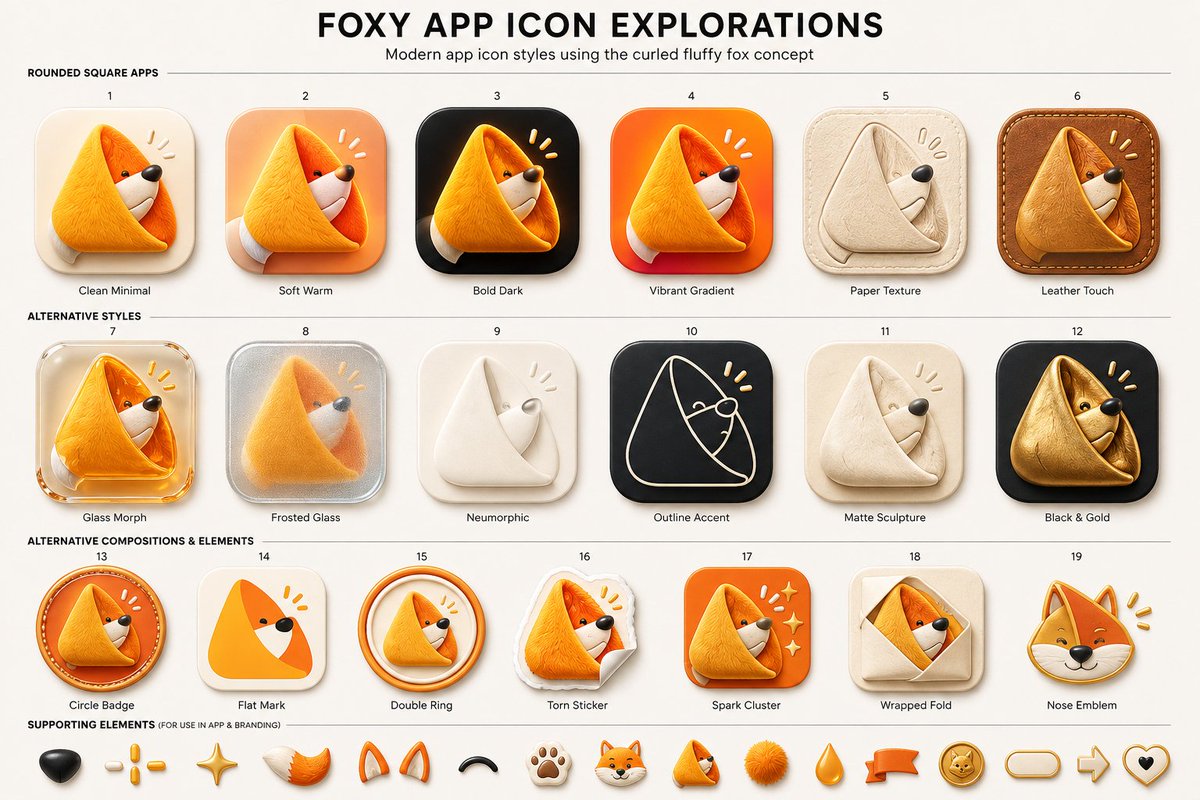
Foxy App Icon Exploration Board
A structured prompt for generating a polished 19-variant app icon exploration sheet featuring a curled fluffy fox mascot in multiple UI styles.
Questo è un esempio di prompt GPT Image 2 per Grafica e poster . Utilizza il prompt pronto per la copia qui sotto per generare immagini simili e verifica l'attribuzione Awesome GPT Image 2 Prompts e i diritti di utilizzo commerciale prima del riutilizzo.
Hai bisogno del set completo di prompt? Usa il Grafica e poster hub tematico per ulteriori esempi correlati oppure apri il GPT Image 2 catalogo rapido per l'indice completo degli esempi, le strutture riutilizzabili e l'attribuzione delle fonti.
Free 1K preview
Generate one preview image instantly, no sign-up required.
3916/4000
Richiesta
prompt pronto per la copia
Goal: Create a clean presentation board titled {argument name="headline text" default="FOXY APP ICON EXPLORATIONS"}, showing modern app icon style variations for a cute curled fluffy fox logo concept.

Canvas: Wide 16:9 beige/off-white design board, high-resolution, centered composition, subtle paper background. At the top, a large bold black all-caps headline, with a smaller subtitle underneath: {argument name="subtitle text" default="Modern app icon styles using the curled fluffy fox concept"}. Use thin horizontal divider lines to separate sections.

Layout: Arrange exactly 19 numbered app icon concepts in a neat grid of 3 rows: first row has 6 icons, second row has 6 icons, third row has 7 icons. Each icon is a rounded-square or badge-style app icon featuring the same curled triangular fox mascot: a fluffy orange fox curled into a soft triangular fold, with a white muzzle, tiny black eye, black nose, and small yellow attention marks near the head. Put a small number above each icon and a short label below it.

Section 1 title: “ROUNDED SQUARE APPS”. Include exactly 6 icons:
1. Clean Minimal — cream rounded-square background, soft shadow, simple orange curled fox.
2. Soft Warm — peach/orange warm gradient rounded-square background.
3. Bold Dark — black rounded-square background with glowing orange fox.
4. Vibrant Gradient — bright orange-red gradient rounded-square background.
5. Paper Texture — beige paper-like icon, embossed folded fox in pale cream.
6. Leather Touch — brown stitched leather rounded-square background, tan leather fox.

Section 2 title: “ALTERNATIVE STYLES”. Include exactly 6 icons:
7. Glass Morph — translucent glossy glass rounded-square icon with orange fox.
8. Frosted Glass — frosted silver translucent square with blurred fox inside.
9. Neumorphic — soft off-white raised icon with minimal white folded fox.
10. Outline Accent — dark charcoal rounded square with thin cream line-art fox outline and yellow accent marks.
11. Matte Sculpture — soft beige matte clay-like curled fox sculpture.
12. Black & Gold — black rounded square with metallic gold fox.

Section 3 title: “ALTERNATIVE COMPOSITIONS & ELEMENTS”. Include exactly 7 icons:
13. Circle Badge — circular orange badge with curled fox inside and stitched/ring detail.
14. Flat Mark — simplified flat orange triangular fox mark on cream rounded square.
15. Double Ring — curled fox inside two circular orange rings.
16. Torn Sticker — fox printed as a torn paper sticker with curled paper corner.
17. Spark Cluster — orange rounded square with fox and small sparkle/star cluster.
18. Wrapped Fold — beige square with fox peeking from a folded envelope/wrap shape.
19. Nose Emblem — fox head emblem focused on face, ears, black nose, and yellow marks.

Supporting elements: Along the bottom, add a row labeled “SUPPORTING ELEMENTS (FOR USE IN APP & BRANDING)” containing exactly 14 small mascot/brand elements: black nose, three yellow dash marks, golden sparkle star, orange-white fluffy tail, pair of orange fox ears, black curved smile/arc, paw print, small fox head, tiny curled fox mascot, orange fluffy pom-pom, orange teardrop, orange ribbon banner, gold fox coin badge, rounded pill outline, right arrow outline, and heart outline with black center. If space is tight, keep the first 14 most visible items and maintain the same visual style.

Visual style: Premium UI concept sheet, polished 3D soft-rendered icons, rounded corners, tactile materials, gentle shadows, warm orange and cream palette with black accents. Use crisp readable typography, small labels, even spacing, and a modern product-design presentation aesthetic. The mascot should remain consistently recognizable across all variations as a {argument name="mascot description" default="curled fluffy orange fox forming a triangular app icon shape"}. Avoid extra icons, extra labels, watermarks, or photorealistic background clutter.
Variabili di richiesta
Segnaposto per gli argomenti modificabili presenti nel prompt, con i relativi valori predefiniti.
Variabile
headline text
Predefinito
FOXY APP ICON EXPLORATIONS
Variabile
subtitle text
Predefinito
Modern app icon styles using the curled fluffy fox concept
Variabile
mascot description
Predefinito
curled fluffy orange fox forming a triangular app icon shape
Best for
- - Grafica e poster visual exploration
- - Image generation and reference-image edits
- - Reusable briefs that keep source attribution visible
Change these parts
- - Subject, product, character, or scene
- - Aspect ratio, camera, lighting, and background
- - Brand, text, color, and output constraints
Recommended model and settings
- - Model: gpt-image-2
- - Input mode: Testo in immagine
- - Aspect ratio: source
- - Commercial status: review original source
How to use this prompt
- 1. Copy the prompt and preserve its structure for the first test.
- 2. Replace the subject, context, and publishing channel.
- 3. Change one camera, lighting, or style variable per iteration.
- 4. Inspect the output, source, text, and rights before reuse.
Limitations, source, and reuse cautions
- - Generated output is an editable draft, not factual, legal, or rights evidence.
- - Review the linked source, people, brands, logos, text, and third-party media before commercial use.
Importato da Awesome GPT Image 2 Prompts . È richiesta l'attribuzione. Lo stato di utilizzo commerciale è allowed ; verificare i diritti della fonte prima dell'utilizzo a pagamento.
Altri casi in questa categoria
Prioritizzazione in base a categoria, compatibilità della modalità di input, qualità e minor rischio.





Note sul riutilizzo e sulla fonte
Utilizza questo prompt in tutta sicurezza dopo aver visualizzato in anteprima il caso.
- 1.Copia il prompt oppure aprilo direttamente in Dovoo tramite il pulsante di generazione.
- 2.Regola le variabili, le proporzioni e le immagini di riferimento in base alle tue esigenze.
- 3.Prima della pubblicazione o dell'utilizzo a pagamento, verificare i diritti di fonte, i requisiti di attribuzione e i rischi relativi al marchio o all'immagine.