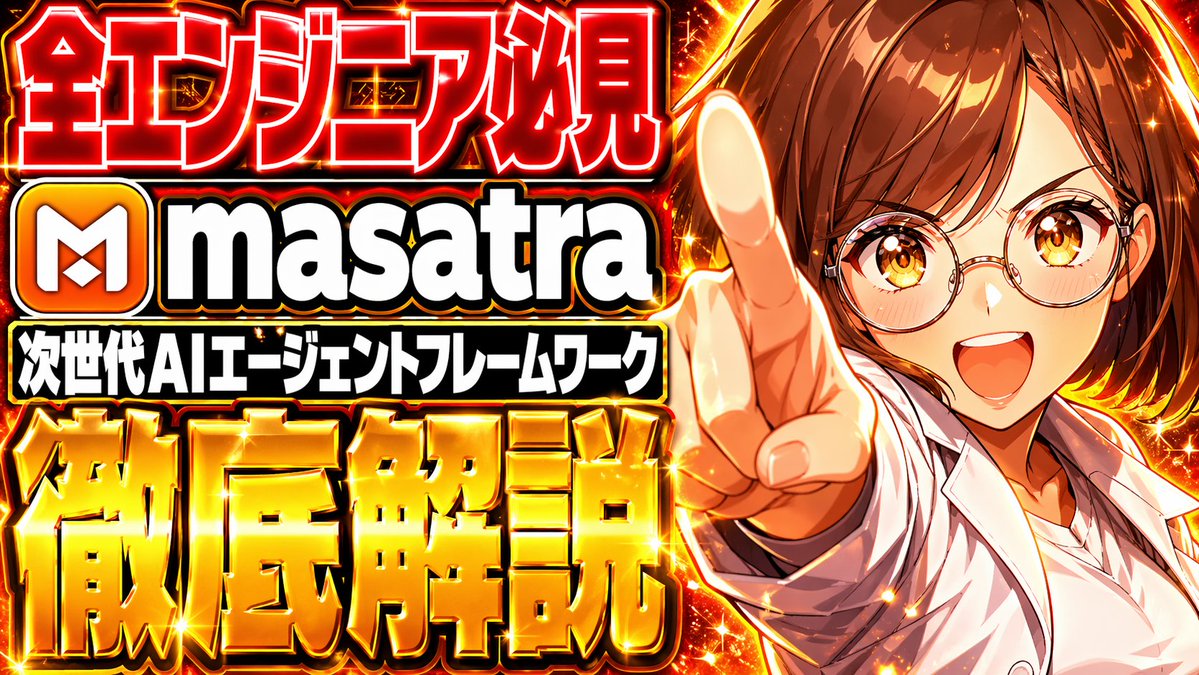
Miniatura giapponese appariscente con intelligenza artificiale
Questo prompt genera una miniatura di YouTube di grande impatto, in stile anime giapponese, per video esplicativi sull'IA o sulla tecnologia, con testo di grandi dimensioni, effetti di fuoco e un personaggio che indica.
Questo è un esempio di prompt GPT Image 2 per Anime e videogiochi . Utilizza il prompt pronto per la copia qui sotto per generare immagini simili e verifica l'attribuzione Awesome GPT Image 2 Prompts e i diritti di utilizzo commerciale prima del riutilizzo.
Free 1K preview
Generate one preview image instantly, no sign-up required.
Richiesta
prompt pronto per la copia
Create a hyper-saturated Japanese YouTube thumbnail in a flashy clickbait anime style, 16:9 landscape, with a split composition: huge stacked text blocks dominating the left two-thirds and an anime character on the right one-third. The background is a fiery explosion of red, orange, and gold energy with glowing sparks, lens flares, glittering star highlights, and a high-contrast metallic shine effect everywhere. On the left, place 4 bold text groups stacked vertically with thick black outlines, white inner strokes, intense outer glow, and glossy 3D treatment. Top line: giant Japanese headline text {argument name="headline text" default="紅エンジニア必見"} in vivid red with white edging and bright gold spark accents. Second line: a rounded square orange app-like icon with a white stylized "M" to the left of the word {argument name="product name" default="masatra"} in enormous lowercase white sans-serif letters with black outline and subtle gray shading. Third line: a black rectangular banner with compact bold white Japanese text reading "次世代AIエージェントフレームワーク". Bottom line: very large gold metallic Japanese text {argument name="bottom text" default="Detailed explanation"} with beveled 3D embossing, orange-to-gold gradient, bright specular highlights, and glowing edges. On the right, show 1 anime-style young adult woman from chest up, with {argument name="hair color" default="brown"} medium-length hair, wearing a white open lab coat over a white shirt, leaning toward the camera and pointing directly at the viewer with a foreshortened hand and extended index finger in the foreground. Her pose should feel confident, urgent, and attention-grabbing. Use dramatic rim lighting from the fiery background, strong orange highlights on skin and clothing, and a polished commercial thumbnail finish. Reserve a large rectangular area over the upper-right face region as a flat placeholder block in {argument name="placeholder color" default="light brown"}, obscuring most of the face. Make the overall design extremely dense, glossy, explosive, and optimized for maximum readability at small size.Variabili di richiesta
Segnaposto per gli argomenti modificabili presenti nel prompt, con i relativi valori predefiniti.
Best for
- - Anime e videogiochi visual exploration
- - Image generation and reference-image edits
- - Reusable briefs that keep source attribution visible
Change these parts
- - Subject, product, character, or scene
- - Aspect ratio, camera, lighting, and background
- - Brand, text, color, and output constraints
Recommended model and settings
- - Model: gpt-image-2
- - Input mode: Testo in immagine
- - Aspect ratio: source
- - Commercial status: review original source
How to use this prompt
- 1. Copy the prompt and preserve its structure for the first test.
- 2. Replace the subject, context, and publishing channel.
- 3. Change one camera, lighting, or style variable per iteration.
- 4. Inspect the output, source, text, and rights before reuse.
Limitations, source, and reuse cautions
- - Generated output is an editable draft, not factual, legal, or rights evidence.
- - Review the linked source, people, brands, logos, text, and third-party media before commercial use.
Altri casi in questa categoria
Prioritizzazione in base a categoria, compatibilità della modalità di input, qualità e minor rischio.






Note sul riutilizzo e sulla fonte
Utilizza questo prompt in tutta sicurezza dopo aver visualizzato in anteprima il caso.
- 1.Copia il prompt oppure aprilo direttamente in Dovoo tramite il pulsante di generazione.
- 2.Regola le variabili, le proporzioni e le immagini di riferimento in base alle tue esigenze.
- 3.Prima della pubblicazione o dell'utilizzo a pagamento, verificare i diritti di fonte, i requisiti di attribuzione e i rischi relativi al marchio o all'immagine.