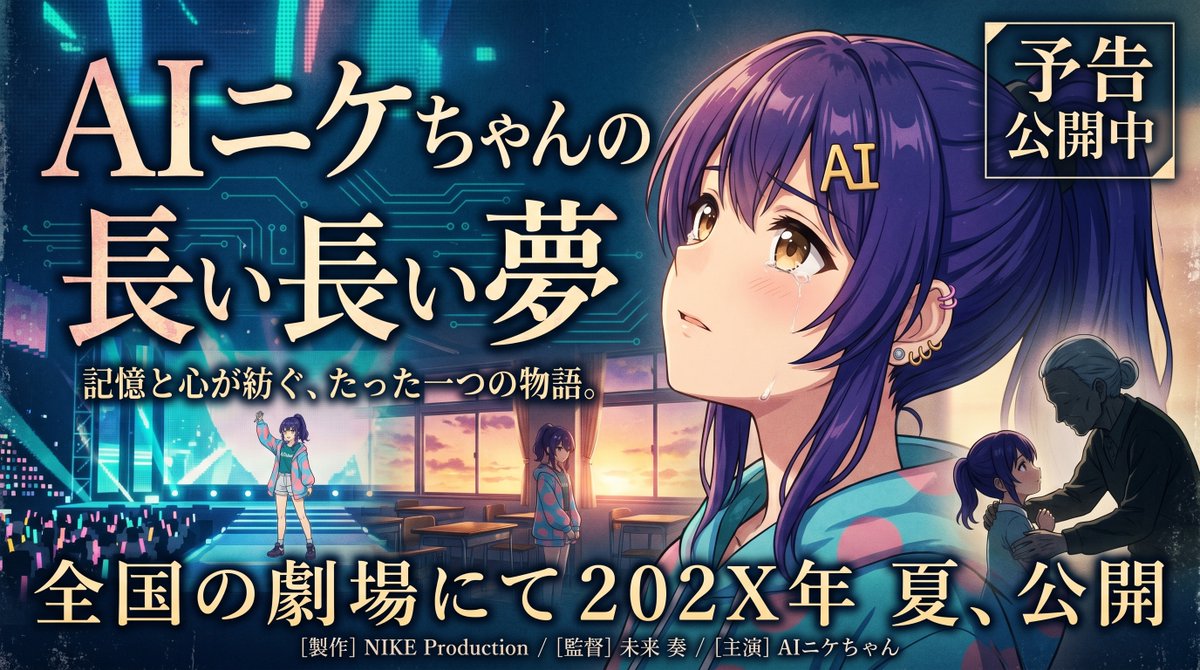
Banner emozionante per un film d'animazione
Un banner cinematografico in stile anime giapponese, con un'eroina in lacrime, vignette narrative a più livelli e un titolo con caratteri tipografici audaci, ideale per trailer promozionali o immagini promozionali per il cinema.
Questo è un esempio di prompt GPT Image 2 per Grafica e poster . Utilizza il prompt pronto per la copia qui sotto per generare immagini simili e verifica l'attribuzione Awesome GPT Image 2 Prompts e i diritti di utilizzo commerciale prima del riutilizzo.
Free 1K preview
Generate one preview image instantly, no sign-up required.
Richiesta
prompt pronto per la copia
Create a dramatic Japanese movie trailer banner in a polished anime-cinema poster style, widescreen 16:9. The main character is {argument name="character name" default="AIニケちゃん"}, a teenage anime girl with long deep-purple hair tied in a high ponytail, soft side bangs, a gold hair clip reading "AI," warm amber-brown eyes, light blush, and visible tears on her cheeks. She wears a colorful pastel hoodie in turquoise, pink, and lavender tones. Make her the emotional centerpiece on the right half of the image in a large close-up portrait, gazing upward with a wistful, fragile expression, lit by warm sunset light from behind and cool neon blue light from the front. The background should blend futuristic digital imagery and nostalgic school-life drama: faint glowing circuit-board patterns, a stage or concert venue with cyan and magenta glow sticks on the left, and a classroom interior with desks and large sunset windows in the center. Include 3 smaller narrative character vignettes: one full-body figure of the girl standing on a lit stage at lower left, one medium figure of her standing alone in the classroom near the windows at center bottom, and one small silhouette-like scene at lower right of an elderly woman facing the girl in an intimate emotional moment. Use rich cinematic contrast, luminous rim light, dreamy haze, and a bittersweet, heartfelt atmosphere. Add large ornate Japanese title typography on the left and center reading "AIニケちゃんの 長い長い夢" in gold with soft glow and dark outline. Add a smaller tagline beneath it reading "記憶と心が紡ぐ、たった一つの物語。" Add a square badge in the upper right with gold frame and dark blue background reading "予告 公開中". Add a large release line across the bottom reading "全国の劇場にて 202X年 夏、公開" with elegant gold serif lettering. Include small production-credit text at the very bottom in Japanese, such as "[製作] NIKE Production / [監督] 未来 奏 / [主演] AIニケちゃん". Overall feel: emotional, nostalgic, futuristic, premium Japanese film promotion banner, highly detailed anime key visual, commercial poster composition.Variabili di richiesta
Segnaposto per gli argomenti modificabili presenti nel prompt, con i relativi valori predefiniti.
Best for
- - Grafica e poster visual exploration
- - Image generation and reference-image edits
- - Reusable briefs that keep source attribution visible
Change these parts
- - Subject, product, character, or scene
- - Aspect ratio, camera, lighting, and background
- - Brand, text, color, and output constraints
Recommended model and settings
- - Model: gpt-image-2
- - Input mode: Testo in immagine
- - Aspect ratio: source
- - Commercial status: review original source
How to use this prompt
- 1. Copy the prompt and preserve its structure for the first test.
- 2. Replace the subject, context, and publishing channel.
- 3. Change one camera, lighting, or style variable per iteration.
- 4. Inspect the output, source, text, and rights before reuse.
Limitations, source, and reuse cautions
- - Generated output is an editable draft, not factual, legal, or rights evidence.
- - Review the linked source, people, brands, logos, text, and third-party media before commercial use.
Altri casi in questa categoria
Prioritizzazione in base a categoria, compatibilità della modalità di input, qualità e minor rischio.






Note sul riutilizzo e sulla fonte
Utilizza questo prompt in tutta sicurezza dopo aver visualizzato in anteprima il caso.
- 1.Copia il prompt oppure aprilo direttamente in Dovoo tramite il pulsante di generazione.
- 2.Regola le variabili, le proporzioni e le immagini di riferimento in base alle tue esigenze.
- 3.Prima della pubblicazione o dell'utilizzo a pagamento, verificare i diritti di fonte, i requisiti di attribuzione e i rischi relativi al marchio o all'immagine.