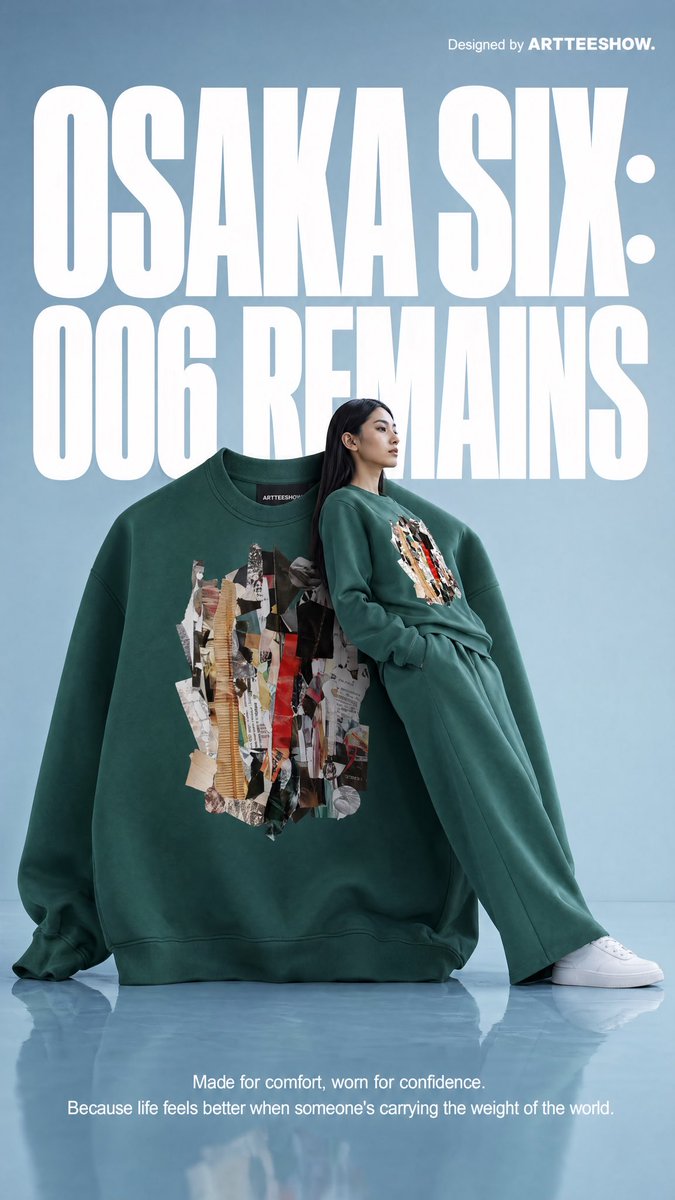
Pubblicità della felpa Osaka Six
Un poster surreale di streetwear d'alta moda che mostra una felpa verde gigante, una modella con la stessa felpa e una tipografia audace, ideale per la pubblicità di abbigliamento o per l'immagine di un concept brand.
Questo è un esempio di prompt GPT Image 2 per Moda e bellezza . Utilizza il prompt pronto per la copia qui sotto per generare immagini simili e verifica l'attribuzione Awesome GPT Image 2 Prompts e i diritti di utilizzo commerciale prima del riutilizzo.
Free 1K preview
Generate one preview image instantly, no sign-up required.
Free text preview doesn’t preserve reference-image consistency.
Richiesta
prompt pronto per la copia
A clean editorial fashion advertisement poster on a pale powder-blue studio background with a glossy reflective floor. The composition is vertical and minimal, dominated by oversized bold white condensed sans-serif typography in the background reading “OSAKA SIX:” on the top line and “006 REMAINS” below, filling most of the upper half behind the subject. In the top right corner, small white branding text reads “Designed by ARTTEESHOW.” Centered in the lower middle is an oversized forest-green crewneck sweatshirt standing upright like a sculptural object, with soft heavy cotton fabric, dropped shoulders, extra-long sleeves pooled on the floor, and a small black neck label that reads ARTTEESHOW. On the chest of the sweatshirt is a large abstract collage print made from torn paper fragments in beige, tan, black, gray, white, and vivid red, arranged vertically like layered scraps. Leaning against the right side of the giant sweatshirt is a slim female fashion model with long straight black hair, wearing a matching {argument name="sweatshirt color" default="forest green"} sweatshirt and relaxed wide-leg sweatpants with clean white low-top sneakers. She is posed in profile with a calm detached editorial attitude, one hand in her pocket, her body reclining diagonally against the giant garment, legs extended forward; Show every face clearly with natural, detailed facial features. The smaller worn sweatshirt has the same abstract torn-paper collage graphic centered on the chest. At the bottom center, add 2 lines of small white copy text: “Made for comfort, worn for confidence.” and “Because life feels better when someone’s carrying the weight of the world.” The image should feel like a premium conceptual streetwear campaign from the early 1990s reimagined as contemporary luxury advertising, with crisp studio lighting, soft shadows, subtle floor reflections, precise product focus, surreal scale contrast between the oversized sweatshirt and the model, and a polished magazine-poster aesthetic.Variabili di richiesta
Segnaposto per gli argomenti modificabili presenti nel prompt, con i relativi valori predefiniti.
Best for
- - Moda e bellezza visual exploration
- - Image generation and reference-image edits
- - Reusable briefs that keep source attribution visible
Change these parts
- - Subject, product, character, or scene
- - Aspect ratio, camera, lighting, and background
- - Brand, text, color, and output constraints
Recommended model and settings
- - Model: gpt-image-2
- - Input mode: Immagine in immagine
- - Aspect ratio: source
- - Commercial status: review original source
How to use this prompt
- 1. Copy the prompt and preserve its structure for the first test.
- 2. Replace the subject, context, and publishing channel.
- 3. Change one camera, lighting, or style variable per iteration.
- 4. Inspect the output, source, text, and rights before reuse.
Limitations, source, and reuse cautions
- - Generated output is an editable draft, not factual, legal, or rights evidence.
- - Review the linked source, people, brands, logos, text, and third-party media before commercial use.
Altri casi in questa categoria
Prioritizzazione in base a categoria, compatibilità della modalità di input, qualità e minor rischio.






Note sul riutilizzo e sulla fonte
Utilizza questo prompt in tutta sicurezza dopo aver visualizzato in anteprima il caso.
- 1.Copia il prompt oppure aprilo direttamente in Dovoo tramite il pulsante di generazione.
- 2.Regola le variabili, le proporzioni e le immagini di riferimento in base alle tue esigenze.
- 3.Prima della pubblicazione o dell'utilizzo a pagamento, verificare i diritti di fonte, i requisiti di attribuzione e i rischi relativi al marchio o all'immagine.