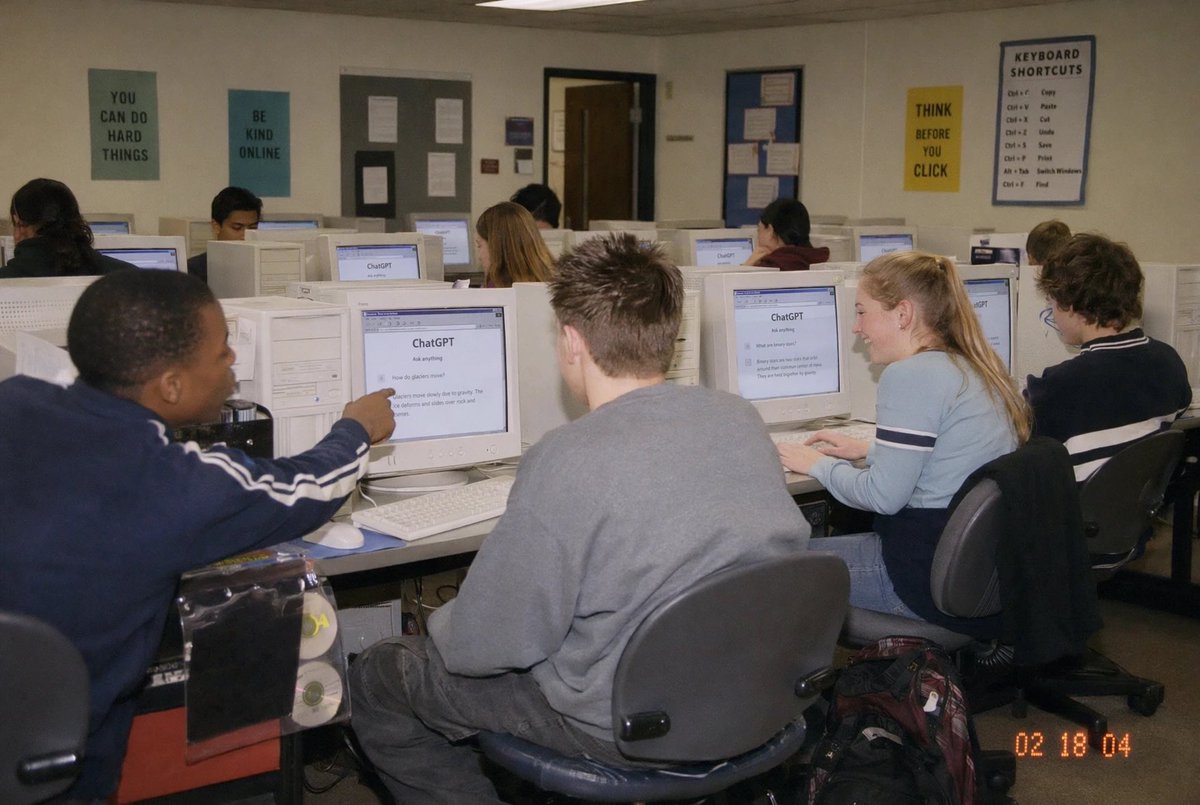
Laboratorio informatico dei primi anni 2000 con ChatGPT
Questo prompt genera una foto spontanea e nostalgica di studenti in classe che usano ChatGPT su computer CRT, ideale per contenuti editoriali o per i social media sull'intelligenza artificiale nell'istruzione quotidiana.
Questo è un esempio di prompt GPT Image 2 per Interni e architettura . Utilizza il prompt pronto per la copia qui sotto per generare immagini simili e verifica l'attribuzione Awesome GPT Image 2 Prompts e i diritti di utilizzo commerciale prima del riutilizzo.
Free 1K preview
Generate one preview image instantly, no sign-up required.
Richiesta
prompt pronto per la copia
A candid documentary-style photo of a {argument name="setting" default="high school computer lab classroom"} filled with exactly 10 students seated at rows of bulky off-white CRT desktop computers, viewed from the back-left corner of the room at a slight wide angle. The scene should feel like an early-2000s snapshot taken on a consumer digital camera with direct flash, soft grain, slightly warm indoor fluorescent lighting, and a timestamp in the bottom-right corner reading {argument name="timestamp" default="02 18 04"}. In the foreground left, a student in a navy track jacket with white sleeve stripes points at a CRT monitor; in the center foreground, another student with short spiky hair wears an oversized gray sweatshirt and sits facing away from the camera; on the right foreground, a blonde student with a ponytail wears a light blue long-sleeve top with dark horizontal arm stripes and types at a keyboard; far right, another student with curly dark hair sits at a workstation. Several other students occupy the middle and back rows, all facing their screens. The monitors prominently display the ChatGPT interface, with the visible heading reading {argument name="screen title" default="ChatGPT"} and simple prompt text beneath it. The room has beige walls, drop ceiling tiles, and multiple motivational classroom posters: exactly 4 readable posters on the back wall saying {argument name="poster one" default="YOU CAN DO HARD THINGS"}, "BE KIND ONLINE", "THINK BEFORE YOU CLICK", and a larger poster titled "KEYBOARD SHORTCUTS" with a list beneath it. Include bulletin boards, a classroom door at the back, rolling office chairs, white keyboards and mice, and a backpack on the floor near the right foreground desk. Show every face clearly with natural, detailed facial features, preserving the look of a real classroom photo while keeping the focus on the students using ChatGPT in an old computer lab.Variabili di richiesta
Segnaposto per gli argomenti modificabili presenti nel prompt, con i relativi valori predefiniti.
Best for
- - Interni e architettura visual exploration
- - Image generation and reference-image edits
- - Reusable briefs that keep source attribution visible
Change these parts
- - Subject, product, character, or scene
- - Aspect ratio, camera, lighting, and background
- - Brand, text, color, and output constraints
Recommended model and settings
- - Model: gpt-image-2
- - Input mode: Testo in immagine
- - Aspect ratio: source
- - Commercial status: review original source
How to use this prompt
- 1. Copy the prompt and preserve its structure for the first test.
- 2. Replace the subject, context, and publishing channel.
- 3. Change one camera, lighting, or style variable per iteration.
- 4. Inspect the output, source, text, and rights before reuse.
Limitations, source, and reuse cautions
- - Generated output is an editable draft, not factual, legal, or rights evidence.
- - Review the linked source, people, brands, logos, text, and third-party media before commercial use.
Altri casi in questa categoria
Prioritizzazione in base a categoria, compatibilità della modalità di input, qualità e minor rischio.






Note sul riutilizzo e sulla fonte
Utilizza questo prompt in tutta sicurezza dopo aver visualizzato in anteprima il caso.
- 1.Copia il prompt oppure aprilo direttamente in Dovoo tramite il pulsante di generazione.
- 2.Regola le variabili, le proporzioni e le immagini di riferimento in base alle tue esigenze.
- 3.Prima della pubblicazione o dell'utilizzo a pagamento, verificare i diritti di fonte, i requisiti di attribuzione e i rischi relativi al marchio o all'immagine.