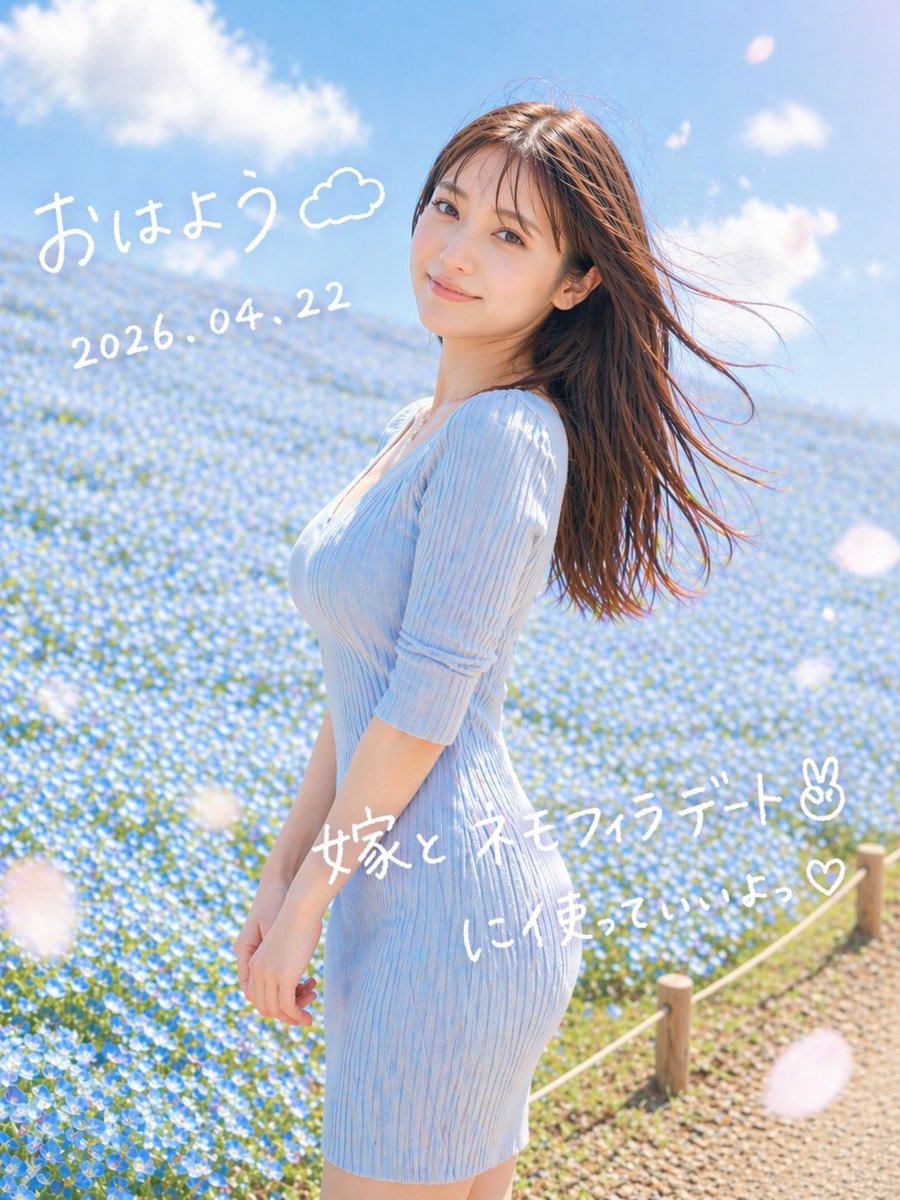
Ritratto sognante di Nemophila in un appuntamento
Questo genera un ritratto verticale, delicato e romantico, di una donna in un campo di fiori blu, con un testo in giapponese scritto a mano, ideale per le immagini dei social media.
Questo è un esempio di prompt GPT Image 2 per Ritratto e personaggio . Utilizza il prompt pronto per la copia qui sotto per generare immagini simili e verifica l'attribuzione Awesome GPT Image 2 Prompts e i diritti di utilizzo commerciale prima del riutilizzo.
Hai bisogno del set completo di prompt? Usa il Ritratto e personaggio hub tematico per ulteriori esempi correlati oppure apri il GPT Image 2 catalogo rapido per l'indice completo degli esempi, le strutture riutilizzabili e l'attribuzione delle fonti.
Free 1K preview
Generate one preview image instantly, no sign-up required.
1335/4000
Richiesta
prompt pronto per la copia
A dreamy vertical spring portrait photo of a young woman standing in profile in a vast field of tiny blue nemophila flowers under a bright blue sky with soft white clouds. She wears a fitted ribbed knit dress in {argument name="dress color" default="pale sky blue"} with elbow-length sleeves, and her long straight brown hair is blowing dramatically to the right in the wind. Frame her from about mid-thigh upward, slightly off-center to the right, with the flower field filling the background and a small rope fence with wooden posts visible along the lower right edge beside a gravel path. Use soft natural morning sunlight, airy high-key exposure, gentle pastel tones, shallow depth of field, subtle lens bloom, and a romantic social-media snapshot aesthetic. Add a few large out-of-focus white flower petals drifting across the foreground. Overlay handwritten white Japanese text directly on the image: at the upper left, "{argument name="greeting text" default="おはよう"}" with a small doodled cloud beside it; below that, the date "{argument name="date text" default="2026.04.22"}"; across the lower middle-right, "{argument name="main note text" default="嫁と ネモフィラデート✌︎"}"; and beneath it, "{argument name="sub note text" default="に使っていいよっ♡"}". Keep the handwriting casual, playful, and slightly uneven like a marker pen on a photo.Variabili di richiesta
Segnaposto per gli argomenti modificabili presenti nel prompt, con i relativi valori predefiniti.
Variabile
dress color
Predefinito
pale sky blue
Variabile
greeting text
Predefinito
おはよう
Variabile
date text
Predefinito
2026.04.22
Variabile
main note text
Predefinito
嫁と ネモフィラデート✌︎
Variabile
sub note text
Predefinito
に使っていいよっ♡
Best for
- - Ritratto e personaggio visual exploration
- - Image generation and reference-image edits
- - Reusable briefs that keep source attribution visible
Change these parts
- - Subject, product, character, or scene
- - Aspect ratio, camera, lighting, and background
- - Brand, text, color, and output constraints
Recommended model and settings
- - Model: gpt-image-2
- - Input mode: Testo in immagine
- - Aspect ratio: source
- - Commercial status: review original source
How to use this prompt
- 1. Copy the prompt and preserve its structure for the first test.
- 2. Replace the subject, context, and publishing channel.
- 3. Change one camera, lighting, or style variable per iteration.
- 4. Inspect the output, source, text, and rights before reuse.
Limitations, source, and reuse cautions
- - Generated output is an editable draft, not factual, legal, or rights evidence.
- - Review the linked source, people, brands, logos, text, and third-party media before commercial use.
Importato da Awesome GPT Image 2 Prompts . È richiesta l'attribuzione. Lo stato di utilizzo commerciale è allowed ; verificare i diritti della fonte prima dell'utilizzo a pagamento.
Altri casi in questa categoria
Prioritizzazione in base a categoria, compatibilità della modalità di input, qualità e minor rischio.






Note sul riutilizzo e sulla fonte
Utilizza questo prompt in tutta sicurezza dopo aver visualizzato in anteprima il caso.
- 1.Copia il prompt oppure aprilo direttamente in Dovoo tramite il pulsante di generazione.
- 2.Regola le variabili, le proporzioni e le immagini di riferimento in base alle tue esigenze.
- 3.Prima della pubblicazione o dell'utilizzo a pagamento, verificare i diritti di fonte, i requisiti di attribuzione e i rischi relativi al marchio o all'immagine.