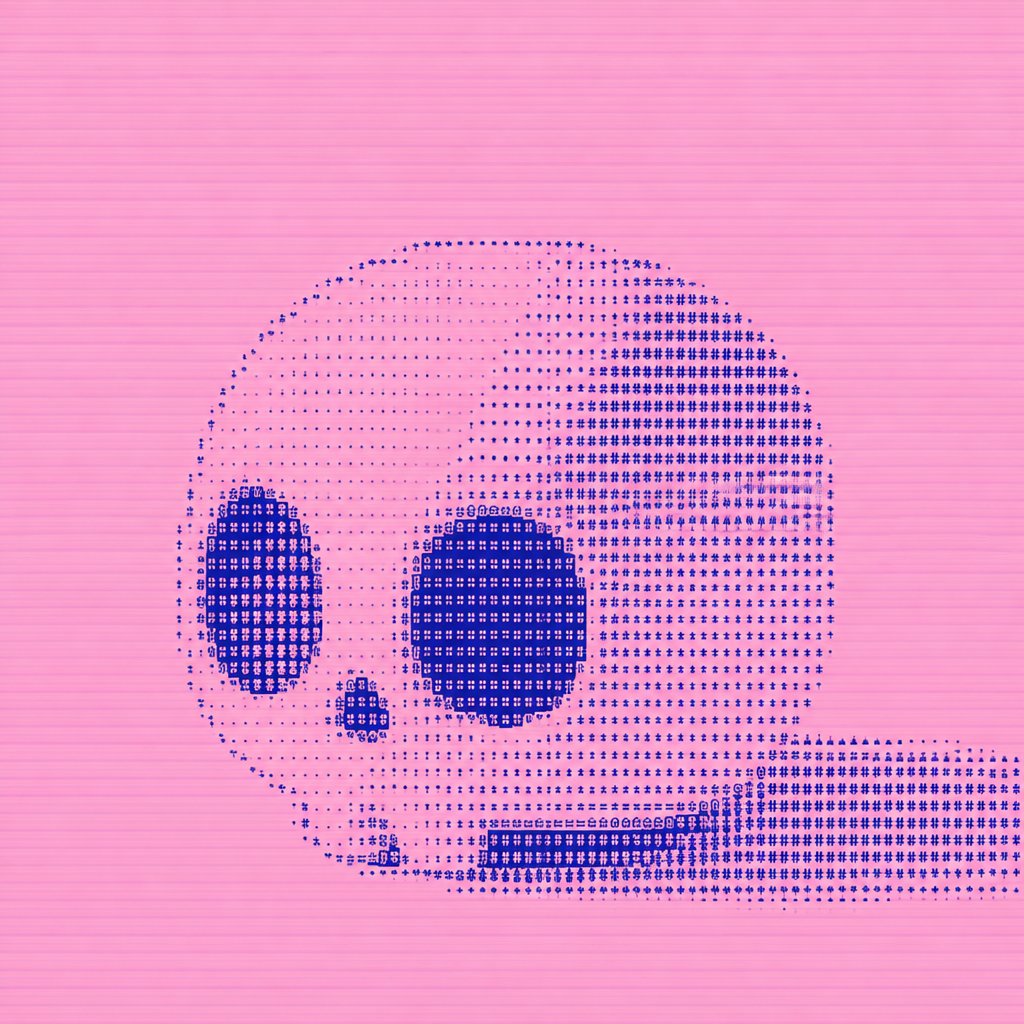
Dithered Pink Skull Pixel Art
A square experimental pixel-art skull rendered with cobalt-blue ASCII-style dithering on a pink scanline background.
Questo è un esempio di prompt GPT Image 2 per Illustrazione e arte . Utilizza il prompt pronto per la copia qui sotto per generare immagini simili e verifica l'attribuzione Awesome GPT Image 2 Prompts e i diritti di utilizzo commerciale prima del riutilizzo.
Hai bisogno del set completo di prompt? Usa il Illustrazione e arte hub tematico per ulteriori esempi correlati oppure apri il GPT Image 2 catalogo rapido per l'indice completo degli esempi, le strutture riutilizzabili e l'attribuzione delle fonti.
Free 1K preview
Generate one preview image instantly, no sign-up required.
1294/4000
Richiesta
prompt pronto per la copia
Create a square pixel-art/dither study of a side-view human skull on a flat {argument name="background color" default="bubblegum pink"} background. The skull should face left and sit slightly below center, with a long horizontal lower jaw extending to the right edge. Use an 8-bit halftone ASCII-like dither technique made from tiny dark-blue symbols, dots, crosses, plus signs, and blocky glyph marks rather than smooth shading. The skull is composed of two main tones: pale translucent pink fill and dense {argument name="dither color" default="deep cobalt blue"} stippling. Include exactly 4 prominent dark anatomical features: one tall oval left eye socket, one large round right eye socket, one small rounded triangular nose cavity between and below them, and one rectangular band of teeth along the lower jaw. The cranium is large and rounded, with the right rear area shaded most densely in blue, fading into sparse dots across the upper left forehead. The lower jaw is a long rectangular dotted mass running from the skull toward the right border. Add subtle horizontal scanline texture across the entire image, like CRT or low-resolution print banding. Keep the composition minimal, centered, graphic, and experimental, with no text, no border, no watermark, and no additional objects.Variabili di richiesta
Segnaposto per gli argomenti modificabili presenti nel prompt, con i relativi valori predefiniti.
Variabile
background color
Predefinito
bubblegum pink
Variabile
dither color
Predefinito
deep cobalt blue
Best for
- - Illustrazione e arte visual exploration
- - Image generation and reference-image edits
- - Reusable briefs that keep source attribution visible
Change these parts
- - Subject, product, character, or scene
- - Aspect ratio, camera, lighting, and background
- - Brand, text, color, and output constraints
Recommended model and settings
- - Model: gpt-image-2
- - Input mode: Testo in immagine
- - Aspect ratio: source
- - Commercial status: review original source
How to use this prompt
- 1. Copy the prompt and preserve its structure for the first test.
- 2. Replace the subject, context, and publishing channel.
- 3. Change one camera, lighting, or style variable per iteration.
- 4. Inspect the output, source, text, and rights before reuse.
Limitations, source, and reuse cautions
- - Generated output is an editable draft, not factual, legal, or rights evidence.
- - Review the linked source, people, brands, logos, text, and third-party media before commercial use.
Importato da Awesome GPT Image 2 Prompts . È richiesta l'attribuzione. Lo stato di utilizzo commerciale è allowed ; verificare i diritti della fonte prima dell'utilizzo a pagamento.
Altri casi in questa categoria
Prioritizzazione in base a categoria, compatibilità della modalità di input, qualità e minor rischio.
Note sul riutilizzo e sulla fonte
Utilizza questo prompt in tutta sicurezza dopo aver visualizzato in anteprima il caso.
- 1.Copia il prompt oppure aprilo direttamente in Dovoo tramite il pulsante di generazione.
- 2.Regola le variabili, le proporzioni e le immagini di riferimento in base alle tue esigenze.
- 3.Prima della pubblicazione o dell'utilizzo a pagamento, verificare i diritti di fonte, i requisiti di attribuzione e i rischi relativi al marchio o all'immagine.