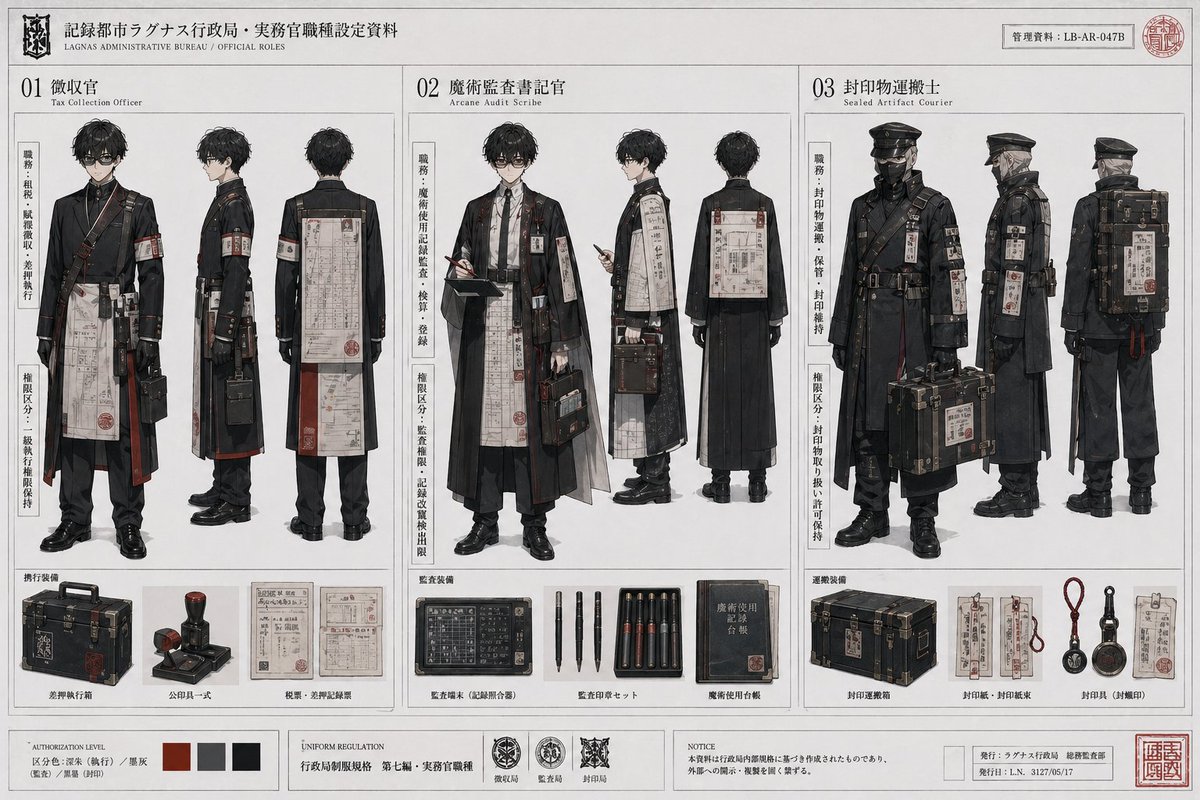
Scheda dei ruoli dell'Ufficio Dark Fantasy
Questo prompt trasforma una semplice rotazione di un personaggio anime in un dossier concettuale dettagliato di un'uniforme governativa fittizia, utile per la creazione di mondi, la progettazione di costumi o la presentazione di personaggi ricchi di oggetti di scena.
Questo è un esempio di prompt GPT Image 2 per Anime e videogiochi . Utilizza il prompt pronto per la copia qui sotto per generare immagini simili e verifica l'attribuzione Awesome GPT Image 2 Prompts e i diritti di utilizzo commerciale prima del riutilizzo.
Free 1K preview
Generate one preview image instantly, no sign-up required.
Free text preview doesn’t preserve reference-image consistency.
Richiesta
prompt pronto per la copia
Using REFERENCE_0 as the base character sheet, redesign the same male student into a fictional Japanese dark-bureaucratic fantasy worldbuilding dossier. Keep his core body type, hairstyle, and face structure consistent, but replace the school uniform concept with 3 official role variants presented as a professional concept-art document on aged white paper with thin grid lines, black ink, muted grayscale, and deep red accent marks. Create a 3-column layout labeled 01, 02, and 03, each showing full-body front, side, and back views of the same character reimagined for a different job. Role 01 should be a tax collection officer in a long black coat with hanging paperwork, armband, shoulder straps, leather belts, and a compact case. Role 02 should be an arcane audit scribe with glasses, layered robe-like outerwear over formal clothes, dangling seals and inspection documents, a ledger or clipboard, writing tools, and a briefcase. Role 03 should be a sealed artifact courier with a military-style cap, face covering, heavier protective coat, straps, tags, and a large transport case plus a backpack-like cargo unit. Add vertical Japanese side notes beside each role, dense bureaucratic labels, official insignias, stamps, serial numbers, and small English sublabels for the role names. At the bottom, include 3 equipment sections, one under each column: for role 01 show exactly 3 items — a hard case, an official stamp, and 2 paper forms; for role 02 show exactly 4 items — a black device/ledger panel, a set of 4 pens, a tray of 6 seal sticks or cartridges, and 1 blue handbook; for role 03 show exactly 4 items — a transport chest, 2 paper tags/forms, 3 hanging sealing tools, and 2 circular sealing tools plus 1 document card. Include an additional footer strip with exactly 4 color swatches, exactly 3 insignia emblems, a notice block, and publication/record information boxes. Overall style: high-end anime concept sheet mixed with occult government archive design, meticulous costume detailing, restrained composition, realistic textile rendering, and a serious institutional mood.
Best for
- - Anime e videogiochi visual exploration
- - Image generation and reference-image edits
- - Reusable briefs that keep source attribution visible
Change these parts
- - Subject, product, character, or scene
- - Aspect ratio, camera, lighting, and background
- - Brand, text, color, and output constraints
Recommended model and settings
- - Model: gpt-image-2
- - Input mode: Immagine in immagine
- - Aspect ratio: source
- - Commercial status: review original source
How to use this prompt
- 1. Copy the prompt and preserve its structure for the first test.
- 2. Replace the subject, context, and publishing channel.
- 3. Change one camera, lighting, or style variable per iteration.
- 4. Inspect the output, source, text, and rights before reuse.
Limitations, source, and reuse cautions
- - Generated output is an editable draft, not factual, legal, or rights evidence.
- - Review the linked source, people, brands, logos, text, and third-party media before commercial use.
Altri casi in questa categoria
Prioritizzazione in base a categoria, compatibilità della modalità di input, qualità e minor rischio.






Note sul riutilizzo e sulla fonte
Utilizza questo prompt in tutta sicurezza dopo aver visualizzato in anteprima il caso.
- 1.Copia il prompt oppure aprilo direttamente in Dovoo tramite il pulsante di generazione.
- 2.Regola le variabili, le proporzioni e le immagini di riferimento in base alle tue esigenze.
- 3.Prima della pubblicazione o dell'utilizzo a pagamento, verificare i diritti di fonte, i requisiti di attribuzione e i rischi relativi al marchio o all'immagine.