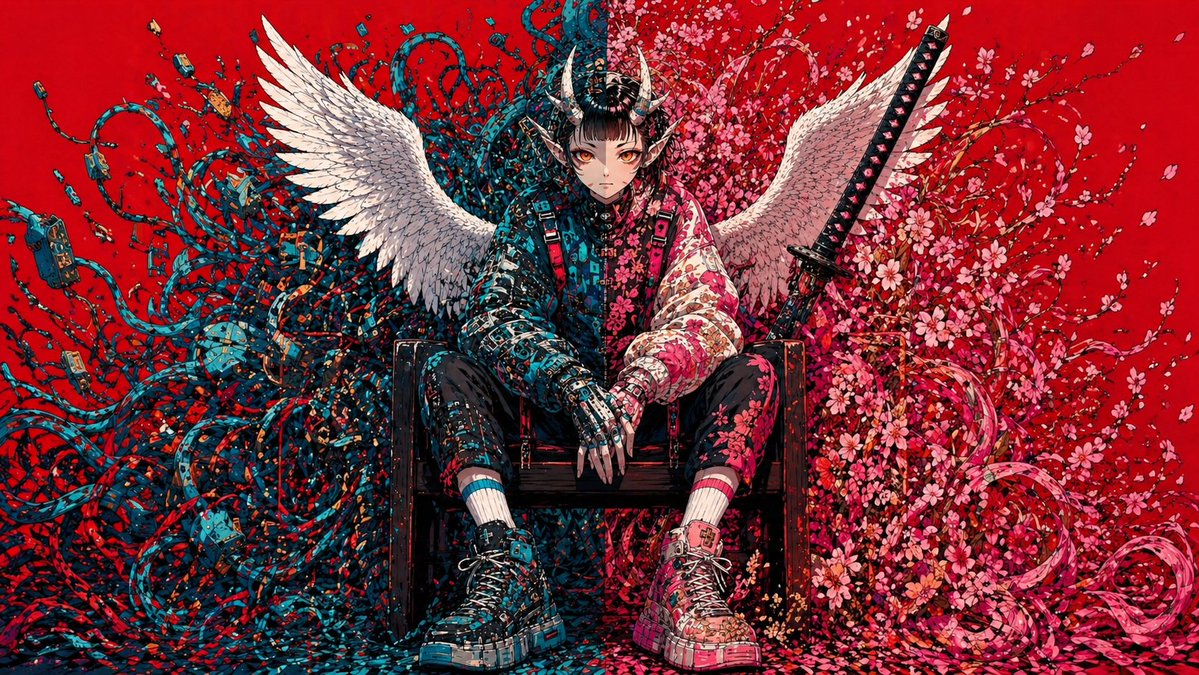
Samurai dell'angelo caduto cyberpunk
Questo prompt genera un'illustrazione di grande impatto con un singolo personaggio, ideale per la copertina di un album, le immagini chiave o un concept art di forte effetto per i social media.
Questo è un esempio di prompt GPT Image 2 per Anime e videogiochi . Utilizza il prompt pronto per la copia qui sotto per generare immagini simili e verifica l'attribuzione Awesome GPT Image 2 Prompts e i diritti di utilizzo commerciale prima del riutilizzo.
Free 1K preview
Generate one preview image instantly, no sign-up required.
Richiesta
prompt pronto per la copia
A hyper-detailed symmetrically composed anime-inspired cyberpunk illustration on a flat, saturated {argument name="background color" default="crimson red"} background. Centered in the frame, a solitary androgynous warrior sits slouched on a dark wooden chair, legs apart, hands relaxed between the knees, projecting calm menace and fallen-divinity energy. Show every face clearly with natural, detailed facial features, framed by an elaborate black samurai-style horned helmet with 2 curved horns and dense mechanical ornamentation. The figure has 2 large white feathered wings spread outward from the back. Behind and around the seated body, the composition splits into two contrasting organic-tech masses: on the left side, a chaotic storm of 1 dense tangle of teal and dark blue cables, wires, plugs, circuit fragments, and techno-organic tendrils; on the right side, 1 explosive bloom of pink cherry blossoms, petals, curling branches, and ribbon-like floral swirls. Place 1 upright katana behind the figure on the right side, angled slightly inward, with a black handle and visible guard. Dress the character in a mixed streetwear and armored outfit: a split-tone jacket with the left half in dark cyan-black circuitry patterns and the right half in pale pink floral patterns, black fitted pants with asymmetrical detailing, mismatched striped socks in cyan and pink, and chunky high-top sneakers with oversized soles, one predominantly cyan-black and the other predominantly pink-white, both covered in graphic paneling and straps. The hands should look partly mechanical or armored, with long sharp fingers. Flood the image with tiny decorative fragments, petals, paint-like flecks, and micro-details so the entire scene feels intricately hand-inked. Use a high-contrast palette dominated by {argument name="accent color 1" default="teal blue"}, {argument name="accent color 2" default="pink"}, black, and white against the red field. Render in an ultra-detailed manga-meets-graffiti style with crisp linework, dense textures, poster-like frontal framing, and a balanced fusion of angelic, demonic, floral, and cybernetic motifs.Variabili di richiesta
Segnaposto per gli argomenti modificabili presenti nel prompt, con i relativi valori predefiniti.
Best for
- - Anime e videogiochi visual exploration
- - Image generation and reference-image edits
- - Reusable briefs that keep source attribution visible
Change these parts
- - Subject, product, character, or scene
- - Aspect ratio, camera, lighting, and background
- - Brand, text, color, and output constraints
Recommended model and settings
- - Model: gpt-image-2
- - Input mode: Testo in immagine
- - Aspect ratio: source
- - Commercial status: review original source
How to use this prompt
- 1. Copy the prompt and preserve its structure for the first test.
- 2. Replace the subject, context, and publishing channel.
- 3. Change one camera, lighting, or style variable per iteration.
- 4. Inspect the output, source, text, and rights before reuse.
Limitations, source, and reuse cautions
- - Generated output is an editable draft, not factual, legal, or rights evidence.
- - Review the linked source, people, brands, logos, text, and third-party media before commercial use.
Altri casi in questa categoria
Prioritizzazione in base a categoria, compatibilità della modalità di input, qualità e minor rischio.






Note sul riutilizzo e sulla fonte
Utilizza questo prompt in tutta sicurezza dopo aver visualizzato in anteprima il caso.
- 1.Copia il prompt oppure aprilo direttamente in Dovoo tramite il pulsante di generazione.
- 2.Regola le variabili, le proporzioni e le immagini di riferimento in base alle tue esigenze.
- 3.Prima della pubblicazione o dell'utilizzo a pagamento, verificare i diritti di fonte, i requisiti di attribuzione e i rischi relativi al marchio o all'immagine.