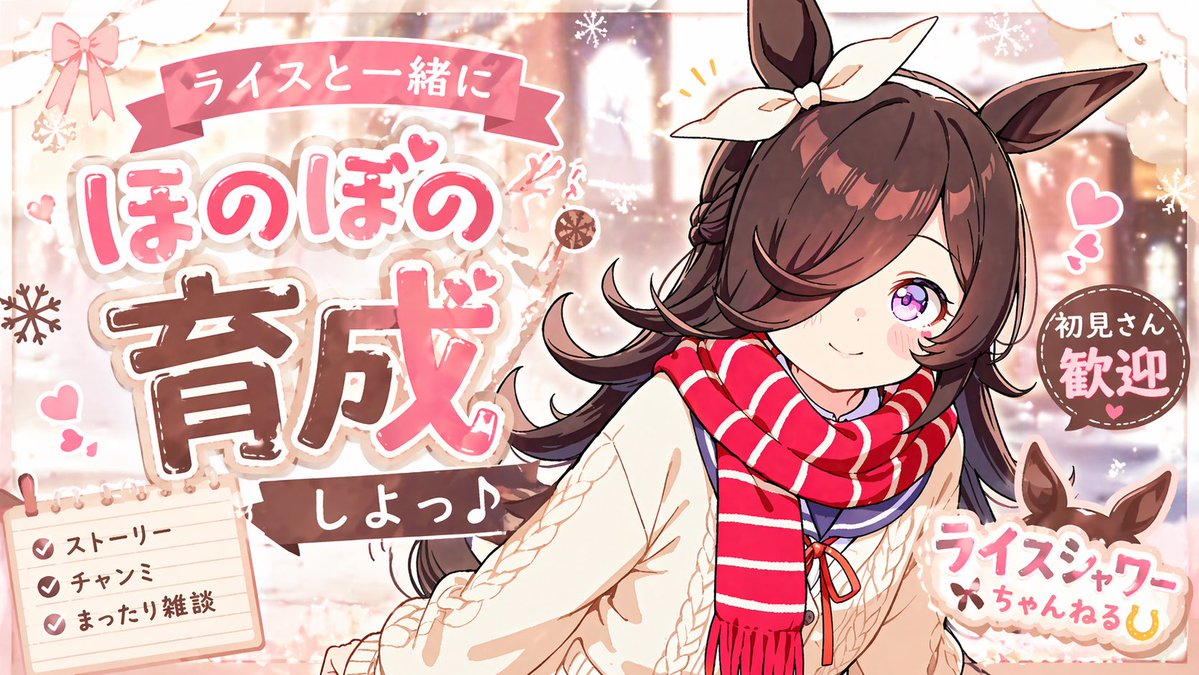
Simpatico poster invernale per un canale di anime.
Questo prompt genera una miniatura promozionale in stile anime giapponese dai colori pastello, con un singolo personaggio ragazza-cavallo e grafica testuale a strati, ideale per annunci di streaming, fan club o canali di fantasia.
Questo è un esempio di prompt GPT Image 2 per Anime e videogiochi . Utilizza il prompt pronto per la copia qui sotto per generare immagini simili e verifica l'attribuzione Awesome GPT Image 2 Prompts e i diritti di utilizzo commerciale prima del riutilizzo.
Free 1K preview
Generate one preview image instantly, no sign-up required.
Richiesta
prompt pronto per la copia
A cute pastel anime promotional poster in a dreamy idol-fanclub style, landscape orientation, featuring a single horse-girl character from the waist up on the right side of the composition. She has {argument name="hair color" default="dark chestnut brown"} long fluffy hair with side-swept bangs covering one eye, one large visible sparkling purple-pink eye, fair skin, soft blush, and upright horse ears with a large cream bow tied between them. Her expression is gentle, shy, and welcoming, with a small smile and a slight head tilt toward the viewer. She wears a thick red scarf with white horizontal stripes, a cream cable-knit sweater, and a navy sailor-style inner collar with a small red ribbon at the chest. The overall color palette is warm pink, cream, beige, and cocoa brown with soft winter lighting.

Design the image as a Japanese fan-content announcement graphic with layered sticker-like typography, fluffy outlines, hearts, sparkles, and snowflake motifs. The background should be a softly blurred cozy winter café or warmly lit indoor scene with glowing bokeh and pale decorative textures. Add exactly 5 major text areas: a pink ribbon banner at the top with the Japanese text "ライスと一緒に"; a very large central-left headline in rounded pop lettering reading "ほのぼの 育成" with "ほのぼの" in pink and white and "育成" in bold brown with white stitched edging; a small dark ribbon under it reading "しよっ♪"; a circular brown badge on the right reading "初見さん歓迎"; and a logo-like label at bottom right reading "ライスシャワーちゃんねる" with a small horseshoe icon. Add exactly 1 memo pad in the bottom-left corner with 3 checklist lines, each with a pink checkmark: "ストーリー", "チャンミ", and "まったり雑談". Include small decorative pink hearts around the character, tiny accent lines near her head, white snowflakes, lace-like trim, paper-cut corner decorations, and a soft scrapbook aesthetic. Make the whole piece look like an adorable fictional stream or channel thumbnail welcoming new viewers, highly polished, clean anime line art, soft shading, glossy eyes, and charming commercial poster composition.
Variabili di richiesta
Segnaposto per gli argomenti modificabili presenti nel prompt, con i relativi valori predefiniti.
Best for
- - Anime e videogiochi visual exploration
- - Image generation and reference-image edits
- - Reusable briefs that keep source attribution visible
Change these parts
- - Subject, product, character, or scene
- - Aspect ratio, camera, lighting, and background
- - Brand, text, color, and output constraints
Recommended model and settings
- - Model: gpt-image-2
- - Input mode: Testo in immagine
- - Aspect ratio: source
- - Commercial status: review original source
How to use this prompt
- 1. Copy the prompt and preserve its structure for the first test.
- 2. Replace the subject, context, and publishing channel.
- 3. Change one camera, lighting, or style variable per iteration.
- 4. Inspect the output, source, text, and rights before reuse.
Limitations, source, and reuse cautions
- - Generated output is an editable draft, not factual, legal, or rights evidence.
- - Review the linked source, people, brands, logos, text, and third-party media before commercial use.
Altri casi in questa categoria
Prioritizzazione in base a categoria, compatibilità della modalità di input, qualità e minor rischio.






Note sul riutilizzo e sulla fonte
Utilizza questo prompt in tutta sicurezza dopo aver visualizzato in anteprima il caso.
- 1.Copia il prompt oppure aprilo direttamente in Dovoo tramite il pulsante di generazione.
- 2.Regola le variabili, le proporzioni e le immagini di riferimento in base alle tue esigenze.
- 3.Prima della pubblicazione o dell'utilizzo a pagamento, verificare i diritti di fonte, i requisiti di attribuzione e i rischi relativi al marchio o all'immagine.