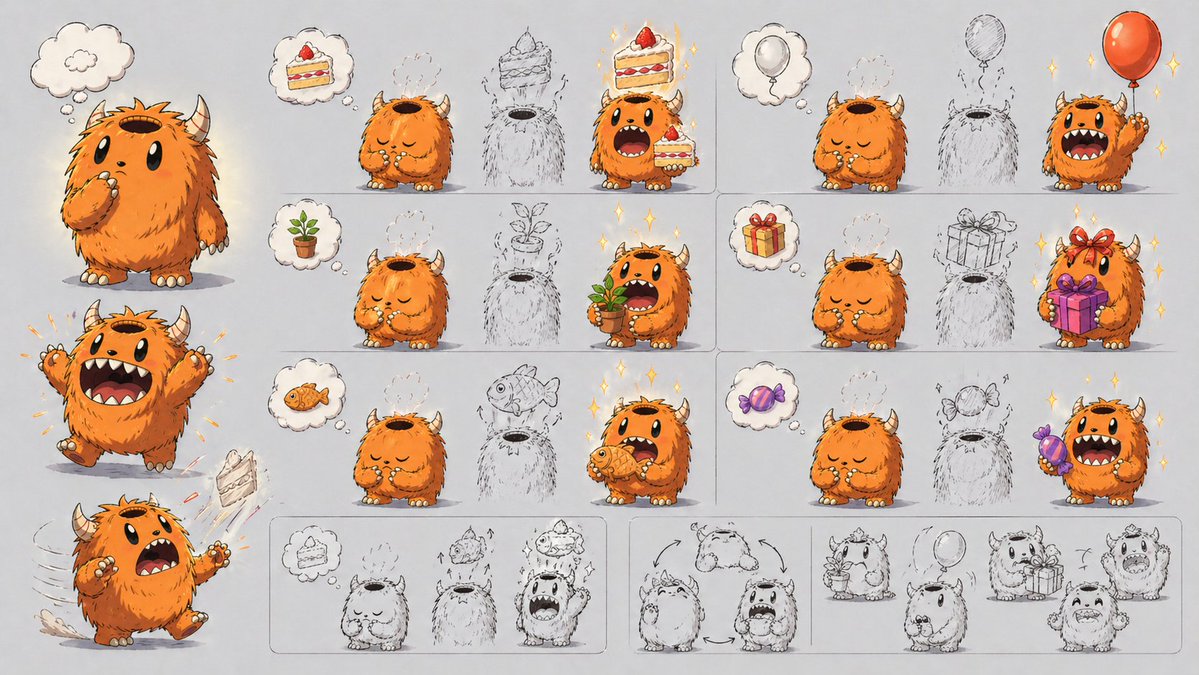
Scheda di progettazione delle abilità del mostro carino
Un'ampia scheda di presentazione del design del personaggio che mostra un mostro cornuto e peloso e sei esempi visivi della sua meccanica di apertura della testa per evocare oggetti, utile per concept art e spiegazione delle abilità del personaggio.
Questo è un esempio di prompt GPT Image 2 per Ritratto e personaggio . Utilizza il prompt pronto per la copia qui sotto per generare immagini simili e verifica l'attribuzione Awesome GPT Image 2 Prompts e i diritti di utilizzo commerciale prima del riutilizzo.
Free 1K preview
Generate one preview image instantly, no sign-up required.
Free text preview doesn’t preserve reference-image consistency.
Richiesta
prompt pronto per la copia
{
  "type": "character design mechanics sheet",
  "style": "cute storybook concept art, polished digital illustration mixed with rough pencil ideation, clean light gray paper background, soft shadows, subtle sparkles on successful transformations",
  "subject": {
    "species": "small fluffy horned monster",
    "name": "{argument name=\"character name\" default=\"orange fluffy monster\"}",
    "appearance": {
      "body": "round and squat, very fluffy fur, tiny arms and legs, cream claws and toenails",
      "fur_color": "{argument name=\"fur color\" default=\"bright orange\"}",
      "horns": "2 short curved beige horns",
      "face": "large black oval eyes, wide mouth with small fangs, expressive eyebrows",
      "top_opening": "large hollow opening on top of head like a container or pot"
    },
    "core_mechanic": "items imagined in a thought bubble can appear out of the opening on the character's head, then the character grabs or presents the item"
  },
  "layout": {
    "format": "wide horizontal character mechanic explainer sheet",
    "sections": [
      {
        "title": "left character poses",
        "position": "left column",
        "count": 3,
        "labels": [
          "thinking neutral standing pose",
          "excited jump with both arms raised",
          "surprised running pose with cake flying out"
        ]
      },
      {
        "title": "top row examples",
        "position": "upper right grid",
        "count": 2,
        "labels": [
          "cake to cake manifestation",
          "balloon to balloon manifestation"
        ]
      },
      {
        "title": "middle row examples",
        "position": "center right grid",
        "count": 2,
        "labels": [
          "potted plant to potted plant manifestation",
          "gift box to gift box manifestation"
        ]
      },
      {
        "title": "bottom row examples",
        "position": "lower right grid",
        "count": 2,
        "labels": [
          "fish to fish manifestation",
          "candy to candy manifestation"
        ]
      },
      {
        "title": "bottom sketch sequence strip",
        "position": "bottom band",
        "count": 4,
        "labels": [
          "cake transformation sequence",
          "turnaround rotation arrows",
          "plant and balloon rough concepts",
          "gift and excited expression rough concepts"
        ]
      }
    ],
    "grid_examples_total": 6,
    "thought_bubbles_total": 8,
    "manifested_object_types_total": 6
  },
  "objects": {
    "manifested_items": [
      {
        "item": "slice of strawberry cake",
        "count": 2
      },
      {
        "item": "red balloon",
        "count": 2
      },
      {
        "item": "small potted sprout plant",
        "count": 2
      },
      {
        "item": "wrapped present box with ribbon",
        "count": 2
      },
      {
        "item": "orange fish",
        "count": 2
      },
      {
        "item": "purple wrapped candy",
        "count": 2
      }
    ],
    "rough_outline_placeholders_in_grid": 6
  },
  "composition": "large full-color character poses stacked on the left, six boxed example panels arranged in 3 rows by 2 columns on the right, and a long row of rough monochrome concept sketches along the bottom",
  "rendering": {
    "linework": "inked outlines with visible sketch underdrawing in some areas",
    "color": "warm orange character against neutral gray background with colorful props",
    "mood": "playful, inventive, character design presentation for explaining an ability visually"
  }
}
Variabili di richiesta
Segnaposto per gli argomenti modificabili presenti nel prompt, con i relativi valori predefiniti.
Best for
- - Ritratto e personaggio visual exploration
- - Image generation and reference-image edits
- - Reusable briefs that keep source attribution visible
Change these parts
- - Subject, product, character, or scene
- - Aspect ratio, camera, lighting, and background
- - Brand, text, color, and output constraints
Recommended model and settings
- - Model: gpt-image-2
- - Input mode: Immagine in immagine
- - Aspect ratio: source
- - Commercial status: review original source
How to use this prompt
- 1. Copy the prompt and preserve its structure for the first test.
- 2. Replace the subject, context, and publishing channel.
- 3. Change one camera, lighting, or style variable per iteration.
- 4. Inspect the output, source, text, and rights before reuse.
Limitations, source, and reuse cautions
- - Generated output is an editable draft, not factual, legal, or rights evidence.
- - Review the linked source, people, brands, logos, text, and third-party media before commercial use.
Altri casi in questa categoria
Prioritizzazione in base a categoria, compatibilità della modalità di input, qualità e minor rischio.






Note sul riutilizzo e sulla fonte
Utilizza questo prompt in tutta sicurezza dopo aver visualizzato in anteprima il caso.
- 1.Copia il prompt oppure aprilo direttamente in Dovoo tramite il pulsante di generazione.
- 2.Regola le variabili, le proporzioni e le immagini di riferimento in base alle tue esigenze.
- 3.Prima della pubblicazione o dell'utilizzo a pagamento, verificare i diritti di fonte, i requisiti di attribuzione e i rischi relativi al marchio o all'immagine.