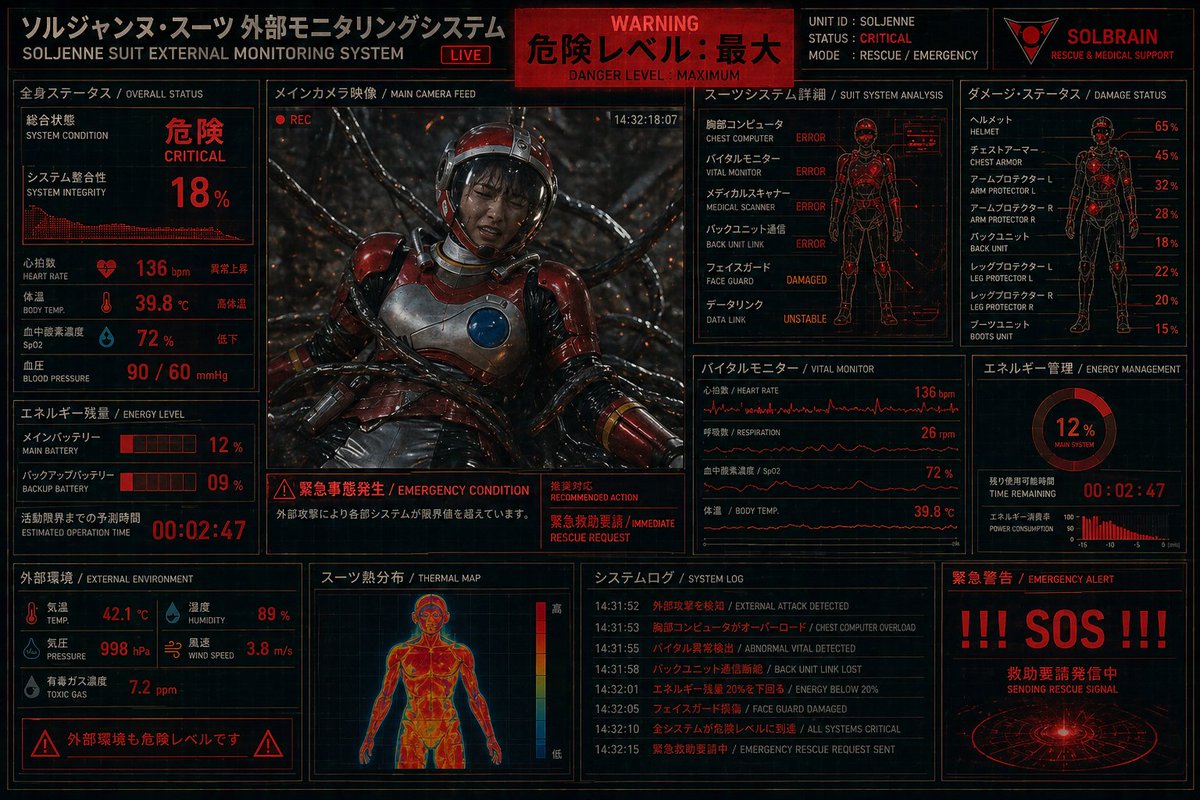
HUD di monitoraggio della tuta di soccorso critico
Un'interfaccia di monitoraggio fantascientifica, densa e in rosso e nero, che mostra una tuta di soccorso gravemente danneggiata e i dati di telemetria di emergenza, ideale per cruscotti di computer in stile cyberpunk e schermate di sistemi fittizi.
Questo è un esempio di prompt GPT Image 2 per Grafica e poster . Utilizza il prompt pronto per la copia qui sotto per generare immagini simili e verifica l'attribuzione Awesome GPT Image 2 Prompts e i diritti di utilizzo commerciale prima del riutilizzo.
Free 1K preview
Generate one preview image instantly, no sign-up required.
Richiesta
prompt pronto per la copia
Create a dense futuristic Japanese sci-fi emergency HUD screen, a full-screen suit telemetry dashboard for {argument name="unit name" default="SOLJENNE"}. Black background with glowing red and orange interface graphics, thin cyan-blue grid accents, distressed industrial UI styling, and a high-contrast cyberpunk control-room aesthetic. The display is a single unified monitoring panel divided into 12 clearly separated sections with Japanese titles and smaller English subtitles. Top header bar: left title block reading "ソルジャンヌ・スーツ 外部モニタリングシステム" with English subtitle "SOLJENNE SUIT EXTERNAL MONITORING SYSTEM" and a small red "LIVE" tag; center red warning banner reading "WARNING", "危険レベル: 最大", and "DANGER LEVEL : MAXIMUM"; right identity block with 4 elements, the text "UNIT ID : SOLJENNE", "STATUS : CRITICAL", "MODE : RESCUE / EMERGENCY", and a red triangular logo above the word "SOLBRAIN" with subtitle "RESCUE & MEDICAL SUPPORT". Middle-left section titled "全身ステータス / OVERALL STATUS" showing system condition "危険 / CRITICAL", system integrity "18%", a waveform graph, and 5 vital readouts: heart rate 136 bpm, body temp 39.8°C, SpO2 72%, blood pressure 90 / 60 mmHg, plus one additional label line for heart beat status. Center large section titled "メインカメラ映像 / MAIN CAMERA FEED" containing the main image: a wounded astronaut in a glossy red-and-silver rescue suit slumped backward in a dark biomechanical environment, thick black cables or tendrils plugged around the body, sparks and debris in the background, helmet visor reflecting light, chest plate with a circular blue device, cinematic lighting, a small red "REC" indicator, and a timestamp "14:32:18:07". Directly under the camera feed, an emergency message strip with 3 blocks: left warning icon and text "緊急事態発生 / EMERGENCY CONDITION", center explanatory Japanese sentence about external attack causing systems to exceed operational limits, and right red text block including "推奨対応 / RECOMMENDED ACTION" and "緊急救助要請 / IMMEDIATE RESCUE REQUEST". Upper-middle-right section titled "スーツシステム詳細 / SUIT SYSTEM ANALYSIS" with a red outlined human figure and 7 subsystem rows: chest computer ERROR, vital monitor ERROR, medical scanner ERROR, back unit link ERROR, face guard DAMAGED, data link UNSTABLE, and one more upper body subsystem error row. Upper-right section titled "ダメージ・ステータス / DAMAGE STATUS" with a human silhouette damage diagram and 8 labeled damage lines: helmet 65%, chest armor 45%, arm protector L 32%, arm protector R 28%, back unit 18%, leg protector L 22%, leg protector R 20%, boots unit 15%. Right-middle section titled "エネルギー管理 / ENERGY MANAGEMENT" with a circular meter showing "12%" and "MAIN SYSTEM", a countdown timer "00:02:47", and a small power consumption bar chart. Middle-lower-right section titled "バイタルモニター / VITAL MONITOR" containing 4 stacked waveform panels labeled heart rate 136 bpm, respiration 26 rpm, SpO2 72%, and body temp 39.8°C. Lower-left-middle section titled "エネルギー残量 / ENERGY LEVEL" with 3 readouts: main battery 12%, backup battery 09%, estimated operation time 00:02:47, each using red segmented bars and bold numerals. Bottom-left section titled "外部環境 / EXTERNAL ENVIRONMENT" with 5 environmental readings: temp 42.1°C, humidity 89%, pressure 998 hPa, wind speed 3.8 m/s, toxic gas 7.2 ppm. Bottom-left warning strip beneath it with hazard icons and Japanese text "外部環境も危険レベルです". Bottom-center section titled "スーツ熱分布 / THERMAL MAP" showing a front-view human thermal body scan in hot reds, oranges, and yellows, with a vertical color scale. Bottom-center-right section titled "システムログ / SYSTEM LOG" with 7 timestamped entries in Japanese and English, including external attack detected, chest computer overload, abnormal vital detected, back unit link lost, energy below 20%, face guard damaged, all systems critical, and emergency rescue request sent. Bottom-right section titled "緊急警告 / EMERGENCY ALERT" with gigantic red text "!!! SOS !!!", Japanese text indicating a rescue signal is being transmitted, and a circular radar-like beacon graphic. Use ultra-detailed UI typography, compact technical panel layout, glowing lines, scanlines, subtle screen noise, red warning highlights, and a grim life-support-crisis mood.Variabili di richiesta
Segnaposto per gli argomenti modificabili presenti nel prompt, con i relativi valori predefiniti.
Best for
- - Grafica e poster visual exploration
- - Image generation and reference-image edits
- - Reusable briefs that keep source attribution visible
Change these parts
- - Subject, product, character, or scene
- - Aspect ratio, camera, lighting, and background
- - Brand, text, color, and output constraints
Recommended model and settings
- - Model: gpt-image-2
- - Input mode: Testo in immagine
- - Aspect ratio: source
- - Commercial status: review original source
How to use this prompt
- 1. Copy the prompt and preserve its structure for the first test.
- 2. Replace the subject, context, and publishing channel.
- 3. Change one camera, lighting, or style variable per iteration.
- 4. Inspect the output, source, text, and rights before reuse.
Limitations, source, and reuse cautions
- - Generated output is an editable draft, not factual, legal, or rights evidence.
- - Review the linked source, people, brands, logos, text, and third-party media before commercial use.
Altri casi in questa categoria
Prioritizzazione in base a categoria, compatibilità della modalità di input, qualità e minor rischio.






Note sul riutilizzo e sulla fonte
Utilizza questo prompt in tutta sicurezza dopo aver visualizzato in anteprima il caso.
- 1.Copia il prompt oppure aprilo direttamente in Dovoo tramite il pulsante di generazione.
- 2.Regola le variabili, le proporzioni e le immagini di riferimento in base alle tue esigenze.
- 3.Prima della pubblicazione o dell'utilizzo a pagamento, verificare i diritti di fonte, i requisiti di attribuzione e i rischi relativi al marchio o all'immagine.