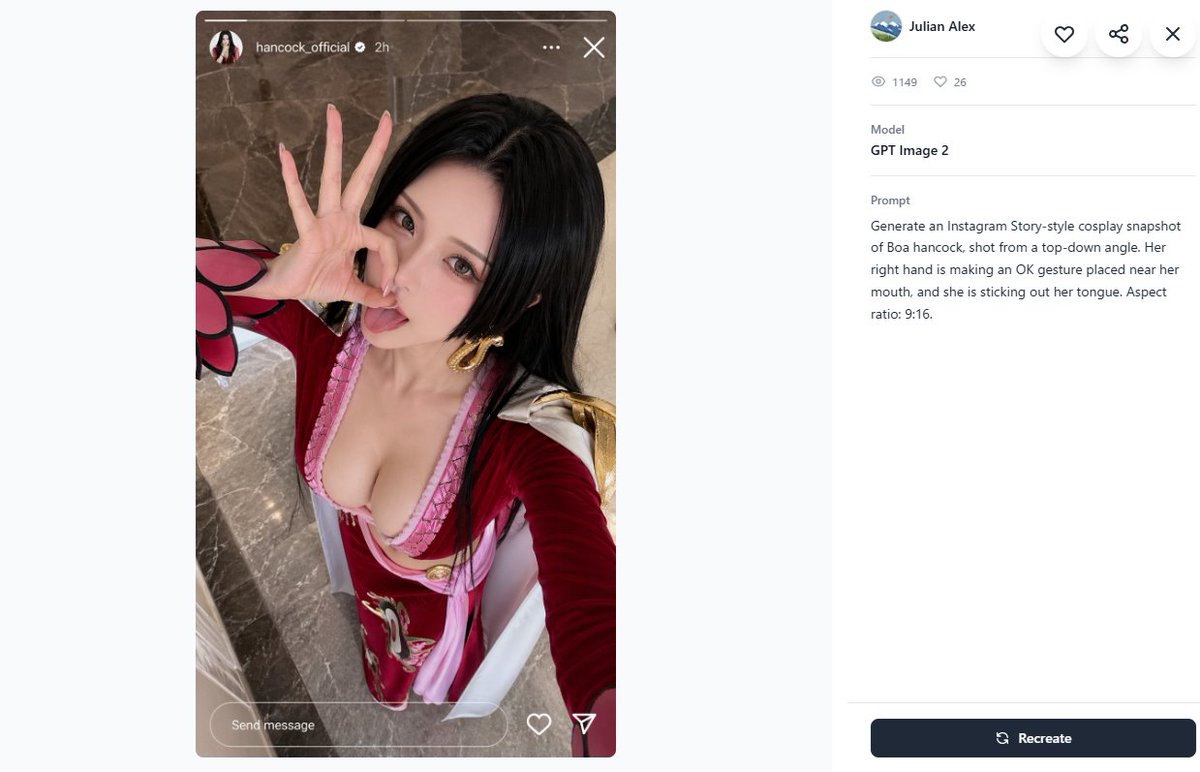
Cosplay Prompt Gallery Screenshot
Generates a desktop prompt-gallery page featuring an Instagram Story-style cosplay selfie and its GPT Image 2 metadata panel.
Questo è un esempio di prompt GPT Image 2 per Altra Ispirazione . Utilizza il prompt pronto per la copia qui sotto per generare immagini simili e verifica l'attribuzione Awesome GPT Image 2 Prompts e i diritti di utilizzo commerciale prima del riutilizzo.
Hai bisogno del set completo di prompt? Usa il Altra Ispirazione hub tematico per ulteriori esempi correlati oppure apri il GPT Image 2 catalogo rapido per l'indice completo degli esempi, le strutture riutilizzabili e l'attribuzione delle fonti.
Free 1K preview
Generate one preview image instantly, no sign-up required.
2151/4000
Richiesta
prompt pronto per la copia
Create a 16:9 desktop webpage screenshot of a prompt-gallery detail page showing one generated image on the left and its metadata on the right. The left side contains a tall Instagram Story-style cosplay snapshot mockup in a rounded rectangle, aspect ratio 9:16, with a realistic top-down selfie of {argument name="character name" default="Boa Hancock"} cosplay. The cosplayer is an adult woman with long straight {argument name="hair color" default="black"} hair, wearing a red and pink anime-inspired outfit with a low neckline, gold hoop earrings, white shoulder accents, and red sleeves with a pink-and-black petal-like cuff detail. Show every face clearly with natural, detailed facial features, but her right hand is clearly making an OK gesture near her mouth and she appears to be sticking out her tongue behind the blur. Camera angle is high above, like a phone selfie, with polished gray-brown marble flooring in the background. Add Instagram Story UI overlays: a thin progress bar across the top, a small circular profile photo, username {argument name="Instagram username" default="hancock_official"}, a verified check, “2h”, three-dot menu, and an X close icon; at the bottom include a rounded “Send message” field plus heart and paper-plane icons. The right panel is a clean white gallery interface with a small circular avatar, the name {argument name="creator name" default="Julian Alex"}, floating circular action buttons for heart, share, and close, a stats row with exactly 2 items: an eye icon with “1149” and a heart icon with “26”, a Model section reading “GPT Image 2”, and a Prompt section containing the exact text: {argument name="visible prompt text" default="Generate an Instagram Story-style cosplay snapshot of Boa hancock, shot from a top-down angle. Her right hand is making an OK gesture placed near her mouth, and she is sticking out her tongue. Aspect ratio: 9:16."}. At the bottom right place a dark navy rounded “Recreate” button with a refresh icon. Use lots of white space, soft gray dividers, modern minimal UI styling, and make the screenshot look like a real browser/app capture rather than a polished poster.Variabili di richiesta
Segnaposto per gli argomenti modificabili presenti nel prompt, con i relativi valori predefiniti.
Variabile
character name
Predefinito
Boa Hancock
Variabile
hair color
Predefinito
black
Variabile
Instagram username
Predefinito
hancock_official
Variabile
creator name
Predefinito
Julian Alex
Variabile
visible prompt text
Predefinito
Generate an Instagram Story-style cosplay snapshot of Boa hancock, shot from a top-down angle. Her right hand is making an OK gesture placed near her mouth, and she is sticking out her tongue. Aspect ratio: 9:16.
Best for
- - Altra Ispirazione visual exploration
- - Image generation and reference-image edits
- - Reusable briefs that keep source attribution visible
Change these parts
- - Subject, product, character, or scene
- - Aspect ratio, camera, lighting, and background
- - Brand, text, color, and output constraints
Recommended model and settings
- - Model: gpt-image-2
- - Input mode: Testo in immagine
- - Aspect ratio: source
- - Commercial status: review original source
How to use this prompt
- 1. Copy the prompt and preserve its structure for the first test.
- 2. Replace the subject, context, and publishing channel.
- 3. Change one camera, lighting, or style variable per iteration.
- 4. Inspect the output, source, text, and rights before reuse.
Limitations, source, and reuse cautions
- - Generated output is an editable draft, not factual, legal, or rights evidence.
- - Review the linked source, people, brands, logos, text, and third-party media before commercial use.
Importato da Awesome GPT Image 2 Prompts . È richiesta l'attribuzione. Lo stato di utilizzo commerciale è allowed ; verificare i diritti della fonte prima dell'utilizzo a pagamento.
Altri casi in questa categoria
Prioritizzazione in base a categoria, compatibilità della modalità di input, qualità e minor rischio.






Note sul riutilizzo e sulla fonte
Utilizza questo prompt in tutta sicurezza dopo aver visualizzato in anteprima il caso.
- 1.Copia il prompt oppure aprilo direttamente in Dovoo tramite il pulsante di generazione.
- 2.Regola le variabili, le proporzioni e le immagini di riferimento in base alle tue esigenze.
- 3.Prima della pubblicazione o dell'utilizzo a pagamento, verificare i diritti di fonte, i requisiti di attribuzione e i rischi relativi al marchio o all'immagine.