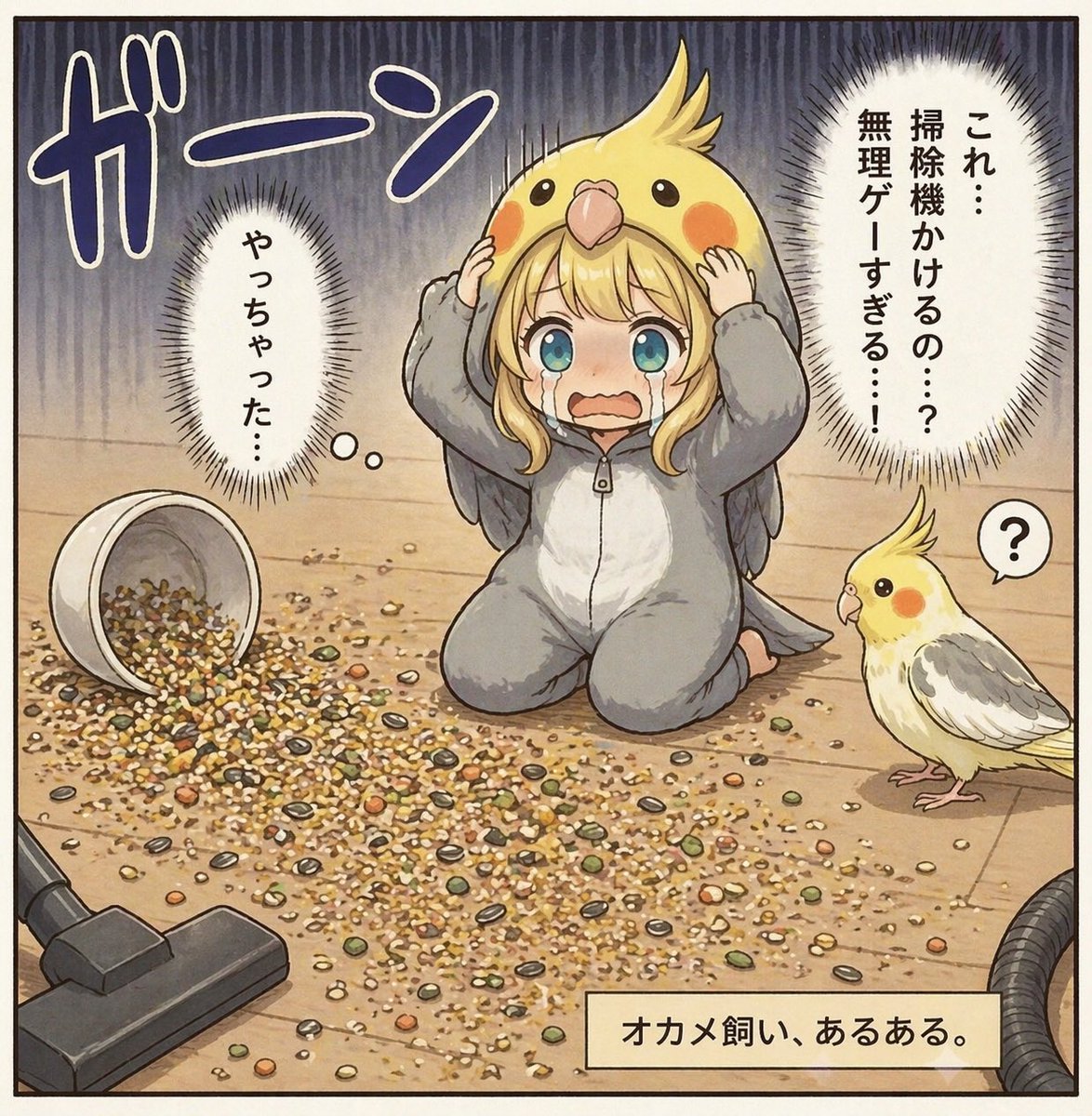
Fumetto di dispersione di semi del proprietario di calopsitta
Questo spunto genera una scena umoristica in stile manga a vignetta singola che ritrae un proprietario di uccelli sopraffatto da un'enorme quantità di semi rovesciati, ideale per post comici in cui i proprietari di animali domestici possono facilmente immedesimarsi.
Questo è un esempio di prompt GPT Image 2 per Anime e videogiochi . Utilizza il prompt pronto per la copia qui sotto per generare immagini simili e verifica l'attribuzione Awesome GPT Image 2 Prompts e i diritti di utilizzo commerciale prima del riutilizzo.
Hai bisogno del set completo di prompt? Usa il Anime e videogiochi hub tematico per ulteriori esempi correlati oppure apri il GPT Image 2 catalogo rapido per l'indice completo degli esempi, le strutture riutilizzabili e l'attribuzione delle fonti.
Free 1K preview
Generate one preview image instantly, no sign-up required.
1772/4000
Richiesta
prompt pronto per la copia
A single-panel Japanese comic-style illustration on a light wooden floor, drawn in a soft, detailed, slightly vintage manga-anime style with clean ink outlines and muted warm colors. In the center, a young woman kneels on the floor in a gray cockatiel kigurumi pajama suit with a white belly panel and small gray wings, while wearing an oversized yellow cockatiel hood shaped like a bird’s head with crest, round black eyes, orange cheek patches, and a beak above her forehead. She holds both sides of the hood in shock, her posture frozen and guilty, with a large rectangular censor block covering the center of her face. Across the floor in front of her is a huge mess of spilled birdseed: mixed grains, pellets, shells, and seeds scattered widely in a dense irregular pile. On the left lies 1 overturned white seed cup spilling its contents, and in the lower left corner 1 vacuum cleaner floor head points toward the mess, with part of the hose visible at the lower right edge. On the right stands 1 real cockatiel, small and curious, with a yellow face, orange cheeks, pale body, gray wings, and a raised crest, looking toward the kneeling woman; next to the bird is 1 small speech bubble containing a question mark. The background is simple indoor flooring with dramatic dark vertical stress lines filling the upper half to heighten panic. Add 4 Japanese text elements integrated like manga lettering: a huge sound effect 「ガーン」 at the upper left, 1 vertical thought bubble on the left reading 「やっちゃった…」, 1 large vertical spiky speech bubble on the upper right reading 「これ…掃除機かけるの…?無理ゲーすぎる…!」, and 1 beige caption box at the bottom right reading 「オカメ飼い、あるある。」. The mood is comedic embarrassment and domestic disaster, as if illustrating a relatable bird-owner mistake.
Best for
- - Anime e videogiochi visual exploration
- - Image generation and reference-image edits
- - Reusable briefs that keep source attribution visible
Change these parts
- - Subject, product, character, or scene
- - Aspect ratio, camera, lighting, and background
- - Brand, text, color, and output constraints
Recommended model and settings
- - Model: gpt-image-2
- - Input mode: Testo in immagine
- - Aspect ratio: source
- - Commercial status: review original source
How to use this prompt
- 1. Copy the prompt and preserve its structure for the first test.
- 2. Replace the subject, context, and publishing channel.
- 3. Change one camera, lighting, or style variable per iteration.
- 4. Inspect the output, source, text, and rights before reuse.
Limitations, source, and reuse cautions
- - Generated output is an editable draft, not factual, legal, or rights evidence.
- - Review the linked source, people, brands, logos, text, and third-party media before commercial use.
Importato da Awesome GPT Image 2 Prompts . È richiesta l'attribuzione. Lo stato di utilizzo commerciale è allowed ; verificare i diritti della fonte prima dell'utilizzo a pagamento.
Altri casi in questa categoria
Prioritizzazione in base a categoria, compatibilità della modalità di input, qualità e minor rischio.






Note sul riutilizzo e sulla fonte
Utilizza questo prompt in tutta sicurezza dopo aver visualizzato in anteprima il caso.
- 1.Copia il prompt oppure aprilo direttamente in Dovoo tramite il pulsante di generazione.
- 2.Regola le variabili, le proporzioni e le immagini di riferimento in base alle tue esigenze.
- 3.Prima della pubblicazione o dell'utilizzo a pagamento, verificare i diritti di fonte, i requisiti di attribuzione e i rischi relativi al marchio o all'immagine.