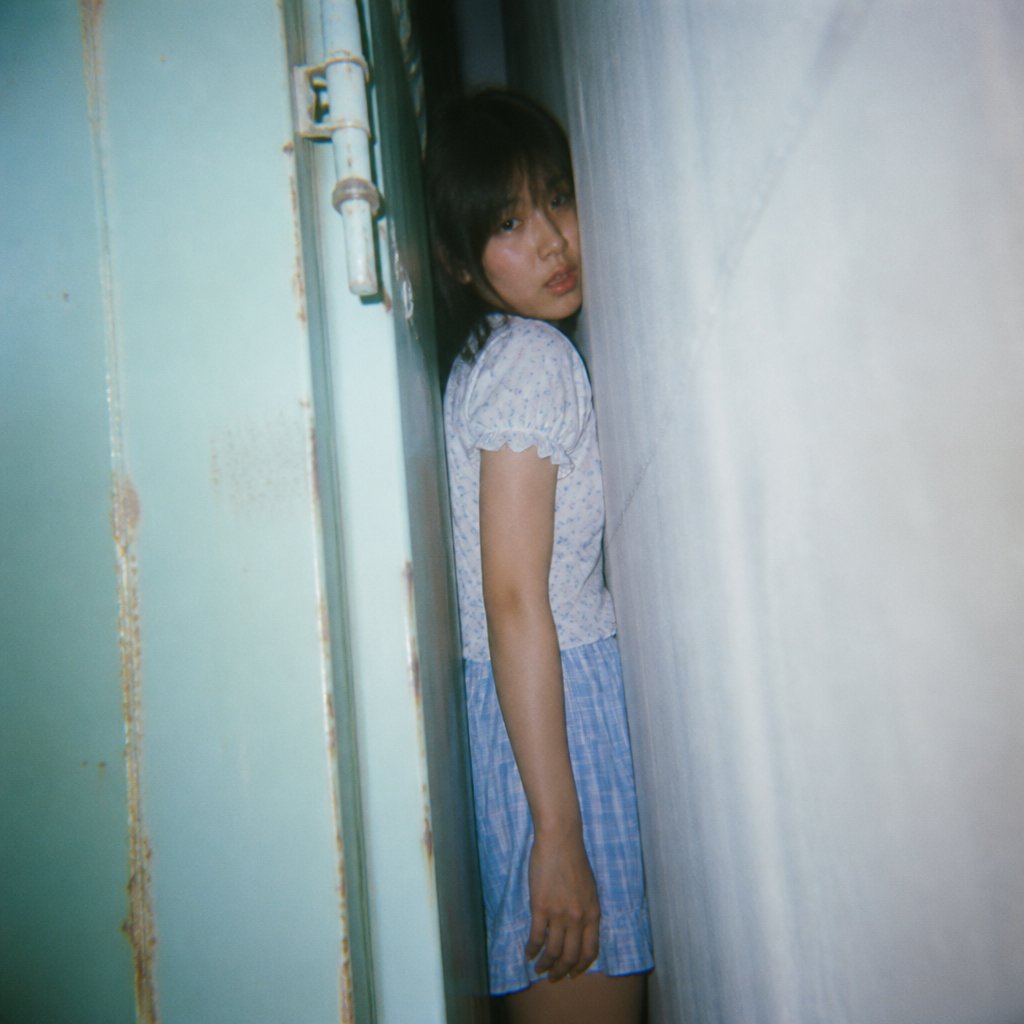
Claustrophobic Flash Snapshot
Generates a grainy analog-style photo of a child squeezed in a narrow space between a door and wall for eerie documentary realism.
Questo è un esempio di prompt GPT Image 2 per Ritratto e personaggio . Utilizza il prompt pronto per la copia qui sotto per generare immagini simili e verifica l'attribuzione Awesome GPT Image 2 Prompts e i diritti di utilizzo commerciale prima del riutilizzo.
Hai bisogno del set completo di prompt? Usa il Ritratto e personaggio hub tematico per ulteriori esempi correlati oppure apri il GPT Image 2 catalogo rapido per l'indice completo degli esempi, le strutture riutilizzabili e l'attribuzione delle fonti.
Free 1K preview
Generate one preview image instantly, no sign-up required.
1008/4000
Richiesta
prompt pronto per la copia
Create a square, Show every face clearly with natural, detailed facial features. The composition should feel cramped and slightly unsettling, as if photographed in a tight corridor or behind a door, with the subject squeezed into the dark vertical space. She has dark shoulder-length hair mostly in shadow, visible from head to mid-thigh, one arm hanging straight down, wearing {argument name="outfit" default="a short-sleeved white blouse with tiny blue floral print and a light blue plaid skirt"}. The left side shows an old mint-green metal door or gate with rust stains, chipped paint, a vertical seam, and a white cylindrical latch or hinge fixture near the upper left; the right side is dominated by a close wall surface with soft texture and bluish shadows. Use harsh direct camera flash, cool faded colors, grainy disposable-camera realism, slight vignetting, imperfect focus, dark background behind the subject, and a claustrophobic documentary snapshot mood. No extra people, no text, no watermark.Variabili di richiesta
Segnaposto per gli argomenti modificabili presenti nel prompt, con i relativi valori predefiniti.
Variabile
face censor style
Predefinito
a solid pixelated blur square covering her face
Variabile
outfit
Predefinito
a short-sleeved white blouse with tiny blue floral print and a light blue plaid skirt
Best for
- - Ritratto e personaggio visual exploration
- - Image generation and reference-image edits
- - Reusable briefs that keep source attribution visible
Change these parts
- - Subject, product, character, or scene
- - Aspect ratio, camera, lighting, and background
- - Brand, text, color, and output constraints
Recommended model and settings
- - Model: gpt-image-2
- - Input mode: Testo in immagine
- - Aspect ratio: source
- - Commercial status: review original source
How to use this prompt
- 1. Copy the prompt and preserve its structure for the first test.
- 2. Replace the subject, context, and publishing channel.
- 3. Change one camera, lighting, or style variable per iteration.
- 4. Inspect the output, source, text, and rights before reuse.
Limitations, source, and reuse cautions
- - Generated output is an editable draft, not factual, legal, or rights evidence.
- - Review the linked source, people, brands, logos, text, and third-party media before commercial use.
Importato da Awesome GPT Image 2 Prompts . È richiesta l'attribuzione. Lo stato di utilizzo commerciale è allowed ; verificare i diritti della fonte prima dell'utilizzo a pagamento.
Altri casi in questa categoria
Prioritizzazione in base a categoria, compatibilità della modalità di input, qualità e minor rischio.

Cinematic Blue Backlit Portrait
Testo in immagine

Studio Portrait of Woman with Sunglasses
Testo in immagine

Playful Morning Selfie Portrait
Testo in immagine

GPT Image 2 Real-Life Character Street Snap
Testo in immagine

Street Selfie with Cat in Matching Cap
Testo in immagine

Morning Bed Stretching Legs Prompt
Testo in immagine
Note sul riutilizzo e sulla fonte
Utilizza questo prompt in tutta sicurezza dopo aver visualizzato in anteprima il caso.
- 1.Copia il prompt oppure aprilo direttamente in Dovoo tramite il pulsante di generazione.
- 2.Regola le variabili, le proporzioni e le immagini di riferimento in base alle tue esigenze.
- 3.Prima della pubblicazione o dell'utilizzo a pagamento, verificare i diritti di fonte, i requisiti di attribuzione e i rischi relativi al marchio o all'immagine.