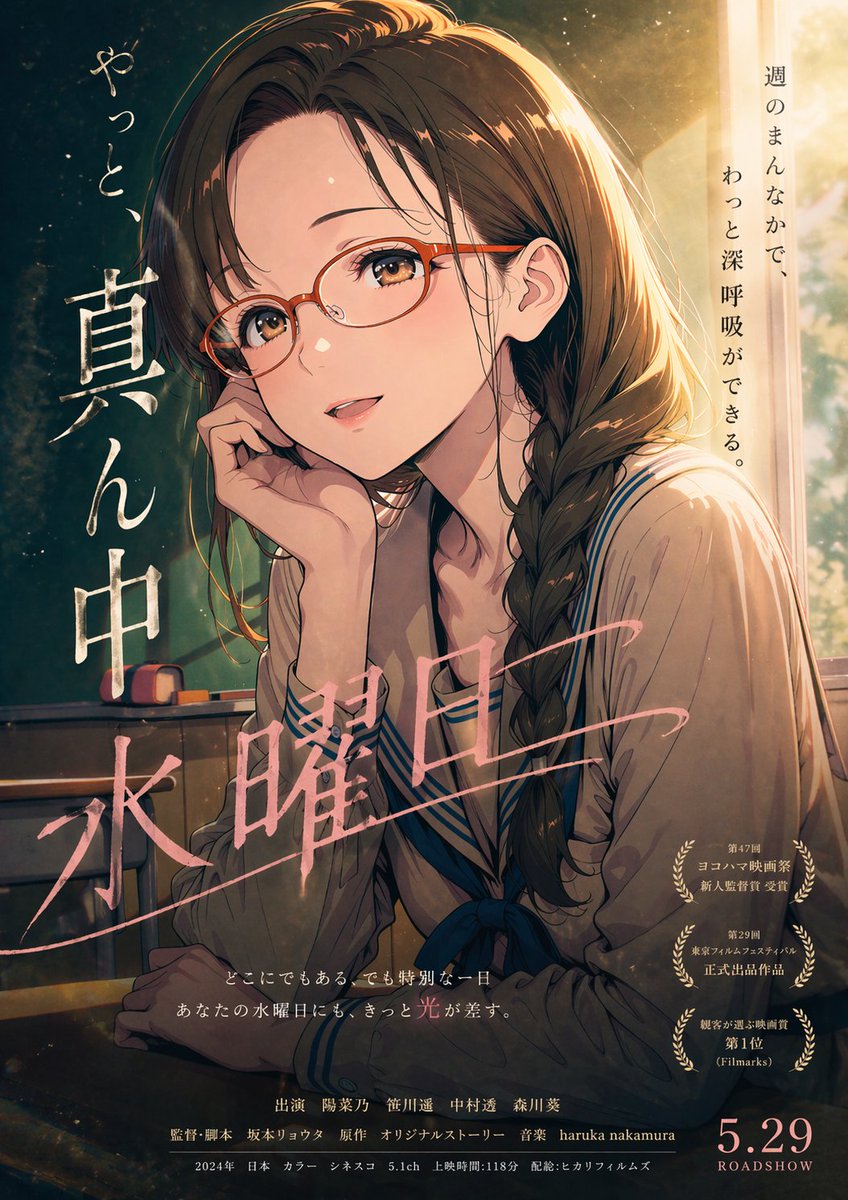
Locandina anime del mercoledì cinematografico
Questo prompt genera un'illustrazione nostalgica in stile locandina cinematografica giapponese che ritrae una studentessa in un'aula illuminata dal sole, ideale per le locandine di anime cinematografici o per le immagini dei poster sui social media.
Questo è un esempio di prompt GPT Image 2 per Anime e videogiochi . Utilizza il prompt pronto per la copia qui sotto per generare immagini simili e verifica l'attribuzione Awesome GPT Image 2 Prompts e i diritti di utilizzo commerciale prima del riutilizzo.
Free 1K preview
Generate one preview image instantly, no sign-up required.
Richiesta
prompt pronto per la copia
A Japanese movie-poster style anime illustration, vertical theatrical one-sheet composition, showing a teenage schoolgirl seated alone in a classroom at golden hour. She has {argument name="hair color" default="dark brown"} hair, long and slightly wavy, gathered into a loose side braid draped over her right shoulder, with soft bangs and warm rim light along the top of her head and hair edges. She wears a cream or light beige sailor-style school uniform with navy trim and a dark blue ribbon bow at the chest. Her pose is quiet and introspective: sitting at a school desk, leaning her cheek into one hand, shoulders slightly curved, looking off to the side with a tired but calm midweek expression. The scene is lit by strong late-afternoon sunlight pouring in from a tall classroom window on the right, creating glowing highlights, dust motes in the air, soft haze, and a nostalgic cinematic mood. In the dimmer left background, include a green classroom chalkboard and 2 small chalkboard erasers or chalk accessories resting on the tray. Use painterly anime realism with rich filmic contrast, delicate facial rendering, textured brushwork, subtle grain, and dramatic poster lighting. Add Japanese poster typography integrated into the artwork: on the left side, large vertical white brush lettering reading "真ん中" with smaller handwritten-style vertical text above reading "やっと、"; across the lower middle, large pink calligraphic title text reading "水曜日" diagonally; on the upper right, a vertical tagline reading "週のまんなかで、わっと深呼吸ができる。" Near the lower right, include 3 stacked gold laurel award emblems with small Japanese text inside each. Along the bottom center, add 2 lines of small Japanese tagline text, then a credits block in small Japanese film-poster typography. In the bottom right corner, place a large release date reading {argument name="release date" default="5.29"} with "ROADSHOW" beneath it. Overall feeling: soft, melancholic, reassuring, like an understated coming-of-age film poster about an ordinary Wednesday becoming quietly special.Variabili di richiesta
Segnaposto per gli argomenti modificabili presenti nel prompt, con i relativi valori predefiniti.
Best for
- - Anime e videogiochi visual exploration
- - Image generation and reference-image edits
- - Reusable briefs that keep source attribution visible
Change these parts
- - Subject, product, character, or scene
- - Aspect ratio, camera, lighting, and background
- - Brand, text, color, and output constraints
Recommended model and settings
- - Model: gpt-image-2
- - Input mode: Testo in immagine
- - Aspect ratio: source
- - Commercial status: review original source
How to use this prompt
- 1. Copy the prompt and preserve its structure for the first test.
- 2. Replace the subject, context, and publishing channel.
- 3. Change one camera, lighting, or style variable per iteration.
- 4. Inspect the output, source, text, and rights before reuse.
Limitations, source, and reuse cautions
- - Generated output is an editable draft, not factual, legal, or rights evidence.
- - Review the linked source, people, brands, logos, text, and third-party media before commercial use.
Altri casi in questa categoria
Prioritizzazione in base a categoria, compatibilità della modalità di input, qualità e minor rischio.






Note sul riutilizzo e sulla fonte
Utilizza questo prompt in tutta sicurezza dopo aver visualizzato in anteprima il caso.
- 1.Copia il prompt oppure aprilo direttamente in Dovoo tramite il pulsante di generazione.
- 2.Regola le variabili, le proporzioni e le immagini di riferimento in base alle tue esigenze.
- 3.Prima della pubblicazione o dell'utilizzo a pagamento, verificare i diritti di fonte, i requisiti di attribuzione e i rischi relativi al marchio o all'immagine.