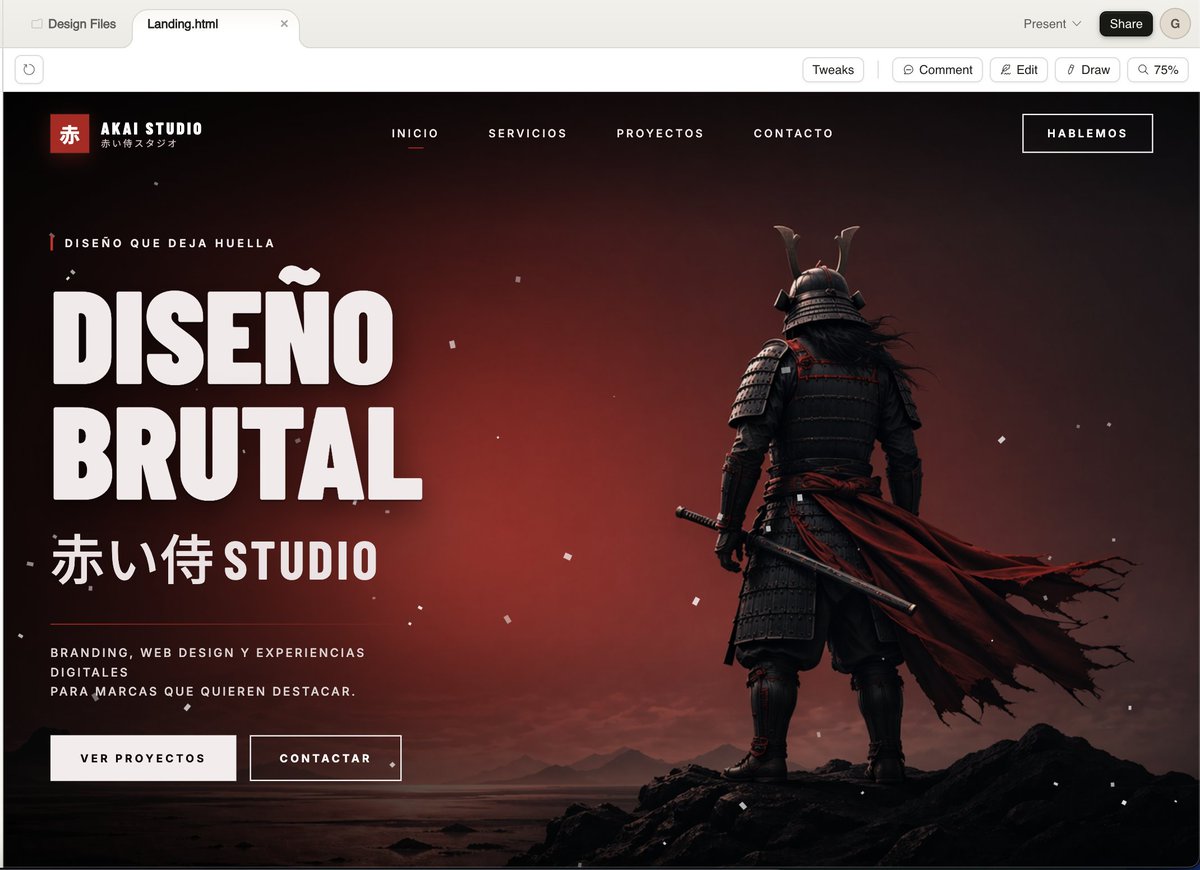
Pagina di destinazione dell'agenzia Cinematic Samurai.
Questo genera una landing page di alta qualità per il dark web, ideale per uno studio creativo, perfetta per mettere in mostra un branding audace, un design web accattivante o progetti di agenzia.
Questo è un esempio di prompt GPT Image 2 per Grafica e poster . Utilizza il prompt pronto per la copia qui sotto per generare immagini simili e verifica l'attribuzione Awesome GPT Image 2 Prompts e i diritti di utilizzo commerciale prima del riutilizzo.
Hai bisogno del set completo di prompt? Usa il Grafica e poster hub tematico per ulteriori esempi correlati oppure apri il GPT Image 2 catalogo rapido per l'indice completo degli esempi, le strutture riutilizzabili e l'attribuzione delle fonti.
Free 1K preview
Generate one preview image instantly, no sign-up required.
2286/4000
Richiesta
prompt pronto per la copia
A cinematic, dark-style landing page model showcasing a Japanese creative agency named {argument name="studio name" default="AKAI STUDIO"}, presented in a modern desktop browser window. The page features a dramatic black-to-deep-red gradient background with a melancholic sunset glow, scattered with fine white dust or ash particles, and utilizes a widescreen hero layout. On the right, place a full-body shot of a samurai from behind, standing on jagged black rocks on a calm shore, wearing layered dark armor and a horned helmet, holding a katana at his side, with a long, tattered deep-red cloak billowing strongly to the right. On the left, create a prominent, oversized white, compact sans-serif headline text (in Spanish) that reads {argument name="headline text" default="DISEÑO BRUTAL"}, stacked in two lines. Above the headline, add a line of small red vertical decorative micro-copy text: {argument name="eyebrow text" default="DISEÑO QUE DEJA HUELLA"}. Below the headline, add large Japanese characters followed by the word STUDIO: {argument name="subheadline text" default="赤い侍 STUDIO"}. Below that, place a short white, mixed-case supporting paragraph text: {argument name="body text" default="BRANDING, WEB DESIGN Y EXPERIENCIAS DIGITALES PARA MARCAS QUE QUIEREN DESTACAR。"}. Below the copy, add two call-to-action buttons: a solid light-colored button labeled “VER PROYECTOS” and an outlined dark-colored button labeled “CONTACTAR”. In the top navigation bar, include 4 centered, uppercase menu items: “INICIO”, “SERVICIOS”, “PROYECTOS”, “CONTACTO”, with “INICIO” underlined in red to indicate its active state. Place a bordered button labeled {argument name="top button text" default="HABLEMOS"} in the upper right corner. In the upper left corner of the website header, add a Logo area containing a small red square with the Chinese character “赤”, the brand name “AKAI STUDIO”, and a small Japanese subtitle below. The overall style should present a combination of high-end brutalist web design and a cinematic game main visual: ultra-detailed UI modeling, sharp typography, strong contrast, a luxurious agency aesthetic, minimalist yet powerful composition, a black, white, and red color scheme, fine grain, realistic lighting and shadows, and a high-end presentation.Variabili di richiesta
Segnaposto per gli argomenti modificabili presenti nel prompt, con i relativi valori predefiniti.
Variabile
studio name
Predefinito
AKAI STUDIO
Variabile
headline text
Predefinito
DISEÑO BRUTAL
Variabile
eyebrow text
Predefinito
DISEÑO QUE DEJA HUELLA
Variabile
subheadline text
Predefinito
赤い侍 STUDIO
Variabile
body text
Predefinito
BRANDING, WEB DESIGN Y EXPERIENCIAS DIGITALES PARA MARCAS QUE QUIEREN DESTACAR。
Variabile
top button text
Predefinito
HABLEMOS
Best for
- - Grafica e poster visual exploration
- - Image generation and reference-image edits
- - Reusable briefs that keep source attribution visible
Change these parts
- - Subject, product, character, or scene
- - Aspect ratio, camera, lighting, and background
- - Brand, text, color, and output constraints
Recommended model and settings
- - Model: gpt-image-2
- - Input mode: Testo in immagine
- - Aspect ratio: source
- - Commercial status: review original source
How to use this prompt
- 1. Copy the prompt and preserve its structure for the first test.
- 2. Replace the subject, context, and publishing channel.
- 3. Change one camera, lighting, or style variable per iteration.
- 4. Inspect the output, source, text, and rights before reuse.
Limitations, source, and reuse cautions
- - Generated output is an editable draft, not factual, legal, or rights evidence.
- - Review the linked source, people, brands, logos, text, and third-party media before commercial use.
Importato da Awesome GPT Image 2 Prompts . È richiesta l'attribuzione. Lo stato di utilizzo commerciale è allowed ; verificare i diritti della fonte prima dell'utilizzo a pagamento.
Altri casi in questa categoria
Prioritizzazione in base a categoria, compatibilità della modalità di input, qualità e minor rischio.

Female Clown Cyborg Portrait
Testo in immagine

Imperial Research Bunker on Volcanic Planet
Testo in immagine

Greyscale Puzzle Portrait with Color Accent
Testo in immagine

Pink Hijab Mirror Selfie Portrait
Testo in immagine

Manga Desert Radio Telescope Road Trip
Testo in immagine

Android Quantum Lab Workstation
Testo in immagine
Note sul riutilizzo e sulla fonte
Utilizza questo prompt in tutta sicurezza dopo aver visualizzato in anteprima il caso.
- 1.Copia il prompt oppure aprilo direttamente in Dovoo tramite il pulsante di generazione.
- 2.Regola le variabili, le proporzioni e le immagini di riferimento in base alle tue esigenze.
- 3.Prima della pubblicazione o dell'utilizzo a pagamento, verificare i diritti di fonte, i requisiti di attribuzione e i rischi relativi al marchio o all'immagine.