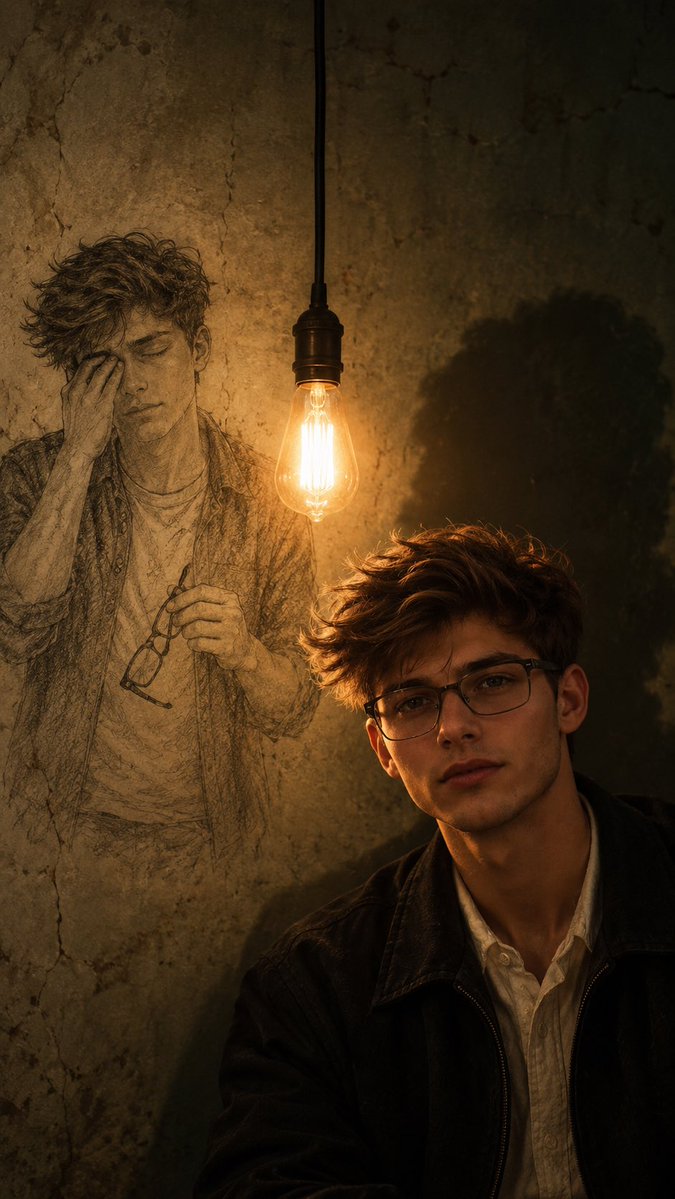
Cinematic Memory Portrait with Sketch
A prompt for gpt-image-2 that creates a melancholic, cinematic portrait of a young man with a hand-drawn sketch of his younger self on an aged wall, illuminated by a single Edison bulb. It requires an uploaded reference image to preserve composition and subject details.
Questo è un esempio di prompt GPT Image 2 per Ritratto e personaggio . Utilizza il prompt pronto per la copia qui sotto per generare immagini simili e verifica l'attribuzione Awesome GPT Image 2 Prompts e i diritti di utilizzo commerciale prima del riutilizzo.
Free 1K preview
Generate one preview image instantly, no sign-up required.
Free text preview doesn’t preserve reference-image consistency.
Richiesta
prompt pronto per la copia
Use the uploaded image as the primary visual reference. Recreate the same composition and cinematic storytelling: a young curly-haired man wearing rectangular glasses, a dark jacket over a light shirt, sitting in the lower-right foreground with a quiet, emotionally distant expression. Behind him, on an aged textured wall, is a large hand-drawn pencil-sketch version of the same person, appearing younger and holding/removing his glasses while covering one eye, creating a visual contrast between his present self and his memories.

A single warm vintage Edison bulb hangs from the ceiling exactly between the real subject and the sketch, acting as the main practical light source. The bulb casts warm amber illumination across the face and wall while creating a large, soft, haunting shadow on the right side.

Camera position: eye-level camera positioned slightly in front of and to the right of the subject, medium-close portrait framing, with the subject occupying the lower-right third and the sketch dominating the left background. Keep the hanging bulb near the central vertical axis. Slightly compressed perspective, natural depth, subtle foreground/background separation.

Atmosphere: melancholic, nostalgic, mysterious, introspective, slightly surreal. Photorealistic subject combined with hand-drawn graphite artwork, making the sketch feel physically integrated into the old wall rather than digitally pasted on.

Lighting: low-key cinematic lighting, warm tungsten glow from the bulb, deep surrounding shadows, subtle falloff, realistic skin highlights, detailed curly hair, natural reflections on glasses.

Color palette: muted olive-brown, aged beige, charcoal black, warm amber and subtle skin tones. Add realistic wall cracks, stains, pencil texture, film grain and gentle atmospheric imperfections.

Composition must closely preserve the reference image, including the subject placement, sketch placement, hanging bulb, shadow, lighting direction, and emotional contrast. Vertical 9:16, cinematic editorial photography, ultra-detailed, photorealistic, 4K.
Best for
- - Ritratto e personaggio visual exploration
- - Image generation and reference-image edits
- - Reusable briefs that keep source attribution visible
Change these parts
- - Subject, product, character, or scene
- - Aspect ratio, camera, lighting, and background
- - Brand, text, color, and output constraints
Recommended model and settings
- - Model: gpt-image-2
- - Input mode: Immagine in immagine
- - Aspect ratio: source
- - Commercial status: review original source
How to use this prompt
- 1. Copy the prompt and preserve its structure for the first test.
- 2. Replace the subject, context, and publishing channel.
- 3. Change one camera, lighting, or style variable per iteration.
- 4. Inspect the output, source, text, and rights before reuse.
Limitations, source, and reuse cautions
- - Generated output is an editable draft, not factual, legal, or rights evidence.
- - Review the linked source, people, brands, logos, text, and third-party media before commercial use.
Altri casi in questa categoria
Prioritizzazione in base a categoria, compatibilità della modalità di input, qualità e minor rischio.






Note sul riutilizzo e sulla fonte
Utilizza questo prompt in tutta sicurezza dopo aver visualizzato in anteprima il caso.
- 1.Copia il prompt oppure aprilo direttamente in Dovoo tramite il pulsante di generazione.
- 2.Regola le variabili, le proporzioni e le immagini di riferimento in base alle tue esigenze.
- 3.Prima della pubblicazione o dell'utilizzo a pagamento, verificare i diritti di fonte, i requisiti di attribuzione e i rischi relativi al marchio o all'immagine.