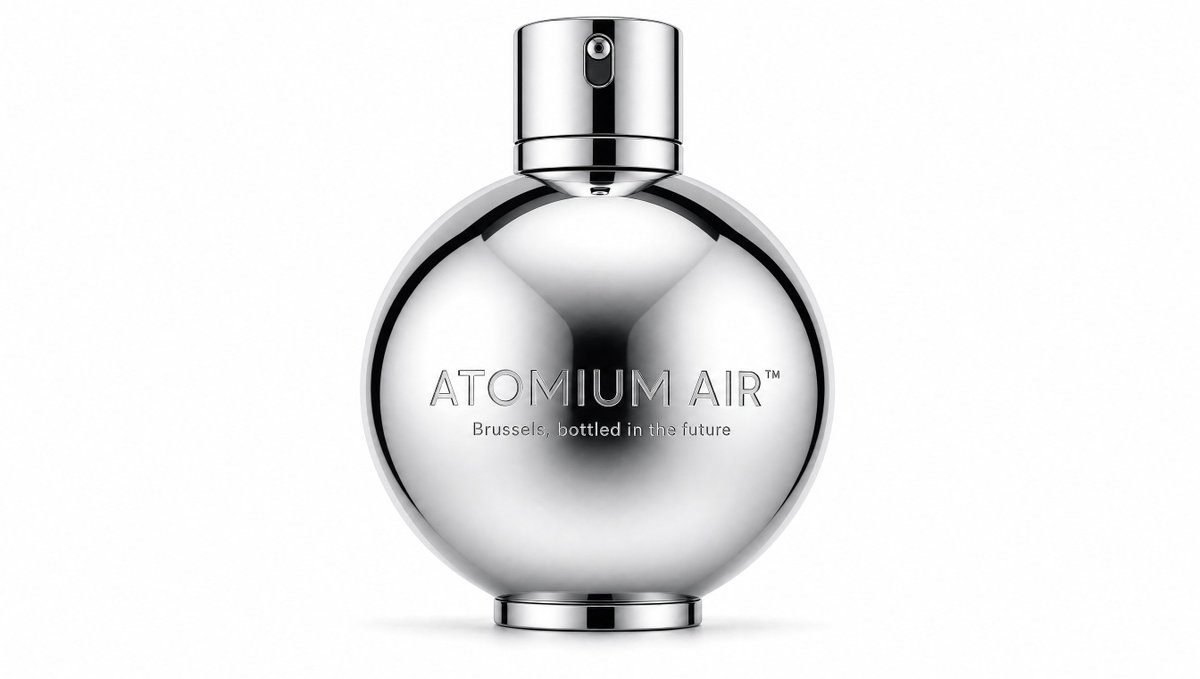
Flacone di profumo Atomium Air Chrome
Fotografia fotorealistica di un profumo di lusso, che ritrae una bottiglia sferica cromata con il logo inciso su uno sfondo bianco pulito in studio.
Questo è un esempio di prompt GPT Image 2 per Prodotto e commerciale . Utilizza il prompt pronto per la copia qui sotto per generare immagini simili e verifica l'attribuzione Awesome GPT Image 2 Prompts e i diritti di utilizzo commerciale prima del riutilizzo.
Hai bisogno del set completo di prompt? Usa il Prodotto e commerciale hub tematico per ulteriori esempi correlati oppure apri il GPT Image 2 catalogo rapido per l'indice completo degli esempi, le strutture riutilizzabili e l'attribuzione delle fonti.
Free 1K preview
Generate one preview image instantly, no sign-up required.
1246/4000
Richiesta
prompt pronto per la copia
Create a minimalist luxury fragrance product shot on a clean white studio background. Center a single futuristic perfume bottle shaped like a perfectly round polished chrome sphere with a flat circular base and a short cylindrical chrome spray cap on top. The bottle should look highly reflective and mirror-like, with smooth black-and-white studio reflections curving across the spherical surface, a dark soft central reflection, crisp metallic rim highlights, and subtle grounding shadow beneath. The sprayer has a tiny nozzle aperture visible near the top front, with a vertical black reflective strip running down the cap. Add engraved metallic text across the front of the sphere: {argument name="fragrance name" default="ATOMIUM AIR™"} in thin uppercase modern sans-serif lettering, and a smaller tagline beneath it reading {argument name="tagline" default="Brussels, bottled in the future"}. The composition is symmetrical, premium, quiet, and hyper-realistic, like a high-end cosmetics advertisement inspired by Belgian futurism, Art Deco chrome, rain-slick Brussels, and spacecraft-like design. Use only one bottle, one cap, one base, and two visible text lines; no people, no props, no colored background, no extra labels, no watermark.Variabili di richiesta
Segnaposto per gli argomenti modificabili presenti nel prompt, con i relativi valori predefiniti.
Variabile
fragrance name
Predefinito
ATOMIUM AIR™
Variabile
tagline
Predefinito
Brussels, bottled in the future
Best for
- - Prodotto e commerciale visual exploration
- - Image generation and reference-image edits
- - Reusable briefs that keep source attribution visible
Change these parts
- - Subject, product, character, or scene
- - Aspect ratio, camera, lighting, and background
- - Brand, text, color, and output constraints
Recommended model and settings
- - Model: gpt-image-2
- - Input mode: Testo in immagine
- - Aspect ratio: source
- - Commercial status: review original source
How to use this prompt
- 1. Copy the prompt and preserve its structure for the first test.
- 2. Replace the subject, context, and publishing channel.
- 3. Change one camera, lighting, or style variable per iteration.
- 4. Inspect the output, source, text, and rights before reuse.
Limitations, source, and reuse cautions
- - Generated output is an editable draft, not factual, legal, or rights evidence.
- - Review the linked source, people, brands, logos, text, and third-party media before commercial use.
Importato da Awesome GPT Image 2 Prompts . È richiesta l'attribuzione. Lo stato di utilizzo commerciale è allowed ; verificare i diritti della fonte prima dell'utilizzo a pagamento.
Altri casi in questa categoria
Prioritizzazione in base a categoria, compatibilità della modalità di input, qualità e minor rischio.

Matte Black B.AI Keyboard Keycap
Testo in immagine

Luxury Travel Fashion Portrait Prompt
Testo in immagine

Studio Portrait of Woman with Sunglasses
Testo in immagine

Gray Denim Lace-Up Top Prompt for GPT Image 2
Testo in immagine

Hiker in Red Jacket
Testo in immagine

Orange Rooftop Fashion Photo Prompt
Testo in immagine
Note sul riutilizzo e sulla fonte
Utilizza questo prompt in tutta sicurezza dopo aver visualizzato in anteprima il caso.
- 1.Copia il prompt oppure aprilo direttamente in Dovoo tramite il pulsante di generazione.
- 2.Regola le variabili, le proporzioni e le immagini di riferimento in base alle tue esigenze.
- 3.Prima della pubblicazione o dell'utilizzo a pagamento, verificare i diritti di fonte, i requisiti di attribuzione e i rischi relativi al marchio o all'immagine.