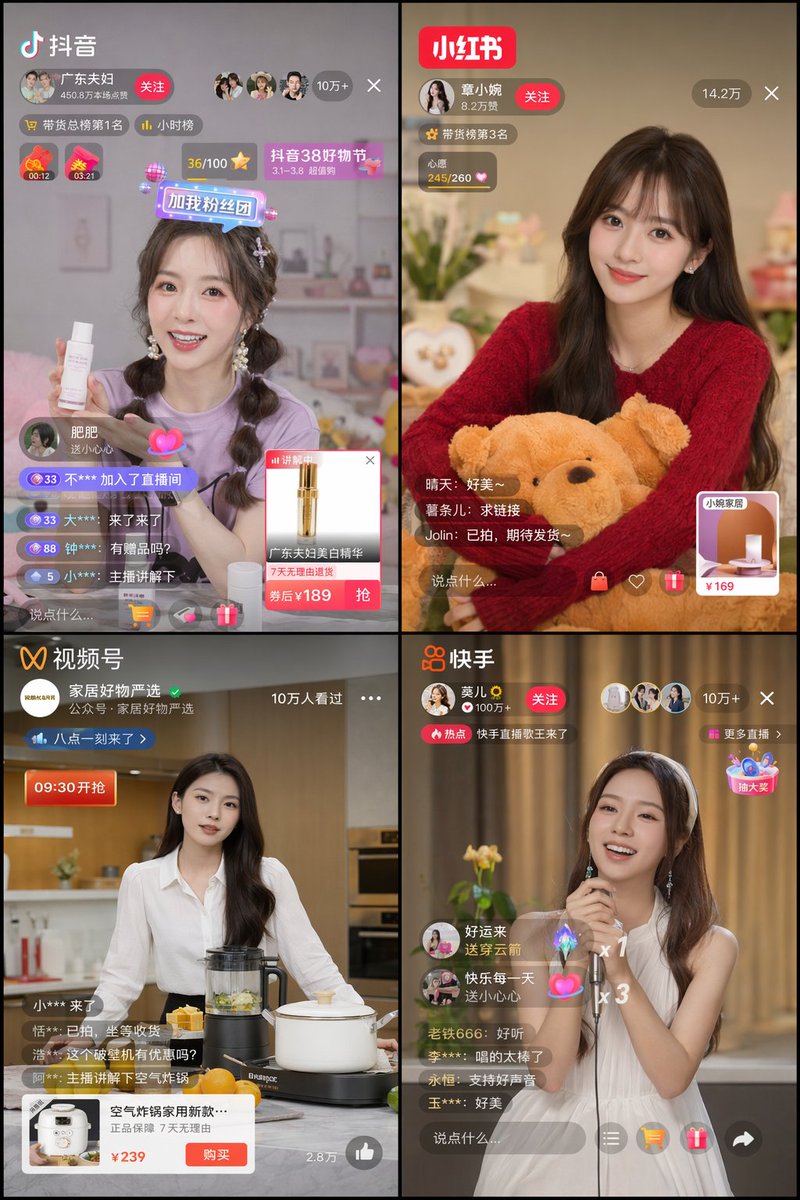
Griglia dell'interfaccia utente dell'app cinese per lo streaming live
Genera una griglia 2x2 di interfacce realistiche di app di livestreaming cinesi, caratterizzate da diversi host, piattaforme e sovrapposizioni di interfaccia utente.
Questo è un esempio di prompt GPT Image 2 per Altra Ispirazione . Utilizza il prompt pronto per la copia qui sotto per generare immagini simili e verifica l'attribuzione Awesome GPT Image 2 Prompts e i diritti di utilizzo commerciale prima del riutilizzo.
Hai bisogno del set completo di prompt? Usa il Altra Ispirazione hub tematico per ulteriori esempi correlati oppure apri il GPT Image 2 catalogo rapido per l'indice completo degli esempi, le strutture riutilizzabili e l'attribuzione delle fonti.
Free 1K preview
Generate one preview image instantly, no sign-up required.
2852/4000
Richiesta
prompt pronto per la copia
{
  "type": "2x2 grid of Chinese livestreaming app interfaces",
  "layout": {
    "grid": "2 columns, 2 rows",
    "panels": [
      {
        "position": "top-left",
        "platform": "Douyin",
        "logo": "Douyin",
        "host": {
          "name": "{argument name=\"douyin host name\" default=\"Guangdong couple\"}",
          "appearance": "young woman, purple t-shirt, braided pigtails",
          "action": "holding a white skincare bottle"
        },
        "ui_elements": [
          "Profile banner with a “Follow” button",
          "Viewers “100,000+”",
          "Floating sticker “Add my fan group”",
          "chat stream with 4 messages",
          "Product coverage card, showing a golden bottle and “¥{argument name=\"douyin product price\" default=\"189\"} after coupon”"
        ]
      },
      {
        "position": "top-right",
        "platform": "Xiaohongshu",
        "logo": "Xiaohongshu (Little Red Book)",
        "host": {
          "name": "{argument name=\"xiaohongshu host name\" default=\"Zhang Xiaowan\"}",
          "appearance": "young woman, red sweater, long wavy dark hair",
          "action": "hugging a large brown teddy bear"
        },
        "ui_elements": [
          "Profile banner with a “Follow” button",
          "View count “142,000”",
          "heart progress bar '245/260'",
          "chat stream with 3 messages",
          "product overlay card showing a lamp and '¥169'"
        ]
      },
      {
        "position": "bottom-left",
        "platform": "WeChat Video",
        "logo": "Video Channels",
        "host": {
          "name": "{argument name=\"wechat host name\" default=\"Carefully Selected Home Goods\"}",
          "appearance": "young woman, white button-up shirt, long dark hair",
          "action": "standing in a kitchen with a blender and white pot"
        },
        "ui_elements": [
          "profile banner",
          "Viewers: \"100,000+ have watched\"",
          "Countdown label: \"Starts in 09:30\"",
          "chat stream with 4 messages",
          "product overlay card showing an air fryer and '¥239'"
        ]
      },
      {
        "position": "bottom-right",
        "platform": "Kuaishou",
        "logo": "Kuaishou",
        "host": {
          "name": "{argument name=\"kuaishou host name\" default=\"Mo'er\"}",
          "appearance": "young woman, white sleeveless dress, white headband",
          "action": "holding a microphone and singing"
        },
        "ui_elements": [
          "Profile banner with a “Follow” button",
          "Viewers “100,000+”",
          "Trending topic banner: \"Kuaishou Live Singing King is Here\"",
          "chat stream with 5 messages",
          "floating gift animations including a rocket and hearts",
          "Floating treasure chest: \"Win Big Prizes\""
        ]
      }
    ]
  }
}
Variabili di richiesta
Segnaposto per gli argomenti modificabili presenti nel prompt, con i relativi valori predefiniti.
Variabile
douyin host name
Predefinito
Guangdong couple
Variabile
douyin product price
Predefinito
189
Variabile
xiaohongshu host name
Predefinito
Zhang Xiaowan
Variabile
wechat host name
Predefinito
Carefully Selected Home Goods
Variabile
kuaishou host name
Predefinito
Mo'er
Best for
- - Altra Ispirazione visual exploration
- - Image generation and reference-image edits
- - Reusable briefs that keep source attribution visible
Change these parts
- - Subject, product, character, or scene
- - Aspect ratio, camera, lighting, and background
- - Brand, text, color, and output constraints
Recommended model and settings
- - Model: gpt-image-2
- - Input mode: Testo in immagine
- - Aspect ratio: source
- - Commercial status: review original source
How to use this prompt
- 1. Copy the prompt and preserve its structure for the first test.
- 2. Replace the subject, context, and publishing channel.
- 3. Change one camera, lighting, or style variable per iteration.
- 4. Inspect the output, source, text, and rights before reuse.
Limitations, source, and reuse cautions
- - Generated output is an editable draft, not factual, legal, or rights evidence.
- - Review the linked source, people, brands, logos, text, and third-party media before commercial use.
Importato da Awesome GPT Image 2 Prompts . È richiesta l'attribuzione. Lo stato di utilizzo commerciale è allowed ; verificare i diritti della fonte prima dell'utilizzo a pagamento.
Altri casi in questa categoria
Prioritizzazione in base a categoria, compatibilità della modalità di input, qualità e minor rischio.

MotoGP POV Cornering Shot
Testo in immagine

Autumn Cozy Casual Outfit Prompt
Testo in immagine

Cute Focus Desk Flat Lay and Kawaii Illustration
Testo in immagine

Studio Portrait of Woman with Sunglasses
Testo in immagine

Morning Bed Stretching Legs Prompt
Testo in immagine

Tuxedo Cat Photo and Line Art Diptych
Testo in immagine
Note sul riutilizzo e sulla fonte
Utilizza questo prompt in tutta sicurezza dopo aver visualizzato in anteprima il caso.
- 1.Copia il prompt oppure aprilo direttamente in Dovoo tramite il pulsante di generazione.
- 2.Regola le variabili, le proporzioni e le immagini di riferimento in base alle tue esigenze.
- 3.Prima della pubblicazione o dell'utilizzo a pagamento, verificare i diritti di fonte, i requisiti di attribuzione e i rischi relativi al marchio o all'immagine.