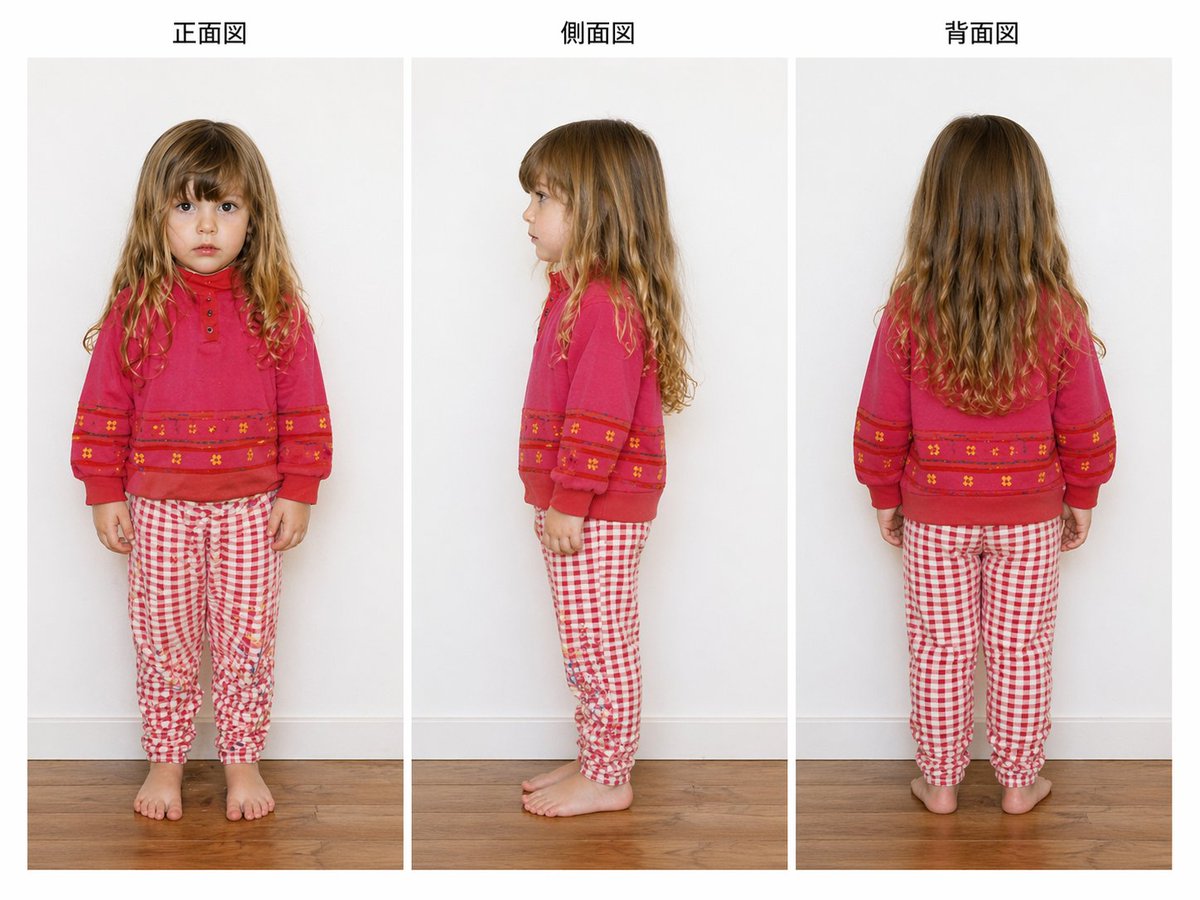
Riferimento per l'abbigliamento per bambini in tre viste
Un'immagine di riferimento pulita, in stile studio, con tre viste di una giovane ragazza in pose frontali, laterali e posteriori, ideale per la documentazione di capi d'abbigliamento, l'estrazione di modelli o l'analisi di rotazione.
Questo è un esempio di prompt GPT Image 2 per Prodotto e commerciale . Utilizza il prompt pronto per la copia qui sotto per generare immagini simili e verifica l'attribuzione Awesome GPT Image 2 Prompts e i diritti di utilizzo commerciale prima del riutilizzo.
Questo prompt è pensato per più immagini di riferimento. Apriremo Dovoo con il prompt e l'immagine di anteprima disponibile; aggiungeremo i riferimenti rimanenti in Dovoo prima di generare.
Free 1K preview
Generate one preview image instantly, no sign-up required.
Free text preview doesn’t preserve reference-image consistency.
Richiesta
prompt pronto per la copia
{
  "image_quality": {
    "camera": "straight-on eye-level fashion catalog framing",
    "lighting": "soft even studio lighting with minimal shadows",
    "render_intent": "accurate apparel and body-view documentation, similar to a garment fitting or model extraction reference image"
  },
  "layout": {
    "background": "plain light gray indoor wall with white baseboard and warm medium-tone wooden floor",
    "composition": "three evenly spaced full-body photos arranged in vertical panels across a landscape canvas",
    "figure_count": 3,
    "sections": [
      {
        "count": 1,
        "labels": [
          "front view"
        ],
        "position": "left",
        "title": "Front view"
      },
      {
        "count": 1,
        "labels": [
          "side view"
        ],
        "position": "center",
        "title": "Side view"
      },
      {
        "count": 1,
        "labels": [
          "back view"
        ],
        "position": "right",
        "title": "Back view"
      }
    ],
    "view_details": {
      "center": "left-facing side profile standing view",
      "left": "full frontal standing view",
      "right": "full back standing view"
    }
  },
  "outfit": {
    "bottom": {
      "color": "red and white",
      "fit": "slim jogger-style pajama or lounge pants with gathered ankles",
      "pattern": "small gingham check",
      "type": "pants"
    },
    "footwear": "barefoot",
    "top": {
      "color": "bright pink-red",
      "details": [
        "crew neckline",
        "long sleeves with cuffed wrists",
        "small button placket at upper chest",
        "horizontal decorative bands across lower chest and sleeves",
        "tiny floral motifs within the bands"
      ],
      "type": "sweatshirt"
    }
  },
  "style": "clean studio fashion documentation photo",
  "subject": {
    "age_appearance": "approximately 5 to 7 years old",
    "face": "Show every face clearly with natural, detailed facial features",
    "hair": {
      "color": "light brown to dark blonde",
      "style": "long loose wavy hair with a center part, slightly curlier toward the ends"
    },
    "person": "young girl",
    "pose_set": "standing naturally with arms relaxed"
  },
  "type": "children's clothing reference sheet"
}
Best for
- - Prodotto e commerciale visual exploration
- - Image generation and reference-image edits
- - Reusable briefs that keep source attribution visible
Change these parts
- - Subject, product, character, or scene
- - Aspect ratio, camera, lighting, and background
- - Brand, text, color, and output constraints
Recommended model and settings
- - Model: gpt-image-2
- - Input mode: Da immagine multipla a immagine
- - Aspect ratio: source
- - Commercial status: review original source
How to use this prompt
- 1. Copy the prompt and preserve its structure for the first test.
- 2. Replace the subject, context, and publishing channel.
- 3. Change one camera, lighting, or style variable per iteration.
- 4. Inspect the output, source, text, and rights before reuse.
Limitations, source, and reuse cautions
- - Generated output is an editable draft, not factual, legal, or rights evidence.
- - Review the linked source, people, brands, logos, text, and third-party media before commercial use.
Altri casi in questa categoria
Prioritizzazione in base a categoria, compatibilità della modalità di input, qualità e minor rischio.






Note sul riutilizzo e sulla fonte
Utilizza questo prompt in tutta sicurezza dopo aver visualizzato in anteprima il caso.
- 1.Copia il prompt oppure aprilo direttamente in Dovoo tramite il pulsante di generazione.
- 2.Regola le variabili, le proporzioni e le immagini di riferimento in base alle tue esigenze.
- 3.Prima della pubblicazione o dell'utilizzo a pagamento, verificare i diritti di fonte, i requisiti di attribuzione e i rischi relativi al marchio o all'immagine.