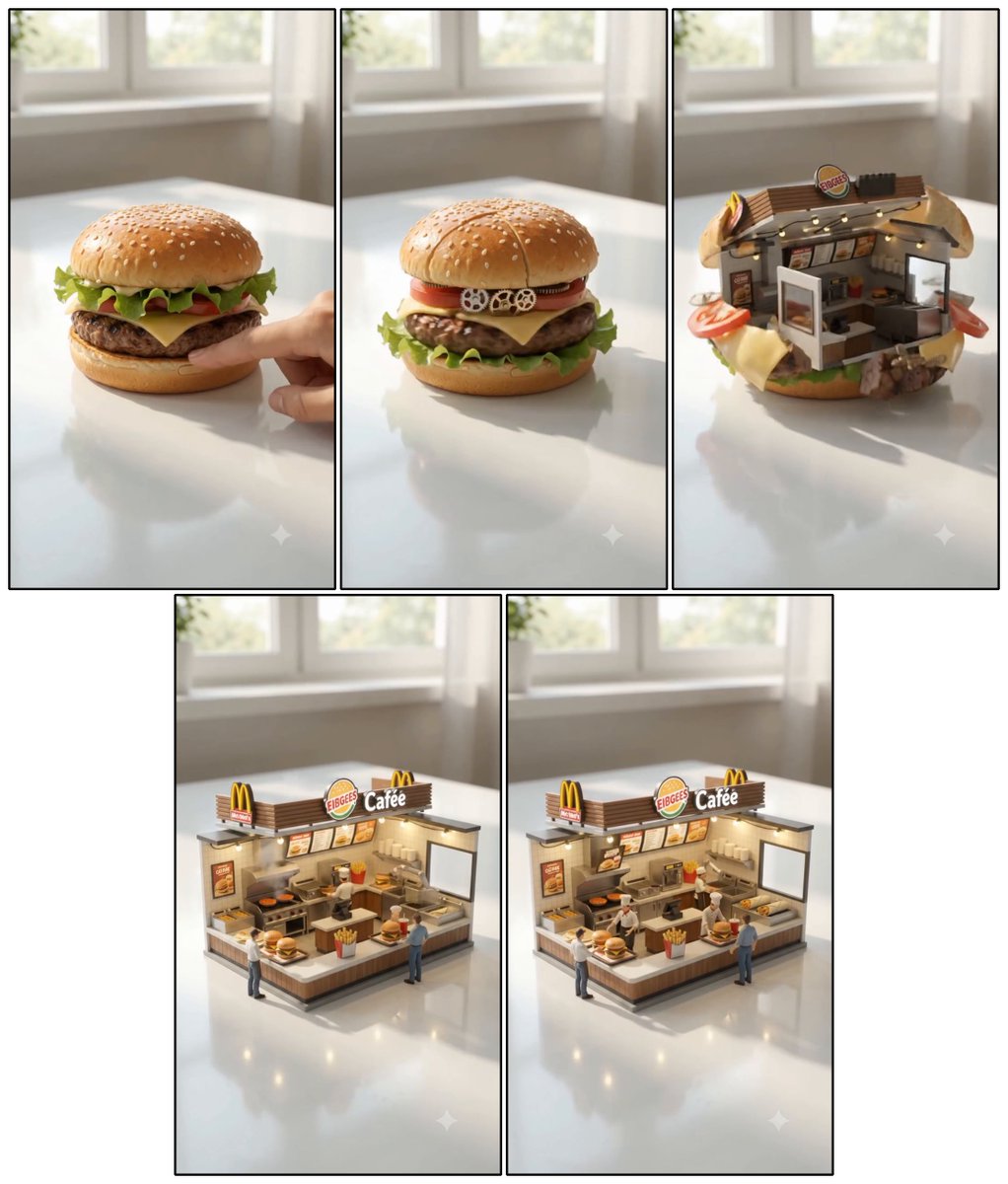
Cheeseburger to Mini Café Storyboard
A five-panel photorealistic transformation collage showing a cheeseburger becoming a miniature fast-food café diorama.
Questo è un esempio di prompt GPT Image 2 per Cibo e bevande . Utilizza il prompt pronto per la copia qui sotto per generare immagini simili e verifica l'attribuzione Awesome GPT Image 2 Prompts e i diritti di utilizzo commerciale prima del riutilizzo.
Hai bisogno del set completo di prompt? Usa il Cibo e bevande hub tematico per ulteriori esempi correlati oppure apri il GPT Image 2 catalogo rapido per l'indice completo degli esempi, le strutture riutilizzabili e l'attribuzione delle fonti.
Free 1K preview
Generate one preview image instantly, no sign-up required.
Free text preview doesn’t preserve reference-image consistency.
3074/4000
Richiesta
prompt pronto per la copia
Objective: Create a highly detailed hyperrealistic miniature food transformation Storyboard, showcasing the process of a cheeseburger transforming into a miniature fast-food restaurant diorama.

Canvas: A square collage on a white background, arranged as 5 vertical panels with thin black borders: 3 panels in a top row and 2 larger panels centered in a bottom row. Each panel is shot in the same brightly, softly lit room, placed on a glossy white table with a blurred sunlit window in the background, featuring realistic reflections, shallow depth of field, and warm natural daylight.

Panel Sequence and Counting Elements:
1. Panel 1: A realistic, juicy {argument name="food item" default="FIBGEES Cafée"} sits on a glossy white table. It features a golden sesame seed bun, crisp lettuce, tomato, melted yellow cheese, and a browned beef patty. A finger gently presses down on the burger from the right side, hinting at the start of a magical transformation.
2. Panel 2: The burger begins to transform while largely maintaining its form. Visible mechanical and architectural details are added within the burger: 3 tiny white gears along the tomato layer, subtle panel seams on the top bun, and glimpses of miniature structural details between the layers.
3. Panel 3: The burger opens up to reveal a miniature fast-food restaurant embedded within the bun. The top bun cracks open and rises like an awning, lettuce and cheese curl around the bottom, tomato slices and patty fragments protrude from the sides, revealing a tiny counter, menu items, warm lighting, kitchen equipment, and a small storefront sign reading {argument name="restaurant sign" default="EIBGEES Cafée"} inside.
4. Panel 4: Transformation complete: A standalone miniature fast-food restaurant diorama is placed on the table. It features a large rooftop sign reading {argument name="restaurant sign" default="EIBGEES Cafée"} with 2 yellow archway logos, a front service counter with 1 box of fries on it, 2 miniature customers visible, and 1 miniature employee behind the counter. Includes warm interior lighting, menu items, a grill, shelving, and miniature food props.
5. Panel 5: A final view, shot from a slightly different angle, almost identical to the previous one, showcasing the completed miniature cafe and including the same counting elements: 1 large rooftop sign, 2 yellow archway logos, 1 service counter, 1 box of fries, 2 miniature customers, and 1 employee, all in sharp, hyperrealistic detail.

Visual Style: Cinematic hyperrealistic macro photography, miniature scale, realistic materials, glossy reflections on the table, soft background blur, bright and inviting room, high detail, warm cafe lighting, toy-like miniature architecture but physically plausible. Use a sense of magical transformation, not a cartoonish style.

Constraints: Maintain consistent lighting, table, and background across all 5 panels. Do not add extra panels. Do not add any titles other than on the visible restaurant signage. Use a clean collage layout with black panel outlines and do not add watermarks.
Variabili di richiesta
Segnaposto per gli argomenti modificabili presenti nel prompt, con i relativi valori predefiniti.
Variabile
food item
Predefinito
FIBGEES Cafée
Variabile
restaurant sign
Predefinito
EIBGEES Cafée
Best for
- - Cibo e bevande visual exploration
- - Image generation and reference-image edits
- - Reusable briefs that keep source attribution visible
Change these parts
- - Subject, product, character, or scene
- - Aspect ratio, camera, lighting, and background
- - Brand, text, color, and output constraints
Recommended model and settings
- - Model: gpt-image-2
- - Input mode: Immagine in immagine
- - Aspect ratio: source
- - Commercial status: review original source
How to use this prompt
- 1. Copy the prompt and preserve its structure for the first test.
- 2. Replace the subject, context, and publishing channel.
- 3. Change one camera, lighting, or style variable per iteration.
- 4. Inspect the output, source, text, and rights before reuse.
Limitations, source, and reuse cautions
- - Generated output is an editable draft, not factual, legal, or rights evidence.
- - Review the linked source, people, brands, logos, text, and third-party media before commercial use.
Importato da Awesome GPT Image 2 Prompts . È richiesta l'attribuzione. Lo stato di utilizzo commerciale è allowed ; verificare i diritti della fonte prima dell'utilizzo a pagamento.
Altri casi in questa categoria
Prioritizzazione in base a categoria, compatibilità della modalità di input, qualità e minor rischio.

Sci-Fi Cyan Lighting Effect
Immagine in immagine

MotoGP POV Cornering Shot
Testo in immagine

Stylish Man Street Lamp Portrait
Immagine in immagine

Orange Rooftop Fashion Photo Prompt
Testo in immagine

Oversized Head Cartoon Caricature Prompt
Immagine in immagineRischio medio

Luxury Travel Fashion Portrait Prompt
Testo in immagine
Note sul riutilizzo e sulla fonte
Utilizza questo prompt in tutta sicurezza dopo aver visualizzato in anteprima il caso.
- 1.Copia il prompt oppure aprilo direttamente in Dovoo tramite il pulsante di generazione.
- 2.Regola le variabili, le proporzioni e le immagini di riferimento in base alle tue esigenze.
- 3.Prima della pubblicazione o dell'utilizzo a pagamento, verificare i diritti di fonte, i requisiti di attribuzione e i rischi relativi al marchio o all'immagine.