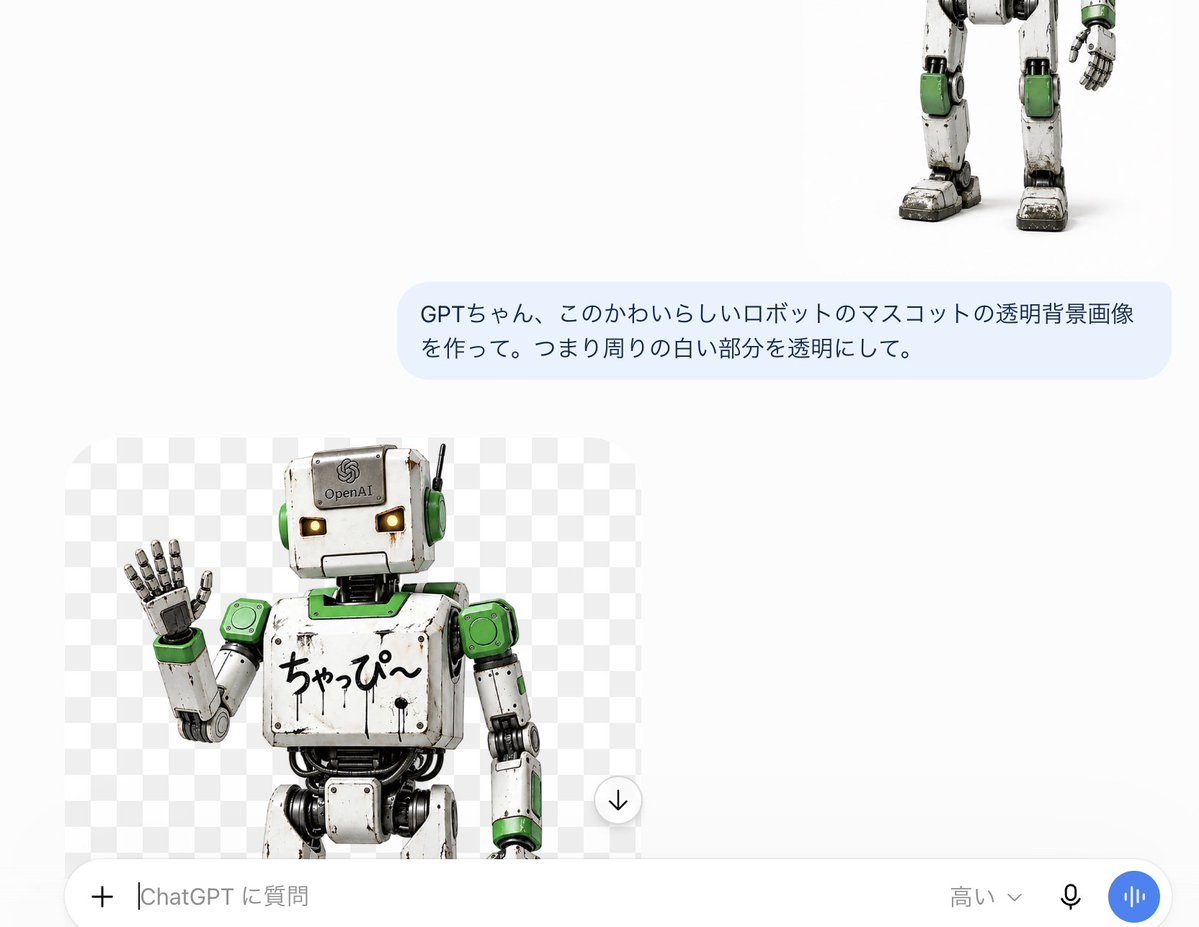
ChatGPT Transparent Robot Screenshot
Creates a Japanese ChatGPT-style screenshot showing a generated transparent-background robot mascot preview.
Questo è un esempio di prompt GPT Image 2 per Altra Ispirazione . Utilizza il prompt pronto per la copia qui sotto per generare immagini simili e verifica l'attribuzione Awesome GPT Image 2 Prompts e i diritti di utilizzo commerciale prima del riutilizzo.
Hai bisogno del set completo di prompt? Usa il Altra Ispirazione hub tematico per ulteriori esempi correlati oppure apri il GPT Image 2 catalogo rapido per l'indice completo degli esempi, le strutture riutilizzabili e l'attribuzione delle fonti.
Free 1K preview
Generate one preview image instantly, no sign-up required.
2772/4000
Richiesta
prompt pronto per la copia
Goal: Create a realistic screenshot of a ChatGPT mobile interface, showcasing a transparent background image generation result of a cute robot mascot.

Canvas: Horizontal screenshot, approximately 1200 × 895 pixels in size, using a simple white application background with plenty of blank space. The interface should be presented as a ChatGPT conversation on a mobile phone or tablet, not a refined poster.

Layout: Place 3 main visible content elements: Place 1 partial robot image in the upper right corner, showing only the lower body, legs, and one hand; Place 1 light blue user message bubble in the upper right, centered; Place 1 generated image preview card in the lower left corner. Add 1 full-width input bar at the bottom.

User Message Bubble: Rounded rectangle, filled with light blue. The Japanese text must be exactly the same: {argument name="user message" default="GPTちゃん、このかわいらしいロボットのマスコットの透明背景画像を作って。つまり周りの白い部分を透明にして。"}. Use dark gray sans-serif font, two lines, left-aligned.

Generated Image Preview Card: Rounded rectangle preview box with a gray and white checkered transparent background pattern. Inside, include 1 cute, aged robot mascot, cropped at the thigh, standing slightly to the left, waving its left hand. Near the bottom right edge of the preview, include 1 circular download button overlay, a white circle with a black downward arrow.

Robot Details: The robot is a charming retro toy-style humanoid mascot with a square grayish-white head, tiny amber glowing rectangular eyes, green circular earmuffs, a thin black antenna on the right side of its head, worn and scratched metal panels with visible black joints and cables, green accents on the shoulders, neck plate, wrists, knees, and side panels. The head has a small OpenAI-like logo and text {argument name="forehead label" default="OpenAI"}. Handwritten Japanese text {argument name="chest text" default="ちゃっぴ〜"} on the chest. The raised hand has segmented metal fingers, palm facing forward. Style is photorealistic 3D rendering, with toy robot proportions, soft studio lighting, subtle dirt, worn edges, and a friendly mascot expression.

Bottom Input Bar: Contains 5 visible controls or text elements: 1 plus icon on the far left, 1 text input placeholder displaying {argument name="input placeholder" default="高い⌄"}, 1 model selection label displaying {argument name="model label" default="High"} with a small downward arrow, 1 black microphone icon, and 1 blue circular voice button with white vertical waveforms. The input bar is white with rounded top corners and a subtle shadow.

Visual Style: Accurate Japanese version of the ChatGPT UI screenshot aesthetic, white negative space, subtle rounded corners, clear UI text, no watermarks, no extra titles, no browser borders.
Variabili di richiesta
Segnaposto per gli argomenti modificabili presenti nel prompt, con i relativi valori predefiniti.
Variabile
user message
Predefinito
GPTちゃん、このかわいらしいロボットのマスコットの透明背景画像を作って。つまり周りの白い部分を透明にして。
Variabile
forehead label
Predefinito
OpenAI
Variabile
chest text
Predefinito
ちゃっぴ〜
Variabile
input placeholder
Predefinito
高い⌄
Variabile
model label
Predefinito
High
Best for
- - Altra Ispirazione visual exploration
- - Image generation and reference-image edits
- - Reusable briefs that keep source attribution visible
Change these parts
- - Subject, product, character, or scene
- - Aspect ratio, camera, lighting, and background
- - Brand, text, color, and output constraints
Recommended model and settings
- - Model: gpt-image-2
- - Input mode: Testo in immagine
- - Aspect ratio: source
- - Commercial status: review original source
How to use this prompt
- 1. Copy the prompt and preserve its structure for the first test.
- 2. Replace the subject, context, and publishing channel.
- 3. Change one camera, lighting, or style variable per iteration.
- 4. Inspect the output, source, text, and rights before reuse.
Limitations, source, and reuse cautions
- - Generated output is an editable draft, not factual, legal, or rights evidence.
- - Review the linked source, people, brands, logos, text, and third-party media before commercial use.
Importato da Awesome GPT Image 2 Prompts . È richiesta l'attribuzione. Lo stato di utilizzo commerciale è allowed ; verificare i diritti della fonte prima dell'utilizzo a pagamento.
Altri casi in questa categoria
Prioritizzazione in base a categoria, compatibilità della modalità di input, qualità e minor rischio.
Note sul riutilizzo e sulla fonte
Utilizza questo prompt in tutta sicurezza dopo aver visualizzato in anteprima il caso.
- 1.Copia il prompt oppure aprilo direttamente in Dovoo tramite il pulsante di generazione.
- 2.Regola le variabili, le proporzioni e le immagini di riferimento in base alle tue esigenze.
- 3.Prima della pubblicazione o dell'utilizzo a pagamento, verificare i diritti di fonte, i requisiti di attribuzione e i rischi relativi al marchio o all'immagine.