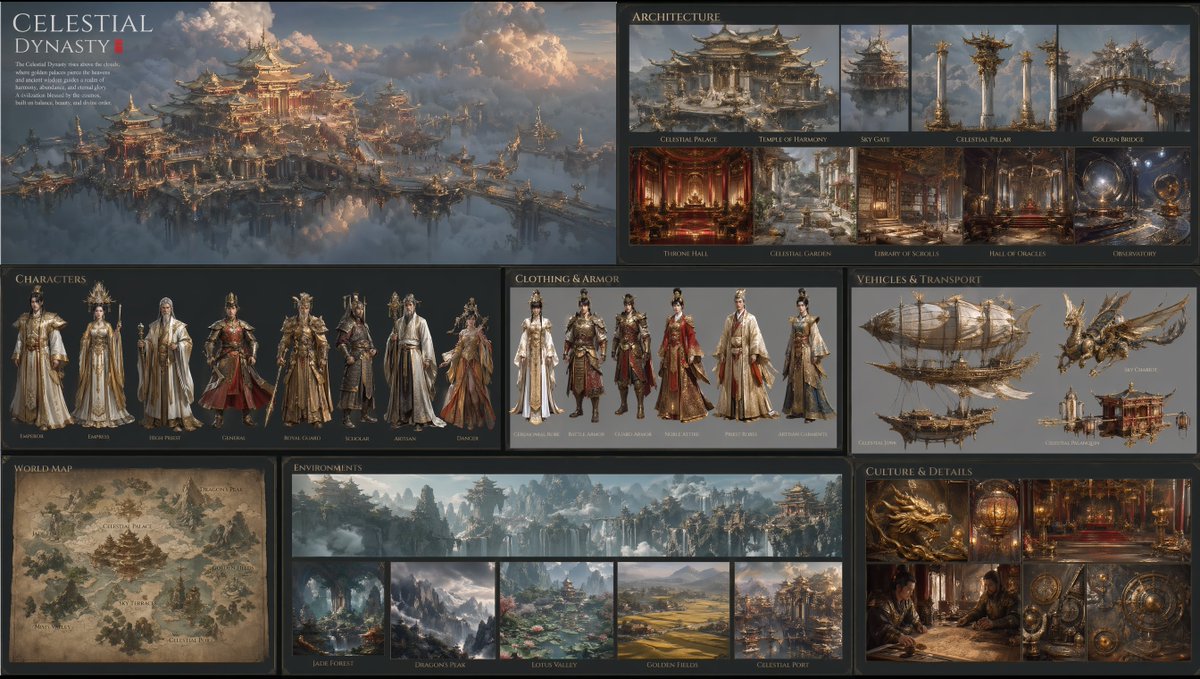
Consiglio biblico mondiale della Dinastia Celeste
Questo strumento trasforma una singola scena di riferimento in una tavola di presentazione completa di una civiltà fantasy, con architettura, personaggi, costumi, veicoli, mappa, ambientazioni e dettagli culturali, ideale per lo sviluppo di concept o la creazione di un universo narrativo per un franchise.
Questo è un esempio di prompt GPT Image 2 per Anime e videogiochi . Utilizza il prompt pronto per la copia qui sotto per generare immagini simili e verifica l'attribuzione Awesome GPT Image 2 Prompts e i diritti di utilizzo commerciale prima del riutilizzo.
Free 1K preview
Generate one preview image instantly, no sign-up required.
Richiesta
prompt pronto per la copia
Using REFERENCE_0 as the visual foundation, expand the single sky-palace scene into a complete cinematic world-building presentation for a fantasy civilization. Preserve the same East Asian celestial imperial design language, floating architecture above clouds, gilded ornamentation, warm sunset lighting, and ultra-detailed realistic concept-art look, then turn it into a polished multi-panel lore board on a dark background with elegant editorial typography. Include 8 labeled sections: 1 large hero overview panel for the civilization, 1 architecture section with 9 images, 1 characters section with 7 full-body character designs, 1 clothing and armor section with 6 outfit variations, 1 vehicles and transport section with 4 vehicle designs, 1 world map section with 1 illustrated map, 1 environments section with 6 environment images, and 1 culture and details section with 6 close-up detail images. Add a refined fantasy title and short lore paragraph for the civilization, using the name {argument name="civilization name" default="Celestial Dynasty"}. The architecture section should show 9 distinct items: palace, temple, gate, pillar, bridge, throne hall, garden, library, and observatory. The characters section should show 7 archetypes: emperor, empress, high priest, general, royal guard, scholar, and artisan. The clothing and armor section should show 6 designs: ceremonial robe, battle armor, noble attire, priest robes, artisan garments, and dancer costume. The vehicles and transport section should show 4 designs: an airship, a flying beast mount, a sky chariot, and a ceremonial palanquin. The environments section should show 6 scenes: one wide banner panorama plus 5 smaller locations, including forest, mountain peaks, lotus valley, golden fields, and a celestial port. The culture and details section should show 6 images: dragon motif, lantern or artifact, palace interior, scholarly scene, mechanical instruments, and decorative symbols. Keep all panels visually unified as if from one official franchise world bible, with extremely rich detail, believable material design, and cinematic realism.Variabili di richiesta
Segnaposto per gli argomenti modificabili presenti nel prompt, con i relativi valori predefiniti.
Best for
- - Anime e videogiochi visual exploration
- - Image generation and reference-image edits
- - Reusable briefs that keep source attribution visible
Change these parts
- - Subject, product, character, or scene
- - Aspect ratio, camera, lighting, and background
- - Brand, text, color, and output constraints
Recommended model and settings
- - Model: gpt-image-2
- - Input mode: Testo in immagine
- - Aspect ratio: source
- - Commercial status: review original source
How to use this prompt
- 1. Copy the prompt and preserve its structure for the first test.
- 2. Replace the subject, context, and publishing channel.
- 3. Change one camera, lighting, or style variable per iteration.
- 4. Inspect the output, source, text, and rights before reuse.
Limitations, source, and reuse cautions
- - Generated output is an editable draft, not factual, legal, or rights evidence.
- - Review the linked source, people, brands, logos, text, and third-party media before commercial use.
Altri casi in questa categoria
Prioritizzazione in base a categoria, compatibilità della modalità di input, qualità e minor rischio.






Note sul riutilizzo e sulla fonte
Utilizza questo prompt in tutta sicurezza dopo aver visualizzato in anteprima il caso.
- 1.Copia il prompt oppure aprilo direttamente in Dovoo tramite il pulsante di generazione.
- 2.Regola le variabili, le proporzioni e le immagini di riferimento in base alle tue esigenze.
- 3.Prima della pubblicazione o dell'utilizzo a pagamento, verificare i diritti di fonte, i requisiti di attribuzione e i rischi relativi al marchio o all'immagine.