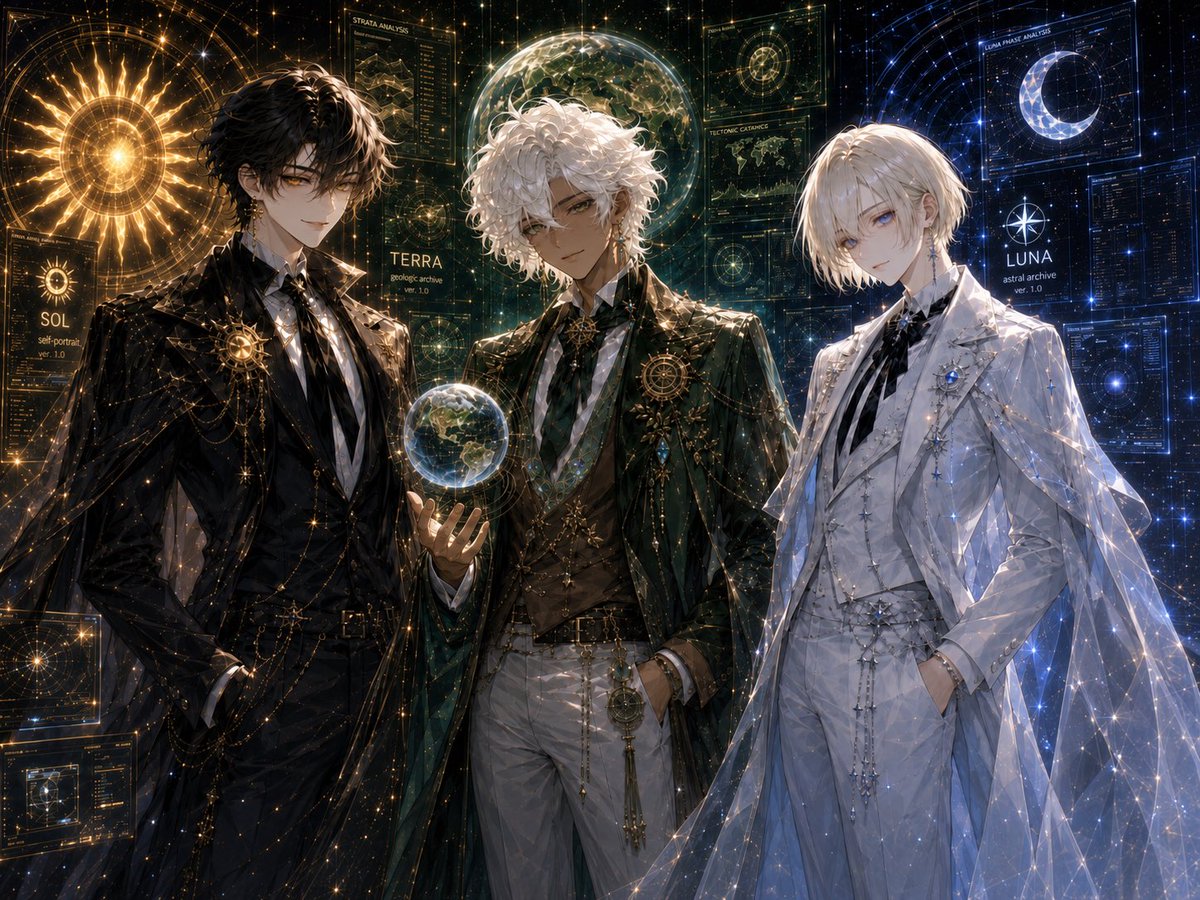
Celestial Archive Trio
Generates a luxurious anime fantasy sci-fi character lineup of three celestial archive guardians labeled SOL, TERRA, and LUNA.
Questo è un esempio di prompt GPT Image 2 per Anime e videogiochi . Utilizza il prompt pronto per la copia qui sotto per generare immagini simili e verifica l'attribuzione Awesome GPT Image 2 Prompts e i diritti di utilizzo commerciale prima del riutilizzo.
Hai bisogno del set completo di prompt? Usa il Anime e videogiochi hub tematico per ulteriori esempi correlati oppure apri il GPT Image 2 catalogo rapido per l'indice completo degli esempi, le strutture riutilizzabili e l'attribuzione delle fonti.
Free 1K preview
Generate one preview image instantly, no sign-up required.
3379/4000
Richiesta
prompt pronto per la copia
Goal: Create a highly detailed anime-style celestial character design illustration featuring exactly 3 elegant young male archive guardians standing shoulder-to-shoulder in a cosmic observatory interface: {argument name="left character name" default="SOL"}, {argument name="center character name" default="TERRA"}, and {argument name="right character name" default="LUNA"}.

Canvas: Wide 4:3 horizontal composition, cinematic crop from upper thighs to head, dark starfield background filled with glowing holographic astronomy UI panels, constellations, fine golden and blue data lines, and sparkling particles. Use ultra-polished fantasy sci-fi art, ornate bishounen character design, dramatic rim lighting, intricate fabric rendering, and luminous celestial effects.

Layout: Place exactly 3 characters across the foreground. Left character: black-haired man in a black formal suit and long dark coat, standing confidently with one hand in his pocket, surrounded by warm gold solar light. Center character: white curly-haired man in dark green and gold formal attire, holding a small glowing Earth-like globe in his left hand, framed by green-gold planetary analysis graphics. Right character: pale blond man in an all-white formal suit with a translucent cape, cool blue lunar lighting, hands in pockets, surrounded by blue star charts and crescent moon graphics.

Subject details: The left character has tousled black hair, amber-gold eyes, a calm confident smile, black shirt and tie, gold chains, star brooches, and an ornate circular sun emblem on the chest. The center character has voluminous curly white hair, tan skin, relaxed confident expression, dark green long coat, white trousers, gold vest details, layered chains, a geometric brooch, and a glowing miniature Earth sphere floating above his palm. The right character has short pale blond hair, pale blue eyes, a delicate melancholic expression, white suit with black ribbon tie, silver star ornaments, blue jewel brooch, and a sheer constellation-pattern cape sparkling with blue-white points of light.

Background and visible interface elements: Include exactly 3 main name labels, one near each character: “SOL” with small text like “sol portrait ver. 1.0”, “TERRA” with small text like “geologic archive ver. 1.0”, and “LUNA” with small text like “astral archive ver. 1.0”. Include exactly 6 prominent holographic panels: 1 large golden sun disk behind the left character, 1 circular map panel at bottom left, 1 vertical “STRATA ANALYSIS” panel above the center, 1 transparent globe/planet display behind the center, 1 blue crescent moon “LUNAR PHASE ANALYSIS” panel above the right, and 1 dense blue data panel at far right. Fill the rest with fine constellation grids, orbit rings, tiny star particles, and technical annotations, but avoid adding extra named characters.

Visual style: Luxurious dark academia meets celestial archive, ornate fantasy tailoring, high-detail anime illustration, luminous gold/green/blue color separation, glossy fabric, transparent holograms, sharp linework, ethereal sparkle, atmospheric depth, elegant symmetrical balance.

Constraints: Use exactly 3 human characters and exactly the 3 name labels SOL, TERRA, and LUNA. No chibi style, no modern casual clothing, no extra characters, no watermark, no logo, no unreadable large headline beyond the described interface labels.
Variabili di richiesta
Segnaposto per gli argomenti modificabili presenti nel prompt, con i relativi valori predefiniti.
Variabile
left character name
Predefinito
SOL
Variabile
center character name
Predefinito
TERRA
Variabile
right character name
Predefinito
LUNA
Best for
- - Anime e videogiochi visual exploration
- - Image generation and reference-image edits
- - Reusable briefs that keep source attribution visible
Change these parts
- - Subject, product, character, or scene
- - Aspect ratio, camera, lighting, and background
- - Brand, text, color, and output constraints
Recommended model and settings
- - Model: gpt-image-2
- - Input mode: Testo in immagine
- - Aspect ratio: source
- - Commercial status: review original source
How to use this prompt
- 1. Copy the prompt and preserve its structure for the first test.
- 2. Replace the subject, context, and publishing channel.
- 3. Change one camera, lighting, or style variable per iteration.
- 4. Inspect the output, source, text, and rights before reuse.
Limitations, source, and reuse cautions
- - Generated output is an editable draft, not factual, legal, or rights evidence.
- - Review the linked source, people, brands, logos, text, and third-party media before commercial use.
Importato da Awesome GPT Image 2 Prompts . È richiesta l'attribuzione. Lo stato di utilizzo commerciale è allowed ; verificare i diritti della fonte prima dell'utilizzo a pagamento.
Altri casi in questa categoria
Prioritizzazione in base a categoria, compatibilità della modalità di input, qualità e minor rischio.

Anime Girl Heterochromia Portrait
Testo in immagine

Hell Hound Character Sheet Infographic
Testo in immagine

MotoGP POV Cornering Shot
Testo in immagine

Luxury Travel Fashion Portrait Prompt
Testo in immagine

Boisterous Shrimpers Entering Pub
Testo in immagine

Cute Speech Bubble Mascot Profile Icon
Testo in immagine
Note sul riutilizzo e sulla fonte
Utilizza questo prompt in tutta sicurezza dopo aver visualizzato in anteprima il caso.
- 1.Copia il prompt oppure aprilo direttamente in Dovoo tramite il pulsante di generazione.
- 2.Regola le variabili, le proporzioni e le immagini di riferimento in base alle tue esigenze.
- 3.Prima della pubblicazione o dell'utilizzo a pagamento, verificare i diritti di fonte, i requisiti di attribuzione e i rischi relativi al marchio o all'immagine.