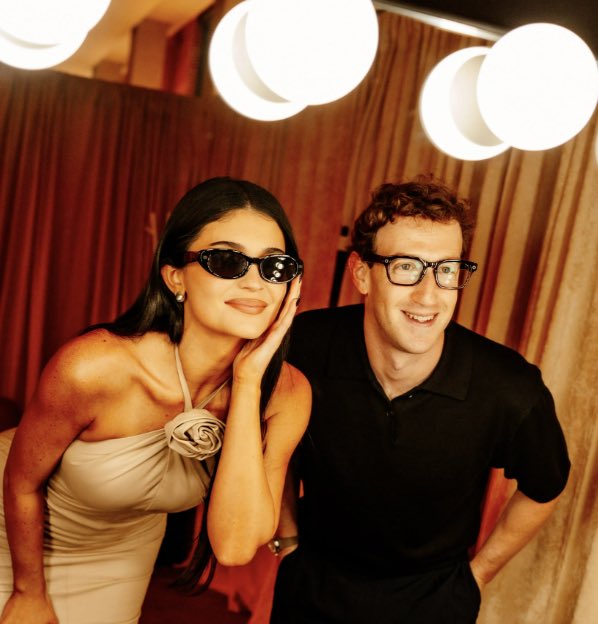
Candid Party Photo With Face Blocks
Generates a warm flash-lit square party photograph of two stylish people with opaque privacy squares covering their faces.
Questo è un esempio di prompt GPT Image 2 per Ritratto e personaggio . Utilizza il prompt pronto per la copia qui sotto per generare immagini simili e verifica l'attribuzione Awesome GPT Image 2 Prompts e i diritti di utilizzo commerciale prima del riutilizzo.
Hai bisogno del set completo di prompt? Usa il Ritratto e personaggio hub tematico per ulteriori esempi correlati oppure apri il GPT Image 2 catalogo rapido per l'indice completo degli esempi, le strutture riutilizzabili e l'attribuzione delle fonti.
Free 1K preview
Generate one preview image instantly, no sign-up required.
1407/4000
Richiesta
prompt pronto per la copia
Create a candid flash photograph of two stylish friends posing closely at an indoor party or lounge, shot from slightly above with a wide-angle lens and warm amber color grading. The scene shows exactly 2 people: on the left, {argument name="woman outfit" default="a woman in a cream one-shoulder fitted dress with a sculptural rosette at the chest, long straight black hair, small earrings, and dark oval sunglasses"}, leaning forward with one hand resting against her cheek; on the right, {argument name="man outfit" default="a man in a black short-sleeve polo shirt with curly reddish-brown hair and small dark sunglasses"}, leaning in with one hand behind his back. Cover each person's face with a centered opaque square privacy block in a warm tan-brown color, exactly 2 face blocks total, leaving hair, sunglasses edges, shoulders, and clothing visible. The background is a cozy retro interior with vertical wood paneling, beige curtains, a red curtain at the left, reddish carpet, and large glowing white spherical pendant lights near the top edge, including exactly 4 visible globe lights: one cropped at the top-left corner, one large central globe, and two overlapping globes at the top-right. Use direct on-camera flash, high ISO party-photo texture, slight motion softness, realistic skin tones, strong warm highlights, intimate celebrity-event snapshot feel, square crop, no text, no watermark.Variabili di richiesta
Segnaposto per gli argomenti modificabili presenti nel prompt, con i relativi valori predefiniti.
Variabile
woman outfit
Predefinito
a woman in a cream one-shoulder fitted dress with a sculptural rosette at the chest, long straight black hair, small earrings, and dark oval sunglasses
Variabile
man outfit
Predefinito
a man in a black short-sleeve polo shirt with curly reddish-brown hair and small dark sunglasses
Best for
- - Ritratto e personaggio visual exploration
- - Image generation and reference-image edits
- - Reusable briefs that keep source attribution visible
Change these parts
- - Subject, product, character, or scene
- - Aspect ratio, camera, lighting, and background
- - Brand, text, color, and output constraints
Recommended model and settings
- - Model: gpt-image-2
- - Input mode: Testo in immagine
- - Aspect ratio: source
- - Commercial status: review original source
How to use this prompt
- 1. Copy the prompt and preserve its structure for the first test.
- 2. Replace the subject, context, and publishing channel.
- 3. Change one camera, lighting, or style variable per iteration.
- 4. Inspect the output, source, text, and rights before reuse.
Limitations, source, and reuse cautions
- - Generated output is an editable draft, not factual, legal, or rights evidence.
- - Review the linked source, people, brands, logos, text, and third-party media before commercial use.
Importato da Awesome GPT Image 2 Prompts . È richiesta l'attribuzione. Lo stato di utilizzo commerciale è allowed ; verificare i diritti della fonte prima dell'utilizzo a pagamento.
Altri casi in questa categoria
Prioritizzazione in base a categoria, compatibilità della modalità di input, qualità e minor rischio.






Note sul riutilizzo e sulla fonte
Utilizza questo prompt in tutta sicurezza dopo aver visualizzato in anteprima il caso.
- 1.Copia il prompt oppure aprilo direttamente in Dovoo tramite il pulsante di generazione.
- 2.Regola le variabili, le proporzioni e le immagini di riferimento in base alle tue esigenze.
- 3.Prima della pubblicazione o dell'utilizzo a pagamento, verificare i diritti di fonte, i requisiti di attribuzione e i rischi relativi al marchio o all'immagine.