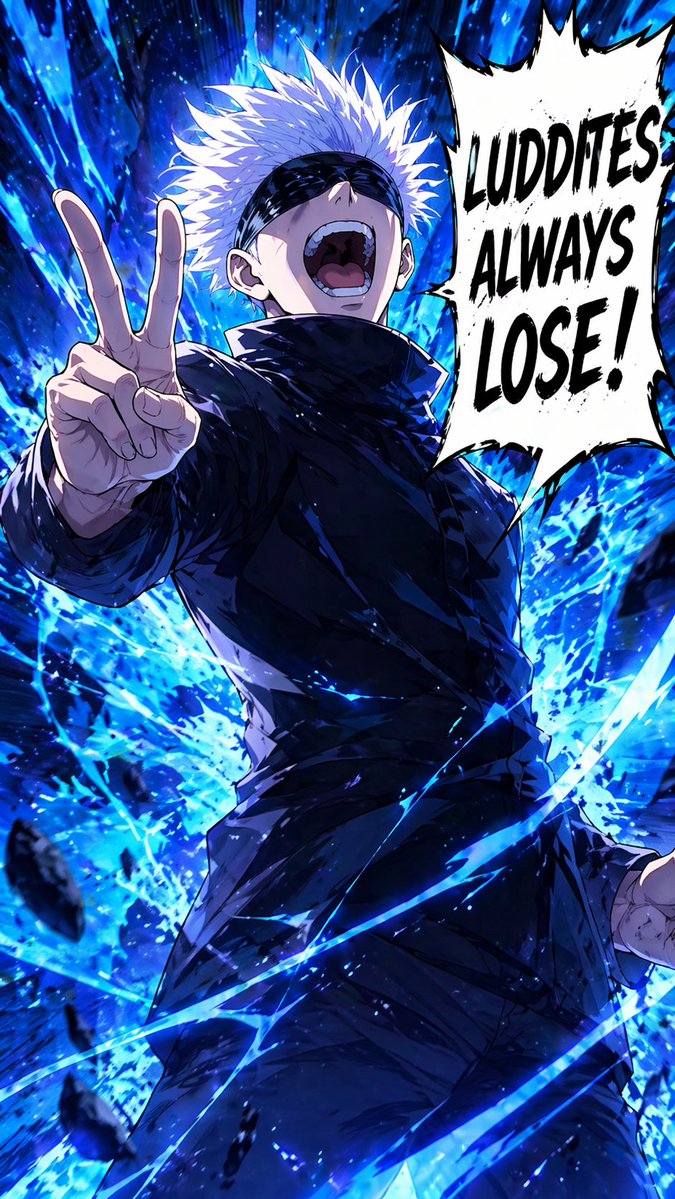
Posa di vittoria dello stregone bendato
Questo prompt genera un drammatico poster d'azione anime verticale raffigurante uno stregone dai capelli bianchi bendato, avvolto da un'energia blu esplosiva e accompagnato da un audace fumetto in stile manga, ideale per illustrazioni di personaggi stilizzati o immagini ispirate ai fandom.
Questo è un esempio di prompt GPT Image 2 per Anime e videogiochi . Utilizza il prompt pronto per la copia qui sotto per generare immagini simili e verifica l'attribuzione Awesome GPT Image 2 Prompts e i diritti di utilizzo commerciale prima del riutilizzo.
Free 1K preview
Generate one preview image instantly, no sign-up required.
Richiesta
prompt pronto per la copia
A high-impact shonen manga anime illustration of a powerful white-haired sorcerer in a dramatic low-angle full-body pose, laughing with his head thrown back and mouth wide open, wearing a sleek black high-collar uniform and a black blindfold over his eyes. His left hand is thrust toward the viewer making a two-finger peace sign, with strong foreshortening that makes the hand large in the foreground, while his right arm hangs lower at his side. Surround him with explosive {argument name="energy color" default="electric blue"} supernatural energy, violent brushstroke-like aura trails, flying debris, sparks, and swirling curved streaks cutting across the frame. The background should be a dark, abstract, chaotic energy burst with glowing blue shards and motion lines, creating a sense of overwhelming power. Use bold cel-shaded anime rendering with painterly highlights, sharp linework, intense contrast, and glossy fabric folds on the black outfit. On the right side, add 1 large jagged white manga speech bubble with thick black outline containing the text {argument name="speech bubble text" default="LUDDITES ALWAYS LOSE!"} in huge distressed black uppercase letters. Vertical composition, dynamic action poster framing, confident triumphant attitude, modern dark fantasy anime aesthetic.Variabili di richiesta
Segnaposto per gli argomenti modificabili presenti nel prompt, con i relativi valori predefiniti.
Best for
- - Anime e videogiochi visual exploration
- - Image generation and reference-image edits
- - Reusable briefs that keep source attribution visible
Change these parts
- - Subject, product, character, or scene
- - Aspect ratio, camera, lighting, and background
- - Brand, text, color, and output constraints
Recommended model and settings
- - Model: gpt-image-2
- - Input mode: Testo in immagine
- - Aspect ratio: source
- - Commercial status: review original source
How to use this prompt
- 1. Copy the prompt and preserve its structure for the first test.
- 2. Replace the subject, context, and publishing channel.
- 3. Change one camera, lighting, or style variable per iteration.
- 4. Inspect the output, source, text, and rights before reuse.
Limitations, source, and reuse cautions
- - Generated output is an editable draft, not factual, legal, or rights evidence.
- - Review the linked source, people, brands, logos, text, and third-party media before commercial use.
Altri casi in questa categoria
Prioritizzazione in base a categoria, compatibilità della modalità di input, qualità e minor rischio.






Note sul riutilizzo e sulla fonte
Utilizza questo prompt in tutta sicurezza dopo aver visualizzato in anteprima il caso.
- 1.Copia il prompt oppure aprilo direttamente in Dovoo tramite il pulsante di generazione.
- 2.Regola le variabili, le proporzioni e le immagini di riferimento in base alle tue esigenze.
- 3.Prima della pubblicazione o dell'utilizzo a pagamento, verificare i diritti di fonte, i requisiti di attribuzione e i rischi relativi al marchio o all'immagine.