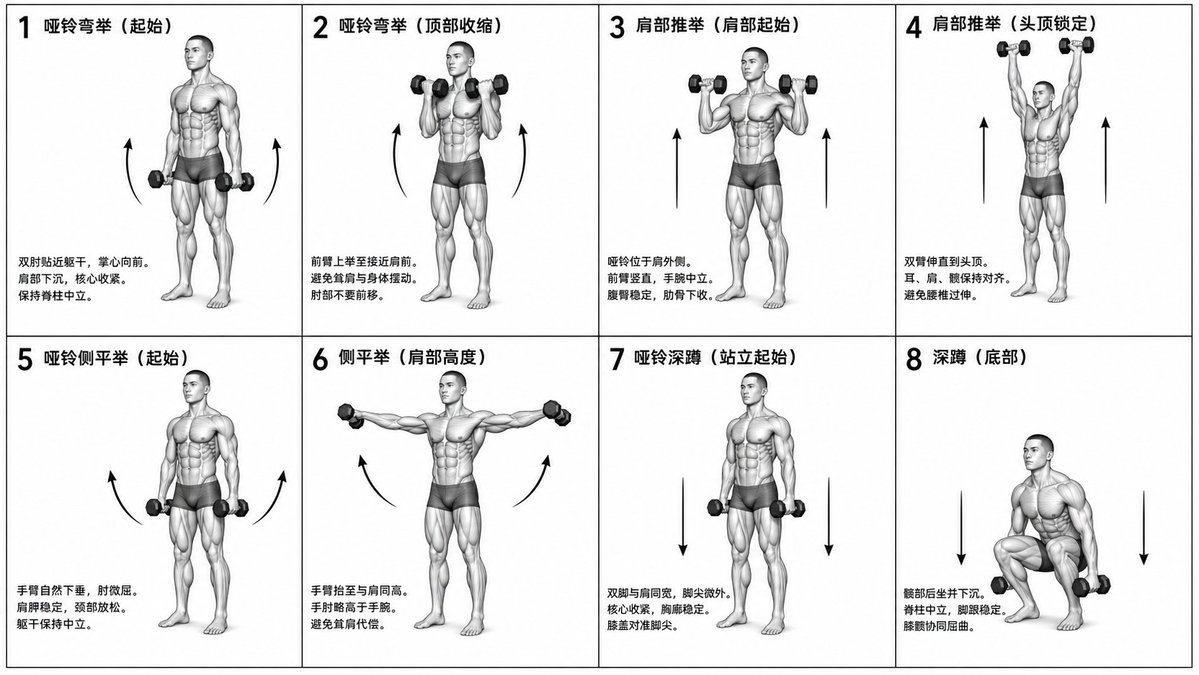
Schema illustrativo per l'allenamento biomeccanico
Un compito complesso per la creazione di una tabella di fitness monocromatica, scientificamente accurata, con griglia 2x4, che mostri esercizi specifici con etichette e figure anatomiche.
Questo è un esempio di prompt GPT Image 2 per Grafica e poster . Utilizza il prompt pronto per la copia qui sotto per generare immagini simili e verifica l'attribuzione Awesome GPT Image 2 Prompts e i diritti di utilizzo commerciale prima del riutilizzo.
Free 1K preview
Generate one preview image instantly, no sign-up required.
Free text preview doesn’t preserve reference-image consistency.
Richiesta
prompt pronto per la copia
Generate a monochrome grayscale technical illustration, a biomechanically accurate fitness instruction sheet, clean 3D anatomical figures, scientific diagram aesthetics, minimalist style, no artistic exaggeration.

2x4 grid layout (total of 8 panels), perfectly aligned cells, equal spacing, thin black border, numbered 1 to 8.

Neutral athletic human body (gender-neutral), proportional anatomy, consistent figure across all panels.

{argument name="training sequence" default="Dumbbell training"} sequence (key positions only):
1. Dumbbell Curl (starting position)
2. Dumbbell Curl (top contraction)
3. Shoulder Press (start at shoulder height)
4. Shoulder Press (overhead lockout)
5. Lateral Raise (arms down)
6. Lateral Raise (arms to shoulder height)
7. Dumbbell Squat (standing start)
8. Squat (bottom position).

Top left corner: bold number + movement name (Chinese).
Center: full-body pose (clear joint positioning).
Bottom left corner: brief technical description (2–3 lines, correct posture cues).
Overlay: directional arrows showing the path of motion (up/down/arc).

Correct joint alignment, neutral spine, proper elbow and knee positioning, realistic weight distribution, no exaggerated movements.

Highly detailed grayscale shading, soft studio lighting, subtle shadows, clean lines, medical/sports science diagram quality.

Solid white background.

No color, no background environment, no extra elements, no stylization, no blur.
Variabili di richiesta
Segnaposto per gli argomenti modificabili presenti nel prompt, con i relativi valori predefiniti.
Best for
- - Grafica e poster visual exploration
- - Image generation and reference-image edits
- - Reusable briefs that keep source attribution visible
Change these parts
- - Subject, product, character, or scene
- - Aspect ratio, camera, lighting, and background
- - Brand, text, color, and output constraints
Recommended model and settings
- - Model: gpt-image-2
- - Input mode: Immagine in immagine
- - Aspect ratio: source
- - Commercial status: review original source
How to use this prompt
- 1. Copy the prompt and preserve its structure for the first test.
- 2. Replace the subject, context, and publishing channel.
- 3. Change one camera, lighting, or style variable per iteration.
- 4. Inspect the output, source, text, and rights before reuse.
Limitations, source, and reuse cautions
- - Generated output is an editable draft, not factual, legal, or rights evidence.
- - Review the linked source, people, brands, logos, text, and third-party media before commercial use.
Altri casi in questa categoria
Prioritizzazione in base a categoria, compatibilità della modalità di input, qualità e minor rischio.






Note sul riutilizzo e sulla fonte
Utilizza questo prompt in tutta sicurezza dopo aver visualizzato in anteprima il caso.
- 1.Copia il prompt oppure aprilo direttamente in Dovoo tramite il pulsante di generazione.
- 2.Regola le variabili, le proporzioni e le immagini di riferimento in base alle tue esigenze.
- 3.Prima della pubblicazione o dell'utilizzo a pagamento, verificare i diritti di fonte, i requisiti di attribuzione e i rischi relativi al marchio o all'immagine.