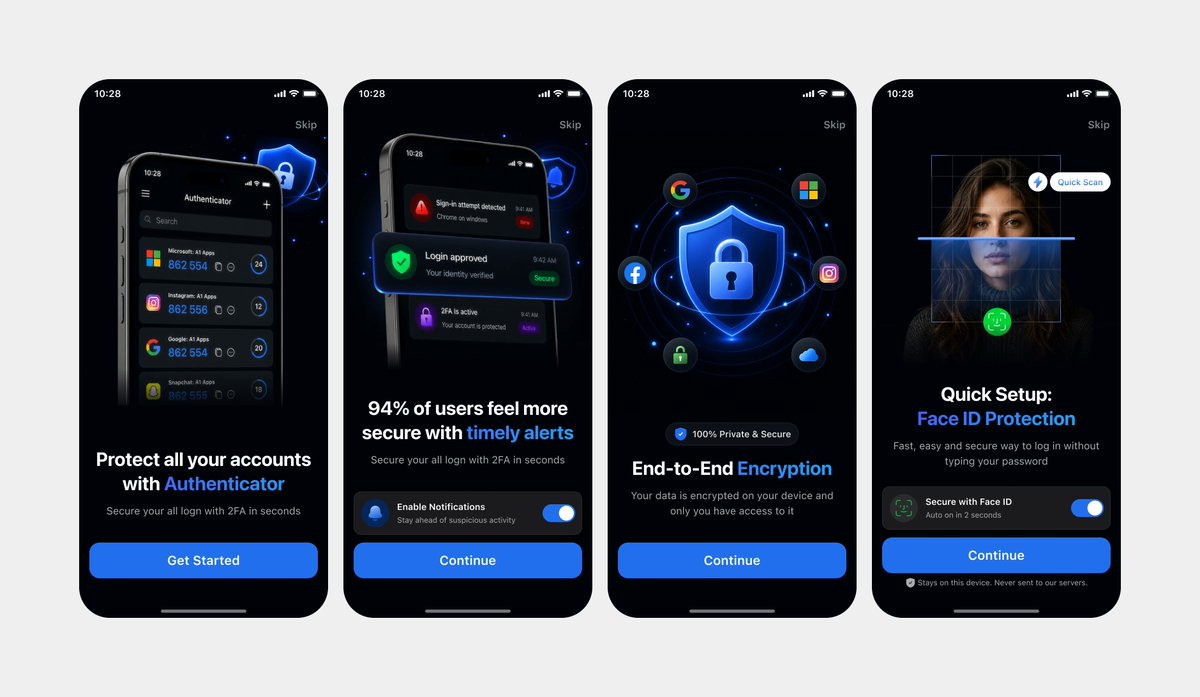
Mockup di interfacce utente pulite per l'onboarding dell'autenticatore
Genera una presentazione di onboarding mobile in modalità scura, elegante e composta da quattro schermate, a partire da riferimenti di interfaccia utente fotografati, utile per landing page di app o vetrine di design.
Questo è un esempio di prompt GPT Image 2 per Prodotto e commerciale . Utilizza il prompt pronto per la copia qui sotto per generare immagini simili e verifica l'attribuzione Awesome GPT Image 2 Prompts e i diritti di utilizzo commerciale prima del riutilizzo.
Hai bisogno del set completo di prompt? Usa il Prodotto e commerciale hub tematico per ulteriori esempi correlati oppure apri il GPT Image 2 catalogo rapido per l'indice completo degli esempi, le strutture riutilizzabili e l'attribuzione delle fonti.
Free 1K preview
Generate one preview image instantly, no sign-up required.
1002/4000
Richiesta
prompt pronto per la copia
Using REFERENCE_0 and REFERENCE_1 as the design references, recreate the same 4 mobile onboarding screens as clean, high-fidelity UI mockups instead of a photographed laptop screen. Remove all perspective distortion, laptop/browser surroundings, glare, and camera artifacts. Present the four iPhone-style screens front-facing, evenly spaced in one horizontal row on a light gray canvas, preserving the dark-mode version from REFERENCE_0 and the same screen order, typography hierarchy, blue security visual style, rounded phone frames, status bars, skip links, bottom home indicators, and CTA structure. Keep exactly 4 screens: 1) authenticator account protection with “Get Started”, 2) timely alerts with notification toggle and “Continue”, 3) end-to-end encryption with shield/lock and social icons plus “Continue”, 4) Face ID protection quick setup with scan overlay, toggle, and “Continue”. Make the UI crisp, polished, app-store-presentation ready, with sharp readable text and consistent spacing.
Best for
- - Prodotto e commerciale visual exploration
- - Image generation and reference-image edits
- - Reusable briefs that keep source attribution visible
Change these parts
- - Subject, product, character, or scene
- - Aspect ratio, camera, lighting, and background
- - Brand, text, color, and output constraints
Recommended model and settings
- - Model: gpt-image-2
- - Input mode: Testo in immagine
- - Aspect ratio: source
- - Commercial status: review original source
How to use this prompt
- 1. Copy the prompt and preserve its structure for the first test.
- 2. Replace the subject, context, and publishing channel.
- 3. Change one camera, lighting, or style variable per iteration.
- 4. Inspect the output, source, text, and rights before reuse.
Limitations, source, and reuse cautions
- - Generated output is an editable draft, not factual, legal, or rights evidence.
- - Review the linked source, people, brands, logos, text, and third-party media before commercial use.
Importato da Awesome GPT Image 2 Prompts . È richiesta l'attribuzione. Lo stato di utilizzo commerciale è allowed ; verificare i diritti della fonte prima dell'utilizzo a pagamento.
Altri casi in questa categoria
Prioritizzazione in base a categoria, compatibilità della modalità di input, qualità e minor rischio.

Matte Black B.AI Keyboard Keycap
Testo in immagine

Cute Speech Bubble Mascot Profile Icon
Testo in immagine

Autumn Cozy Casual Outfit Prompt
Testo in immagine

Tuxedo Cat Photo and Line Art Diptych
Testo in immagine

Luxury Travel Fashion Portrait Prompt
Testo in immagine

Cute Focus Desk Flat Lay and Kawaii Illustration
Testo in immagine
Note sul riutilizzo e sulla fonte
Utilizza questo prompt in tutta sicurezza dopo aver visualizzato in anteprima il caso.
- 1.Copia il prompt oppure aprilo direttamente in Dovoo tramite il pulsante di generazione.
- 2.Regola le variabili, le proporzioni e le immagini di riferimento in base alle tue esigenze.
- 3.Prima della pubblicazione o dell'utilizzo a pagamento, verificare i diritti di fonte, i requisiti di attribuzione e i rischi relativi al marchio o all'immagine.