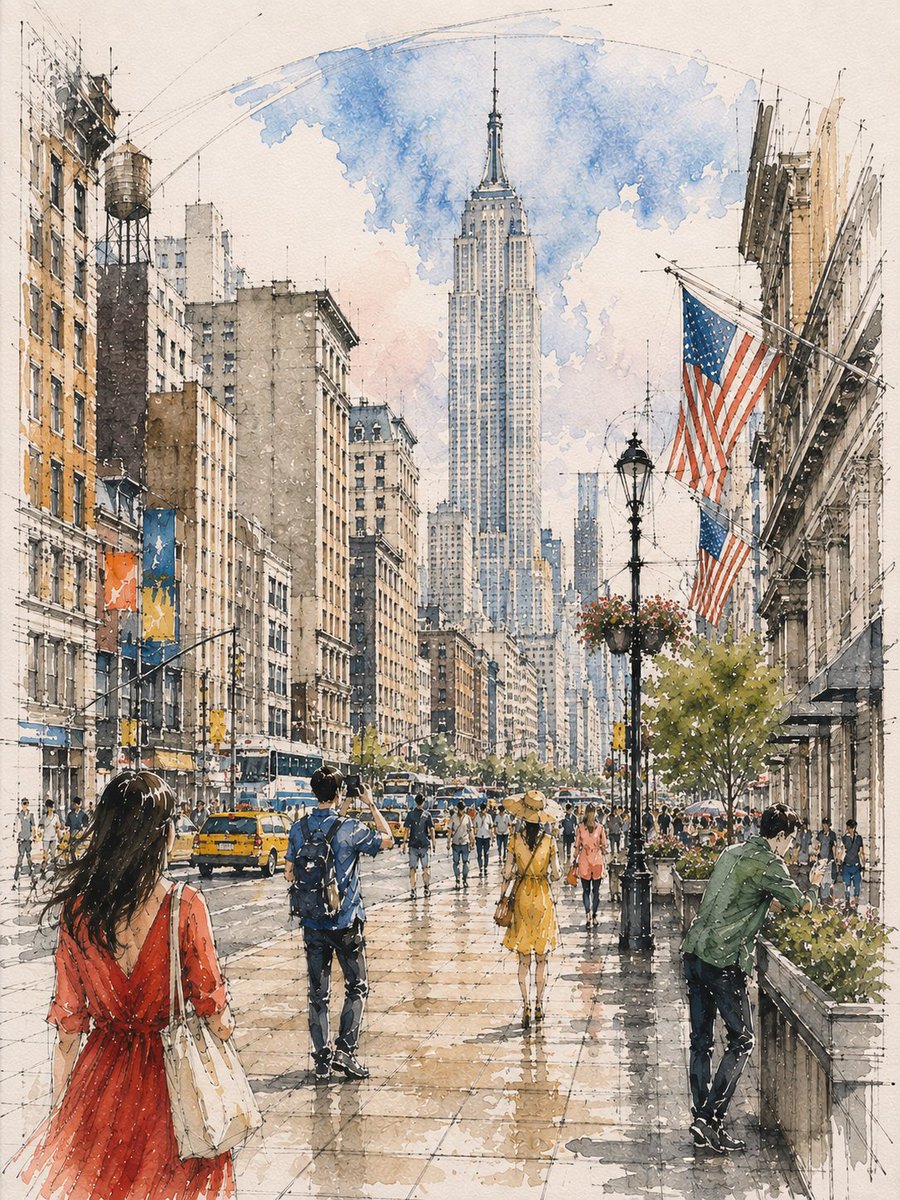
Architectural Watercolor Sketch
A customizable architectural sketching prompt that combines ink linework with loose watercolor washes to create vibrant, atmospheric interiors.
Questo è un esempio di prompt GPT Image 2 per Illustrazione e arte . Utilizza il prompt pronto per la copia qui sotto per generare immagini simili e verifica l'attribuzione Awesome GPT Image 2 Prompts e i diritti di utilizzo commerciale prima del riutilizzo.
Hai bisogno del set completo di prompt? Usa il Illustrazione e arte hub tematico per ulteriori esempi correlati oppure apri il GPT Image 2 catalogo rapido per l'indice completo degli esempi, le strutture riutilizzabili e l'attribuzione delle fonti.
Free 1K preview
Generate one preview image instantly, no sign-up required.
1880/4000
Richiesta
prompt pronto per la copia
Loose watercolor and pen sketch inside {argument name="location" default="[LOCATION / SUBJECT]"}, seen from {argument name="viewpoint" default="[VIEWPOINT]"} toward {argument name="focal point" default="[ARCHITECTURAL FOCAL POINT]"}, {argument name="central feature" default="[CENTRAL FEATURE]"} at center, {argument name="overhead structure" default="[OVERHEAD ARCHITECTURAL FEATURE]"} overhead. Ink line drawn first and left visible through every wash — {argument name="linework details" default="[ARCHITECTURAL LINEWORK]"} and {argument name="floor grid" default="[GROUND / FLOOR GRID]"} overshooting into blank paper, one long confident arc for {argument name="major curve" default="[MAJOR CURVE]"}. Wash about 65%, warm below and cool above: {argument name="warm palette" default="[WARM ARCHITECTURAL PALETTE]"} on {argument name="lower elements" default="[LOWER ARCHITECTURAL ELEMENTS]"}, {argument name="cool palette" default="[COOL PALETTE]"} over {argument name="upper feature" default="[UPPER ARCHITECTURAL FEATURE]"} thinning to bare line at the crown. Diagonal light shafts left as reserved white paper, the brightest value. Floor in {argument name="floor wash" default="[FLOOR COLOR / WASH]"} with a backrun. Figures in three depth bands, clustered and gapped, never in a row: {argument name="near figures" default="[NEAR FIGURES AND SCALE]"}, one cropped by the bottom edge; {argument name="mid figures" default="[MID FIGURES AND SCALE]"} scattered at different distances, {argument name="midground cluster" default="[MIDGROUND CLUSTER]"} clustered at {argument name="focal point" default="[FOCAL POINT]"}; {argument name="far figures" default="[FAR FIGURES AND SCALE]"} dissolving into strokes. Different actions each — {argument name="action 1" default="[ACTION 1]"}, {argument name="action 2" default="[ACTION 2]"}, {argument name="action 3" default="[ACTION 3]"}Variabili di richiesta
Segnaposto per gli argomenti modificabili presenti nel prompt, con i relativi valori predefiniti.
Variabile
location
Predefinito
[LOCATION / SUBJECT]
Variabile
viewpoint
Predefinito
[VIEWPOINT]
Variabile
focal point
Predefinito
[ARCHITECTURAL FOCAL POINT]
Variabile
central feature
Predefinito
[CENTRAL FEATURE]
Variabile
overhead structure
Predefinito
[OVERHEAD ARCHITECTURAL FEATURE]
Variabile
linework details
Predefinito
[ARCHITECTURAL LINEWORK]
Variabile
floor grid
Predefinito
[GROUND / FLOOR GRID]
Variabile
major curve
Predefinito
[MAJOR CURVE]
Variabile
warm palette
Predefinito
[WARM ARCHITECTURAL PALETTE]
Variabile
lower elements
Predefinito
[LOWER ARCHITECTURAL ELEMENTS]
Variabile
cool palette
Predefinito
[COOL PALETTE]
Variabile
upper feature
Predefinito
[UPPER ARCHITECTURAL FEATURE]
Variabile
floor wash
Predefinito
[FLOOR COLOR / WASH]
Variabile
near figures
Predefinito
[NEAR FIGURES AND SCALE]
Variabile
mid figures
Predefinito
[MID FIGURES AND SCALE]
Variabile
midground cluster
Predefinito
[MIDGROUND CLUSTER]
Variabile
far figures
Predefinito
[FAR FIGURES AND SCALE]
Variabile
action 1
Predefinito
[ACTION 1]
Variabile
action 2
Predefinito
[ACTION 2]
Variabile
action 3
Predefinito
[ACTION 3]
Best for
- - Illustrazione e arte visual exploration
- - Image generation and reference-image edits
- - Reusable briefs that keep source attribution visible
Change these parts
- - Subject, product, character, or scene
- - Aspect ratio, camera, lighting, and background
- - Brand, text, color, and output constraints
Recommended model and settings
- - Model: gpt-image-2
- - Input mode: Testo in immagine
- - Aspect ratio: source
- - Commercial status: review original source
How to use this prompt
- 1. Copy the prompt and preserve its structure for the first test.
- 2. Replace the subject, context, and publishing channel.
- 3. Change one camera, lighting, or style variable per iteration.
- 4. Inspect the output, source, text, and rights before reuse.
Limitations, source, and reuse cautions
- - Generated output is an editable draft, not factual, legal, or rights evidence.
- - Review the linked source, people, brands, logos, text, and third-party media before commercial use.
Importato da Awesome GPT Image 2 Prompts . È richiesta l'attribuzione. Lo stato di utilizzo commerciale è allowed ; verificare i diritti della fonte prima dell'utilizzo a pagamento.
Altri casi in questa categoria
Prioritizzazione in base a categoria, compatibilità della modalità di input, qualità e minor rischio.

Grumpy Rhino Storybook Illustration
Testo in immagine

Surreal 3D Chess Match Artwork
Testo in immagine

Martial Arts Legend Character Bible Sheet
Testo in immagine

Manga Desert Radio Telescope Road Trip
Testo in immagine

Female Clown Cyborg Portrait
Testo in immagine

Imperial Research Bunker on Volcanic Planet
Testo in immagine
Note sul riutilizzo e sulla fonte
Utilizza questo prompt in tutta sicurezza dopo aver visualizzato in anteprima il caso.
- 1.Copia il prompt oppure aprilo direttamente in Dovoo tramite il pulsante di generazione.
- 2.Regola le variabili, le proporzioni e le immagini di riferimento in base alle tue esigenze.
- 3.Prima della pubblicazione o dell'utilizzo a pagamento, verificare i diritti di fonte, i requisiti di attribuzione e i rischi relativi al marchio o all'immagine.