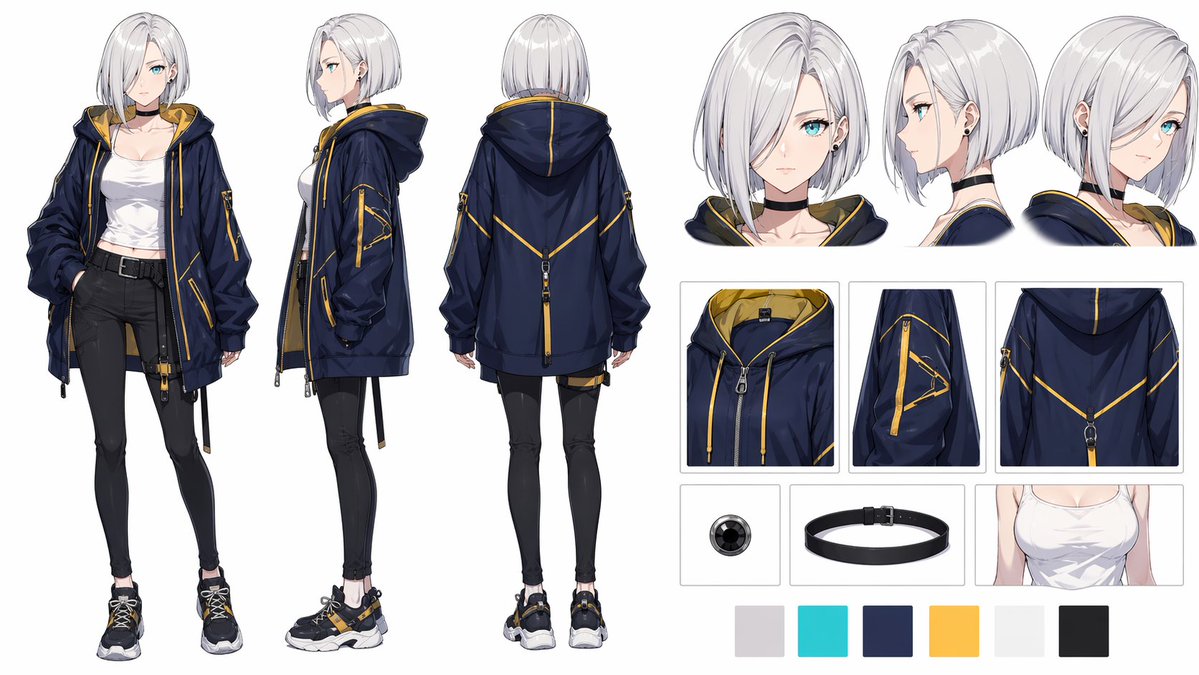
Scheda personaggio in stile streetwear anime
Questo prompt genera una dettagliata tavola di riferimento per personaggi e abiti in stile anime, ideale per la progettazione di costumi, lo sviluppo visivo o la presentazione di concept art.
Questo è un esempio di prompt GPT Image 2 per Anime e videogiochi . Utilizza il prompt pronto per la copia qui sotto per generare immagini simili e verifica l'attribuzione Awesome GPT Image 2 Prompts e i diritti di utilizzo commerciale prima del riutilizzo.
Hai bisogno del set completo di prompt? Usa il Anime e videogiochi hub tematico per ulteriori esempi correlati oppure apri il GPT Image 2 catalogo rapido per l'indice completo degli esempi, le strutture riutilizzabili e l'attribuzione delle fonti.
Free 1K preview
Generate one preview image instantly, no sign-up required.
3315/4000
Richiesta
prompt pronto per la copia
{
  "type": "anime character reference sheet",
  "style": "clean high-detail modern anime design sheet, white background, soft neutral studio lighting, polished fabric rendering, precise seams and zippers, fashion concept art presentation",
  "character": {
    "gender presentation": "young woman",
    "build": "slim, long-legged, slightly athletic",
    "name": "{argument name=\"character name\" default=\"original character\"}",
    "hair": {
      "color": "{argument name=\"hair color\" default=\"silver white\"}",
      "style": "straight chin-length bob with heavy side-swept fringe covering one eye, smooth glossy strands, blunt ends"
    },
    "accessories": [
      "black choker",
      "small black stud earrings"
    ],
    "expression": "neutral"
  },
  "outfit": {
    "outerwear": {
      "type": "oversized technical hoodie jacket",
      "primary color": "{argument name=\"jacket color\" default=\"deep navy blue\"}",
      "lining color": "{argument name=\"lining color\" default=\"mustard yellow\"}",
      "details": [
        "front zipper",
        "large hood",
        "yellow drawstrings",
        "multiple utility straps hanging from hem",
        "yellow piping and seam accents",
        "decorative triangular zip detail on sleeve",
        "back chevron-like yellow line detail",
        "sleeve patch hardware"
      ]
    },
    "top": {
      "type": "fitted cropped tank top",
      "color": "white"
    },
    "bottom": {
      "type": "skinny pants or leggings",
      "color": "black",
      "details": [
        "high waist",
        "black belt with square buckle"
      ]
    },
    "footwear": {
      "type": "chunky sneakers",
      "colors": [
        "black",
        "white",
        "yellow"
      ]
    }
  },
  "layout": {
    "canvas": "landscape sheet",
    "sections": [
      {
        "title": "full body views",
        "position": "left and center",
        "count": 3,
        "labels": [
          "front view",
          "side view",
          "back view"
        ]
      },
      {
        "title": "head views",
        "position": "top right",
        "count": 3,
        "labels": [
          "front close-up",
          "side close-up",
          "three-quarter back close-up"
        ]
      },
      {
        "title": "garment detail panels",
        "position": "middle right",
        "count": 6,
        "labels": [
          "hood interior and collar close-up",
          "sleeve zipper detail",
          "back panel detail",
          "round black accessory close-up",
          "black choker close-up",
          "white tank top torso close-up"
        ]
      },
      {
        "title": "color palette",
        "position": "bottom right",
        "count": 6,
        "labels": [
          "light gray",
          "cyan accent",
          "deep navy blue",
          "golden yellow",
          "off-white",
          "charcoal black"
        ]
      }
    ],
    "centerpiece": "three full-body orthographic fashion views showing the same character in front, side, and back poses"
  },
  "composition": {
    "background": "plain very light gray-white",
    "linework": "fine clean line art",
    "rendering": "semi-realistic anime shading with crisp highlights",
    "focus": "character costume design and construction details"
  }
}
Variabili di richiesta
Segnaposto per gli argomenti modificabili presenti nel prompt, con i relativi valori predefiniti.
Variabile
character name
Predefinito
original character
Variabile
hair color
Predefinito
silver white
Variabile
jacket color
Predefinito
deep navy blue
Variabile
lining color
Predefinito
mustard yellow
Best for
- - Anime e videogiochi visual exploration
- - Image generation and reference-image edits
- - Reusable briefs that keep source attribution visible
Change these parts
- - Subject, product, character, or scene
- - Aspect ratio, camera, lighting, and background
- - Brand, text, color, and output constraints
Recommended model and settings
- - Model: gpt-image-2
- - Input mode: Testo in immagine
- - Aspect ratio: source
- - Commercial status: review original source
How to use this prompt
- 1. Copy the prompt and preserve its structure for the first test.
- 2. Replace the subject, context, and publishing channel.
- 3. Change one camera, lighting, or style variable per iteration.
- 4. Inspect the output, source, text, and rights before reuse.
Limitations, source, and reuse cautions
- - Generated output is an editable draft, not factual, legal, or rights evidence.
- - Review the linked source, people, brands, logos, text, and third-party media before commercial use.
Importato da Awesome GPT Image 2 Prompts . È richiesta l'attribuzione. Lo stato di utilizzo commerciale è allowed ; verificare i diritti della fonte prima dell'utilizzo a pagamento.
Altri casi in questa categoria
Prioritizzazione in base a categoria, compatibilità della modalità di input, qualità e minor rischio.

Manga Desert Radio Telescope Road Trip
Testo in immagine

Grumpy Rhino Storybook Illustration
Testo in immagine

Martial Arts Legend Character Bible Sheet
Testo in immagine

Female Clown Cyborg Portrait
Testo in immagine

Greyscale Puzzle Portrait with Color Accent
Testo in immagine

Glitch Aesthetic Surreal Portrait
Testo in immagine
Note sul riutilizzo e sulla fonte
Utilizza questo prompt in tutta sicurezza dopo aver visualizzato in anteprima il caso.
- 1.Copia il prompt oppure aprilo direttamente in Dovoo tramite il pulsante di generazione.
- 2.Regola le variabili, le proporzioni e le immagini di riferimento in base alle tue esigenze.
- 3.Prima della pubblicazione o dell'utilizzo a pagamento, verificare i diritti di fonte, i requisiti di attribuzione e i rischi relativi al marchio o all'immagine.