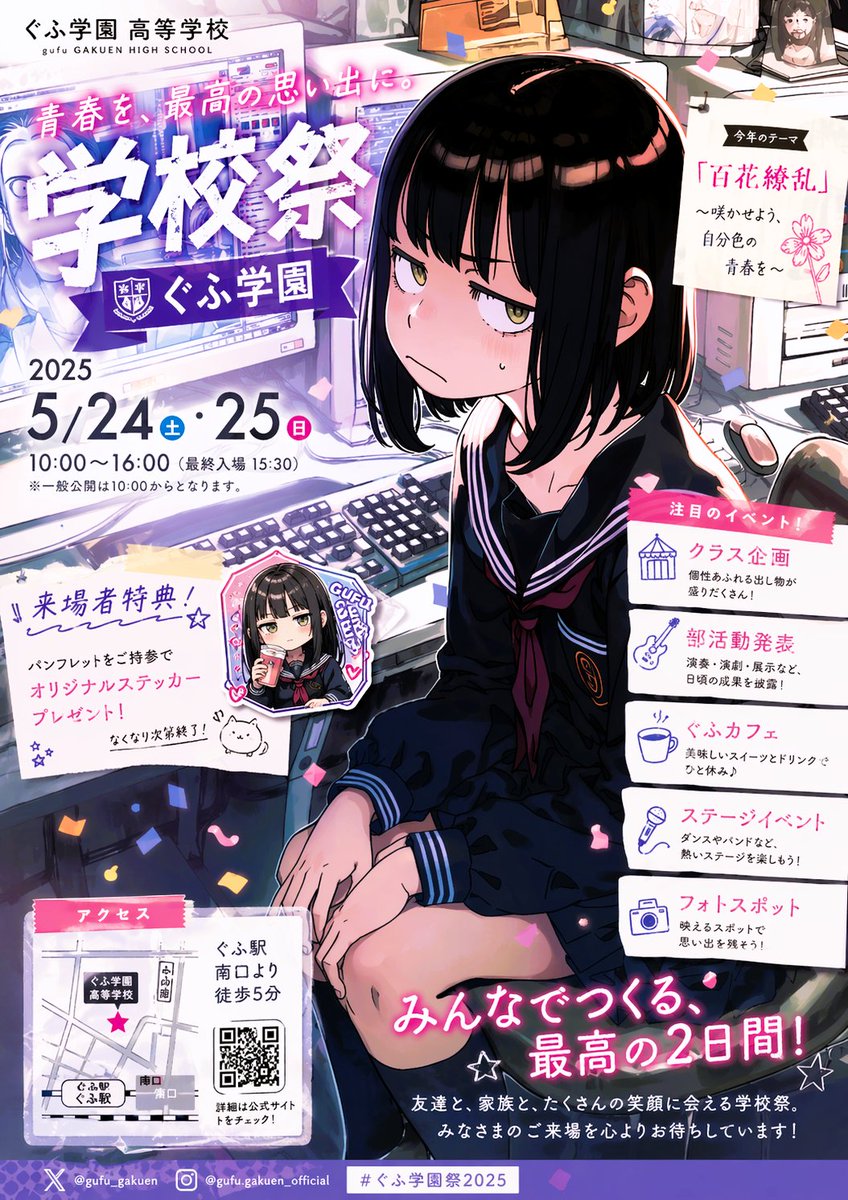
Locandina/Poster del Festival Scolastico di Anime
Questo prompt genera un volantino per eventi in stile anime giapponese, ricco di dettagli, con protagonista una studentessa mascotte dall'aria malinconica e informazioni dettagliate sul festival, ideale per un poster promozionale o una grafica per i social media.
Questo è un esempio di prompt GPT Image 2 per Grafica e poster . Utilizza il prompt pronto per la copia qui sotto per generare immagini simili e verifica l'attribuzione Awesome GPT Image 2 Prompts e i diritti di utilizzo commerciale prima del riutilizzo.
Free 1K preview
Generate one preview image instantly, no sign-up required.
Richiesta
prompt pronto per la copia
{
  "type": "anime school festival flyer poster",
  "style": "Japanese promotional flyer, glossy manga illustration, vibrant purple and pink accent colors, dense print layout, confetti scattered across the composition, polished commercial poster design",
  "setting": {
    "location": "computer classroom or school media room filled with desktop monitors, keyboards, mouse, cables, desk clutter, pinned notes, and soft indoor lighting",
    "time": "festival announcement poster, daytime indoor scene"
  },
  "subject": {
    "count": 1,
    "character": "moody high school girl sitting on a chair beside computer desks",
    "appearance": {
      "gender_presentation": "female",
      "age_appearance": "teenage",
      "hair": {
        "color": "{argument name=\"hair color\" default=\"black\"}",
        "style": "straight chin-length bob with blunt bangs and glossy highlights"
      },
      "eyes": "half-lidded yellow-brown eyes with a tired annoyed stare",
      "expression": "sullen, sleepy, unimpressed, slightly blushing, one small sweat drop on the cheek",
      "pose": "seated with knees together, hands relaxed near her lap, shoulders slightly slouched, looking toward the viewer from a three-quarter angle"
    },
    "clothing": {
      "uniform": "dark navy sailor school uniform",
      "pieces": [
        "long-sleeve sailor top",
        "white trim on collar and cuffs",
        "dark neckerchief with deep red accent",
        "school emblem on chest",
        "matching dark skirt"
      ]
    }
  },
  "layout": {
    "format": "vertical A4-style Japanese event flyer",
    "sections": [
      {
        "title": "ぐふ学園 高等学校",
        "position": "top-left",
        "count": 1,
        "labels": [
          "gufu GAKUEN HIGH SCHOOL"
        ]
      },
      {
        "title": "headline area",
        "position": "upper-left to center-left",
        "count": 3,
        "labels": [
          "青春を、最高の思い出に。",
          "School Festival",
          "ぐふ学園"
        ]
      },
      {
        "title": "date and time",
        "position": "left-middle",
        "count": 5,
        "labels": [
          "2025",
          "5/24",
          "Sat",
          "25",
          "Sun"
        ]
      },
      {
        "title": "time details",
        "position": "left-middle below date",
        "count": 2,
        "labels": [
          "10:00-16:00 (last entry 15:30)",
          "※一般公開は10:00からとなります。"
        ]
      },
      {
        "title": "今年のテーマ",
        "position": "upper-right pinned note",
        "count": 4,
        "labels": [
          "今年のテーマ",
          "『Hyakka Ryoran』",
          "〜咲かせよう、自分色。",
          "青春を〜"
        ]
      },
      {
        "title": "Venue Bonus",
        "position": "left-lower-middle",
        "count": 4,
        "labels": [
          "Venue Bonus!",
          "パンフレットをご持参で",
          "オリジナルステッカー プレゼント!",
          "なくなり次第終了!"
        ]
      },
      {
        "title": "sticker sample",
        "position": "left-center lower",
        "count": 1,
        "labels": [
          "GUFU GAKUEN"
        ]
      },
      {
        "title": "注目のイベント!",
        "position": "right-center stacked cards",
        "count": 5,
        "labels": [
          "クラス企画",
          "Circle Announcements",
          "ぐふカフェ",
          "ステージイベント",
          "フォトスポット"
        ]
      },
      {
        "title": "アクセス",
        "position": "bottom-left",
        "count": 5,
        "labels": [
          "アクセス",
          "ぐふ駅 南口より 徒歩5分",
          "ぐふ学園高等学校",
          "ぐふ駅",
          "詳細は公式サイトをチェック!"
        ]
      },
      {
        "title": "closing slogan",
        "position": "bottom-right",
        "count": 2,
        "labels": [
          "みんなでつくる、最高の2日間!",
          "友達と、家族と、たくさんの笑顔に会える学校祭。みなさまのご来場を心よりお待ちしています!"
        ]
      },
      {
        "title": "footer bar",
        "position": "very bottom",
        "count": 4,
        "labels": [
          "X @gufu_gakuen",
          "Instagram @gufu.gakuen_official",
          "#ぐふ学園祭2025"
        ]
      }
    ],
    "centerpiece": "large seated portrait of the unimpressed schoolgirl overlapping the flyer layout",
    "background_elements_count": 8,
    "background_elements": [
      "multiple computer monitors displaying bright screens",
      "computer keyboards",
      "computer mouse",
      "desk edges and office equipment",
      "hanging paper note with clip",
      "confetti pieces",
      "small doodled mascot near the bonus text",
      "QR code in the access section"
    ]
  },
  "text_treatment": {
    "headline": "oversized bold white kanji with rough textured edges and purple glow",
    "subheadings": "pink ribbon labels and clean Japanese sans-serif body text",
    "overall_feel": "cute but sarcastic, youth-culture school event advertising"
  },
  "color_palette": {
    "main": [
      "purple",
      "pink",
      "white",
      "navy",
      "black"
    ],
    "accents": [
      "soft blue",
      "magenta",
      "warm skin tones"
    ]
  },
  "customization": {
    "school_name": "{argument name=\"school name\" default=\"ぐふ学園\"}",
    "year": "{argument name=\"year\" default=\"2025\"}",
    "festival_title": "{argument name=\"festival title\" default=\"School Festival\"}",
    "theme_text": "{argument name=\"theme text\" default=\"A Kaleidoscope of Flowers\"}"
  }
}
Variabili di richiesta
Segnaposto per gli argomenti modificabili presenti nel prompt, con i relativi valori predefiniti.
Best for
- - Grafica e poster visual exploration
- - Image generation and reference-image edits
- - Reusable briefs that keep source attribution visible
Change these parts
- - Subject, product, character, or scene
- - Aspect ratio, camera, lighting, and background
- - Brand, text, color, and output constraints
Recommended model and settings
- - Model: gpt-image-2
- - Input mode: Testo in immagine
- - Aspect ratio: source
- - Commercial status: review original source
How to use this prompt
- 1. Copy the prompt and preserve its structure for the first test.
- 2. Replace the subject, context, and publishing channel.
- 3. Change one camera, lighting, or style variable per iteration.
- 4. Inspect the output, source, text, and rights before reuse.
Limitations, source, and reuse cautions
- - Generated output is an editable draft, not factual, legal, or rights evidence.
- - Review the linked source, people, brands, logos, text, and third-party media before commercial use.
Altri casi in questa categoria
Prioritizzazione in base a categoria, compatibilità della modalità di input, qualità e minor rischio.






Note sul riutilizzo e sulla fonte
Utilizza questo prompt in tutta sicurezza dopo aver visualizzato in anteprima il caso.
- 1.Copia il prompt oppure aprilo direttamente in Dovoo tramite il pulsante di generazione.
- 2.Regola le variabili, le proporzioni e le immagini di riferimento in base alle tue esigenze.
- 3.Prima della pubblicazione o dell'utilizzo a pagamento, verificare i diritti di fonte, i requisiti di attribuzione e i rischi relativi al marchio o all'immagine.