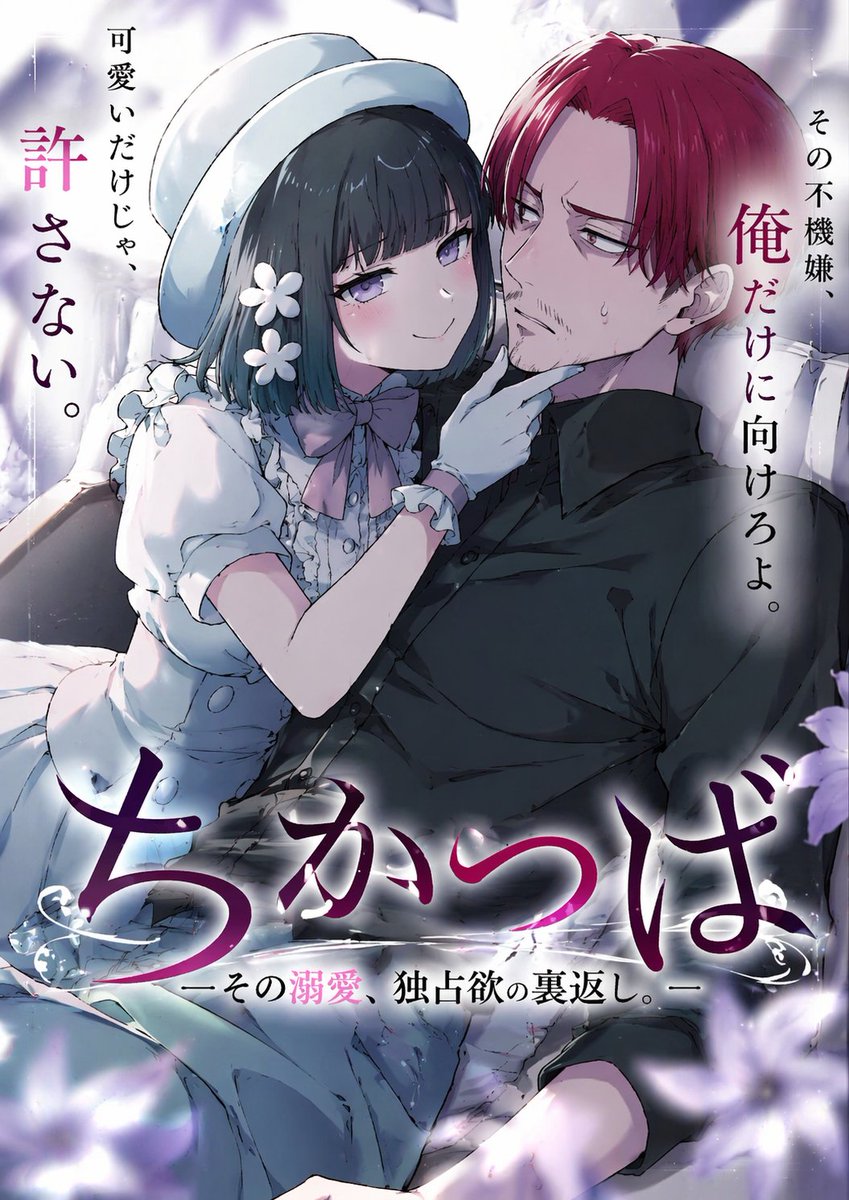
Illustrazione di copertina di una light novel anime
Genera la copertina di una light novel romantica in stile anime con una ragazza provocante e un uomo riluttante, completa di tipografia giapponese personalizzabile.
Questo è un esempio di prompt GPT Image 2 per Anime e videogiochi . Utilizza il prompt pronto per la copia qui sotto per generare immagini simili e verifica l'attribuzione Awesome GPT Image 2 Prompts e i diritti di utilizzo commerciale prima del riutilizzo.
Hai bisogno del set completo di prompt? Usa il Anime e videogiochi hub tematico per ulteriori esempi correlati oppure apri il GPT Image 2 catalogo rapido per l'indice completo degli esempi, le strutture riutilizzabili e l'attribuzione delle fonti.
Free 1K preview
Generate one preview image instantly, no sign-up required.
1147/4000
Richiesta
prompt pronto per la copia
An anime-style light novel cover illustration featuring two characters in an intimate pose. On the left, a young woman with short dark hair, purple eyes, wearing a white hat, a frilly white dress with a pink bow tie, white gloves, and two white flower hairpins. She has an affectionate, teasing smile and is gently touching the chin of the man next to her. On the right, an adult man with {argument name="man's hair color" default="red"} hair parted in the middle, purple eyes, and a light goatee. He is wearing a black button-down shirt and has a slightly annoyed, reluctant expression with a sweat drop on his cheek. The scene features soft, romantic lighting with out-of-focus purple flower petals in the foreground corners. The image includes several Japanese text elements: a large stylized main title at the bottom reading {argument name="main title" default="ちかつば"}, a subtitle below it reading {argument name="subtitle" default="ーその溺愛、独占欲の裏返し。ー"}, vertical text on the top left reading {argument name="left quote" default="可愛いだけじゃ、許さない。"}, and vertical text on the top right reading {argument name="right quote" default="その不機嫌、俺だけに向けろよ。"}.Variabili di richiesta
Segnaposto per gli argomenti modificabili presenti nel prompt, con i relativi valori predefiniti.
Variabile
man's hair color
Predefinito
red
Variabile
main title
Predefinito
ちかつば
Variabile
subtitle
Predefinito
ーその溺愛、独占欲の裏返し。ー
Variabile
left quote
Predefinito
可愛いだけじゃ、許さない。
Variabile
right quote
Predefinito
その不機嫌、俺だけに向けろよ。
Best for
- - Anime e videogiochi visual exploration
- - Image generation and reference-image edits
- - Reusable briefs that keep source attribution visible
Change these parts
- - Subject, product, character, or scene
- - Aspect ratio, camera, lighting, and background
- - Brand, text, color, and output constraints
Recommended model and settings
- - Model: gpt-image-2
- - Input mode: Testo in immagine
- - Aspect ratio: source
- - Commercial status: review original source
How to use this prompt
- 1. Copy the prompt and preserve its structure for the first test.
- 2. Replace the subject, context, and publishing channel.
- 3. Change one camera, lighting, or style variable per iteration.
- 4. Inspect the output, source, text, and rights before reuse.
Limitations, source, and reuse cautions
- - Generated output is an editable draft, not factual, legal, or rights evidence.
- - Review the linked source, people, brands, logos, text, and third-party media before commercial use.
Importato da Awesome GPT Image 2 Prompts . È richiesta l'attribuzione. Lo stato di utilizzo commerciale è allowed ; verificare i diritti della fonte prima dell'utilizzo a pagamento.
Altri casi in questa categoria
Prioritizzazione in base a categoria, compatibilità della modalità di input, qualità e minor rischio.

Manga Desert Radio Telescope Road Trip
Testo in immagine

Grumpy Rhino Storybook Illustration
Testo in immagine

Martial Arts Legend Character Bible Sheet
Testo in immagine

Female Clown Cyborg Portrait
Testo in immagine

Greyscale Puzzle Portrait with Color Accent
Testo in immagine

Glitch Aesthetic Surreal Portrait
Testo in immagine
Note sul riutilizzo e sulla fonte
Utilizza questo prompt in tutta sicurezza dopo aver visualizzato in anteprima il caso.
- 1.Copia il prompt oppure aprilo direttamente in Dovoo tramite il pulsante di generazione.
- 2.Regola le variabili, le proporzioni e le immagini di riferimento in base alle tue esigenze.
- 3.Prima della pubblicazione o dell'utilizzo a pagamento, verificare i diritti di fonte, i requisiti di attribuzione e i rischi relativi al marchio o all'immagine.