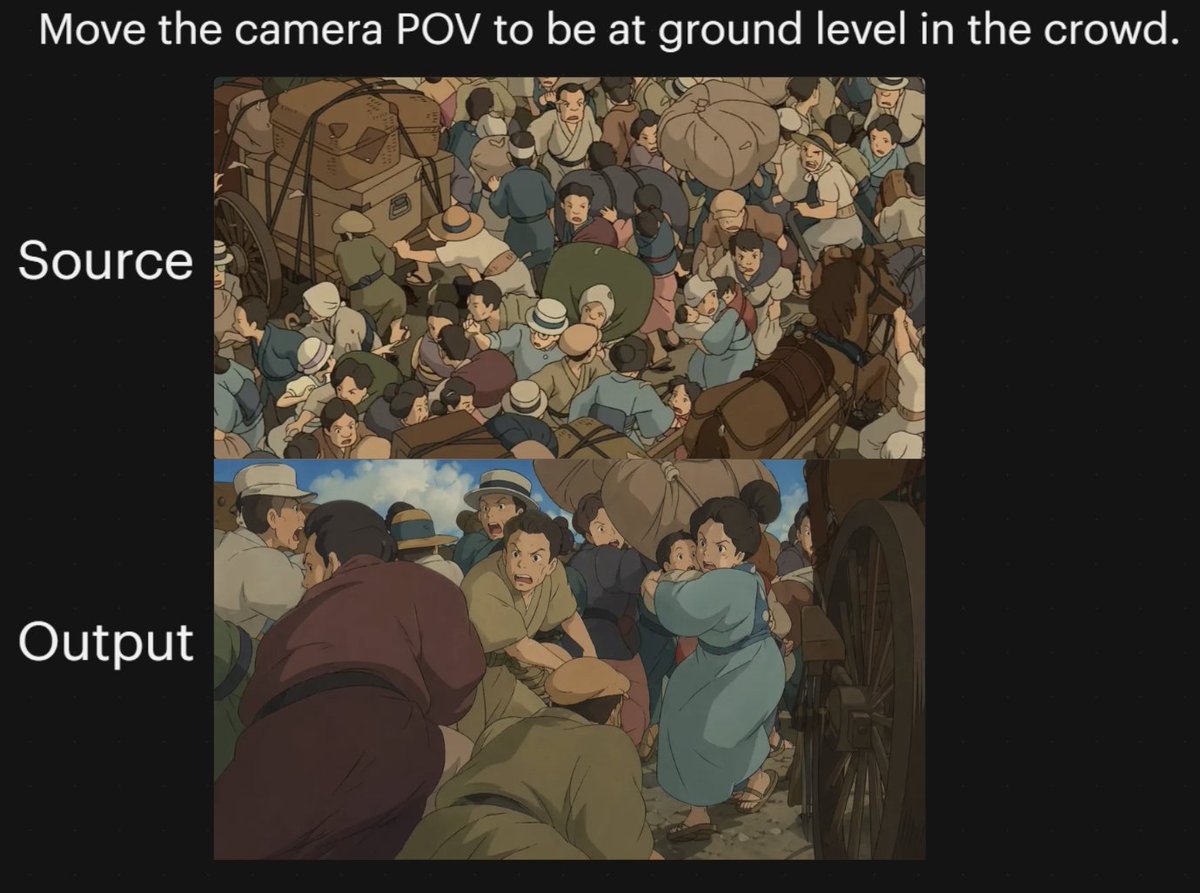
Confronto tra le prospettive di ripresa delle folle negli anime
Questo prompt genera un grafico comparativo a due pannelli con sfondo nero che mostra una scena di folla in stile anime prima e dopo aver cambiato l'inquadratura passando a una prospettiva a livello del suolo, utile per dimostrare la trasformazione del punto di vista nei modelli di immagine.
Questo è un esempio di prompt GPT Image 2 per Illustrazione e arte . Utilizza il prompt pronto per la copia qui sotto per generare immagini simili e verifica l'attribuzione Awesome GPT Image 2 Prompts e i diritti di utilizzo commerciale prima del riutilizzo.
Questo prompt è pensato per più immagini di riferimento. Apriremo Dovoo con il prompt e l'immagine di anteprima disponibile; aggiungeremo i riferimenti rimanenti in Dovoo prima di generare.
Free 1K preview
Generate one preview image instantly, no sign-up required.
Free text preview doesn’t preserve reference-image consistency.
Richiesta
prompt pronto per la copia
A two-panel comparison graphic on a black background demonstrating a dramatic camera-angle change in an anime-style crowded street scene. Place a large white sentence centered across the top: "{argument name="headline text" default="Move the camera POV to be at ground level in the crowd."}". On the left side, add two large white labels aligned with the panels: "Source" beside the upper panel and "Output" beside the lower panel. Create exactly 2 stacked rectangular image panels centered on the canvas. In the top panel, show a high-angle overhead view of a densely packed historical street crowd in a hand-painted anime film style, with dozens of people pressed together around horse-drawn carts and wagon wheels; include bundled luggage, hats, muted earth-tone clothing, blue and tan garments, and a busy composition where figures overlap in every direction. In the bottom panel, recreate the same type of scene but shift the camera to a low, ground-level point of view inside the crowd, looking between bodies and beside a large wagon wheel on the right edge. The foreground should feel immersive and cramped, with several bent or crouched figures close to the camera, a person in a muted purple robe on the left foreground, a kneeling or hunched figure in tan near the center bottom, and a woman in a light blue dress or coat toward the right-middle turning through the crowd while holding a small child. Keep the environment as a chaotic old-world market or transit street with horses, carts, people in brimmed hats and simple period clothing, dusty ground, and warm subdued colors. Use soft cinematic anime lighting, painterly shading, and the visual feel of a classic Studio Ghibli crowd sequence. The overall image should read as a before-and-after camera experiment, with the upper panel as the original overhead composition and the lower panel as the transformed low-angle perspective.Variabili di richiesta
Segnaposto per gli argomenti modificabili presenti nel prompt, con i relativi valori predefiniti.
Best for
- - Illustrazione e arte visual exploration
- - Image generation and reference-image edits
- - Reusable briefs that keep source attribution visible
Change these parts
- - Subject, product, character, or scene
- - Aspect ratio, camera, lighting, and background
- - Brand, text, color, and output constraints
Recommended model and settings
- - Model: gpt-image-2
- - Input mode: Da immagine multipla a immagine
- - Aspect ratio: source
- - Commercial status: review original source
How to use this prompt
- 1. Copy the prompt and preserve its structure for the first test.
- 2. Replace the subject, context, and publishing channel.
- 3. Change one camera, lighting, or style variable per iteration.
- 4. Inspect the output, source, text, and rights before reuse.
Limitations, source, and reuse cautions
- - Generated output is an editable draft, not factual, legal, or rights evidence.
- - Review the linked source, people, brands, logos, text, and third-party media before commercial use.
Altri casi in questa categoria
Prioritizzazione in base a categoria, compatibilità della modalità di input, qualità e minor rischio.






Note sul riutilizzo e sulla fonte
Utilizza questo prompt in tutta sicurezza dopo aver visualizzato in anteprima il caso.
- 1.Copia il prompt oppure aprilo direttamente in Dovoo tramite il pulsante di generazione.
- 2.Regola le variabili, le proporzioni e le immagini di riferimento in base alle tue esigenze.
- 3.Prima della pubblicazione o dell'utilizzo a pagamento, verificare i diritti di fonte, i requisiti di attribuzione e i rischi relativi al marchio o all'immagine.