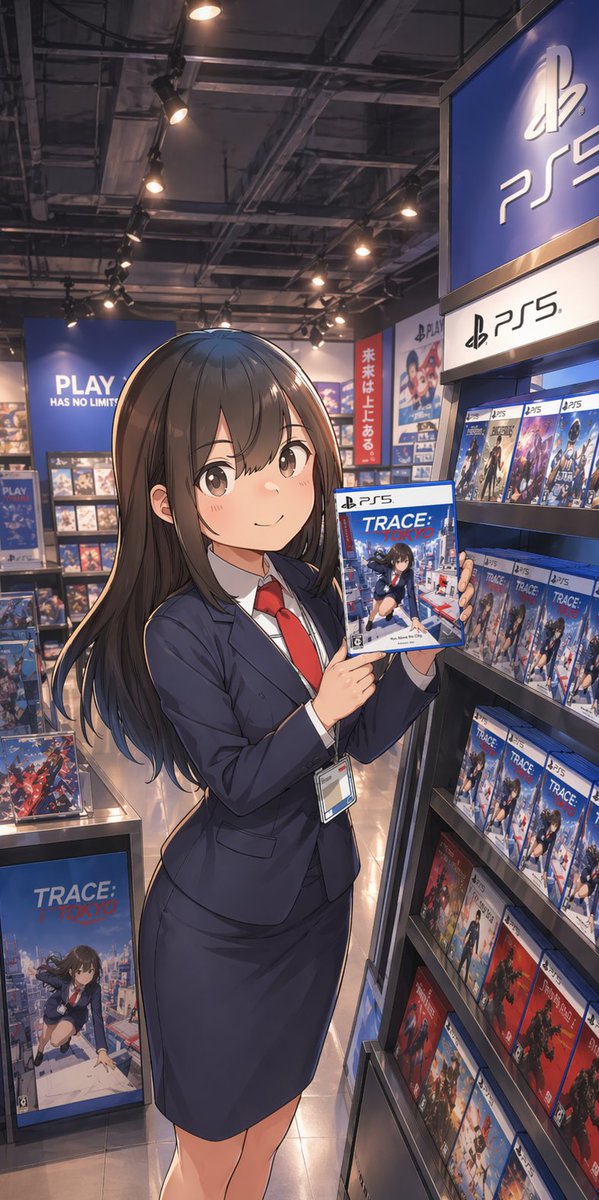
Commesso di anime nel negozio di giochi PS5
Questo prompt genera un'illustrazione promozionale verticale in stile anime di una giovane donna in tailleur che presenta un gioco per PS5 all'interno di un negozio al dettaglio a marchio PlayStation, ideale per post sui social media, poster o finte pubblicità.
Questo è un esempio di prompt GPT Image 2 per Anime e videogiochi . Utilizza il prompt pronto per la copia qui sotto per generare immagini simili e verifica l'attribuzione Awesome GPT Image 2 Prompts e i diritti di utilizzo commerciale prima del riutilizzo.
Free 1K preview
Generate one preview image instantly, no sign-up required.
Richiesta
prompt pronto per la copia
A polished anime-style illustration of a young Japanese woman standing in a modern video game store aisle, posed like a store clerk or promotional staff member. She has long, straight {argument name="hair color" default="dark brown"} hair with soft shine and gentle layered ends, and she wears a fitted navy business suit with exactly 4 visible clothing/accessory pieces: a navy blazer, a matching pencil skirt, a white dress shirt, and a bright red necktie, plus a staff ID badge hanging from her waist. Show every face clearly with natural, detailed facial features. She stands in a relaxed three-quarter pose, slightly turned toward the viewer, holding up a PS5 game case with both hands at chest height to present it. The game cover title should read {argument name="game title" default="TRACE: TOKYO"}, showing an anime schoolgirl over a Tokyo city background. Set the scene inside a PlayStation-branded retail section with 2 dominant PS5 signs visible on the right side, multiple blue PlayStation displays, and shelves densely stocked with PS5 game boxes. Include 1 large floor display box for the same featured game near the lower left, and many repeated PS5 cases on the right shelf, with a few red-spined game cases on the lower shelves for color contrast. In the back left, add a large blue wall sign reading {argument name="store slogan" default="PLAY HAS NO LIMITS"}. In the mid-background, add 1 vertical red banner with Japanese text reading {argument name="banner text" default="未来は上にある。"}. Use warm overhead spotlights, a realistic game shop interior with exposed industrial ceiling fixtures, glossy tile floor reflections, and cinematic depth. Composition is vertical smartphone aspect ratio, full-body framing, slightly low eye-level perspective, with the woman centered-left and the PS5 shelf dominating the right side. Render in high-detail contemporary anime key art style, clean linework, soft shading, realistic store lighting, rich blue tones, and a premium promotional illustration feel.Variabili di richiesta
Segnaposto per gli argomenti modificabili presenti nel prompt, con i relativi valori predefiniti.
Best for
- - Anime e videogiochi visual exploration
- - Image generation and reference-image edits
- - Reusable briefs that keep source attribution visible
Change these parts
- - Subject, product, character, or scene
- - Aspect ratio, camera, lighting, and background
- - Brand, text, color, and output constraints
Recommended model and settings
- - Model: gpt-image-2
- - Input mode: Testo in immagine
- - Aspect ratio: source
- - Commercial status: review original source
How to use this prompt
- 1. Copy the prompt and preserve its structure for the first test.
- 2. Replace the subject, context, and publishing channel.
- 3. Change one camera, lighting, or style variable per iteration.
- 4. Inspect the output, source, text, and rights before reuse.
Limitations, source, and reuse cautions
- - Generated output is an editable draft, not factual, legal, or rights evidence.
- - Review the linked source, people, brands, logos, text, and third-party media before commercial use.
Altri casi in questa categoria
Prioritizzazione in base a categoria, compatibilità della modalità di input, qualità e minor rischio.






Note sul riutilizzo e sulla fonte
Utilizza questo prompt in tutta sicurezza dopo aver visualizzato in anteprima il caso.
- 1.Copia il prompt oppure aprilo direttamente in Dovoo tramite il pulsante di generazione.
- 2.Regola le variabili, le proporzioni e le immagini di riferimento in base alle tue esigenze.
- 3.Prima della pubblicazione o dell'utilizzo a pagamento, verificare i diritti di fonte, i requisiti di attribuzione e i rischi relativi al marchio o all'immagine.