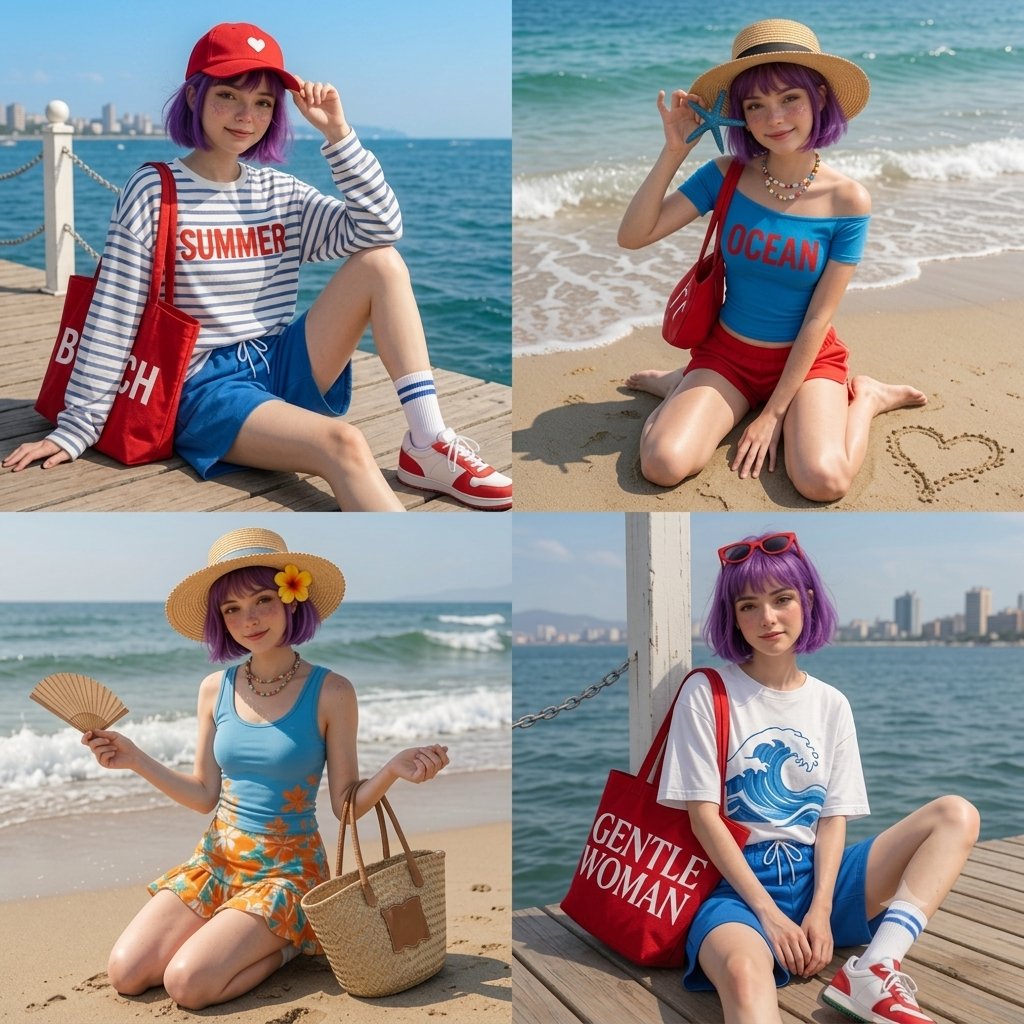
Anime Beach Day 4-Panel Grid
A creative 2x2 grid prompt featuring an anime character in various beach scenarios, from relaxing on a pier to finding a starfish, with detailed fashion and scene descriptions.
Questo è un esempio di prompt GPT Image 2 per Anime e videogiochi . Utilizza il prompt pronto per la copia qui sotto per generare immagini simili e verifica l'attribuzione Awesome GPT Image 2 Prompts e i diritti di utilizzo commerciale prima del riutilizzo.
Hai bisogno del set completo di prompt? Usa il Anime e videogiochi hub tematico per ulteriori esempi correlati oppure apri il GPT Image 2 catalogo rapido per l'indice completo degli esempi, le strutture riutilizzabili e l'attribuzione delle fonti.
Free 1K preview
Generate one preview image instantly, no sign-up required.
1254/4000
Richiesta
prompt pronto per la copia
A 4-panel grid (2x2 layout) featuring a cute anime girl with a {argument name="hair color" default="vibrant purple"} bob haircut and light freckles enjoying a sunny summer beach day. Top-Left: She is sitting on a wooden pier by the deep blue sea, wearing a red baseball cap with a white heart, a white long-sleeve shirt with blue stripes that says '{argument name="shirt text" default="SUMMER"}', blue shorts, and white socks with red sneakers, holding a large red 'BEACH' tote bag. Top-Right: She is kneeling on the sandy beach shore, holding a blue starfish near her face, wearing a straw sunhat, a blue off-the-shoulder top that says 'OCEAN', and red shorts, with a small heart drawn in the sand. Bottom-Left: She is kneeling on the beach with ocean waves behind her, holding a folding fan and a woven straw tote bag, wearing a straw hat with a yellow hibiscus flower, a blue tank top, and a vibrant orange floral mini-skirt. Bottom-Right: She is sitting on the wooden deck by a white post with a city skyline in the distance, wearing red sunglasses on her head, {argument name="bottom outfit" default="a white t-shirt with a blue wave graphic, blue drawstring shorts"}, and carrying a large red tote bag with white bold text that says 'GENTLE WOMAN'.Variabili di richiesta
Segnaposto per gli argomenti modificabili presenti nel prompt, con i relativi valori predefiniti.
Variabile
hair color
Predefinito
vibrant purple
Variabile
shirt text
Predefinito
SUMMER
Variabile
bottom outfit
Predefinito
a white t-shirt with a blue wave graphic, blue drawstring shorts
Best for
- - Anime e videogiochi visual exploration
- - Image generation and reference-image edits
- - Reusable briefs that keep source attribution visible
Change these parts
- - Subject, product, character, or scene
- - Aspect ratio, camera, lighting, and background
- - Brand, text, color, and output constraints
Recommended model and settings
- - Model: gpt-image-2
- - Input mode: Testo in immagine
- - Aspect ratio: source
- - Commercial status: review original source
How to use this prompt
- 1. Copy the prompt and preserve its structure for the first test.
- 2. Replace the subject, context, and publishing channel.
- 3. Change one camera, lighting, or style variable per iteration.
- 4. Inspect the output, source, text, and rights before reuse.
Limitations, source, and reuse cautions
- - Generated output is an editable draft, not factual, legal, or rights evidence.
- - Review the linked source, people, brands, logos, text, and third-party media before commercial use.
Importato da Awesome GPT Image 2 Prompts . È richiesta l'attribuzione. Lo stato di utilizzo commerciale è allowed ; verificare i diritti della fonte prima dell'utilizzo a pagamento.
Altri casi in questa categoria
Prioritizzazione in base a categoria, compatibilità della modalità di input, qualità e minor rischio.

Anime Girl Heterochromia Portrait
Testo in immagine

Street Selfie with Cat in Matching Cap
Testo in immagine

MotoGP POV Cornering Shot
Testo in immagine

Cute Speech Bubble Mascot Profile Icon
Testo in immagine

GPT Image 2 Real-Life Character Street Snap
Testo in immagine

Luxury Travel Fashion Portrait Prompt
Testo in immagine
Note sul riutilizzo e sulla fonte
Utilizza questo prompt in tutta sicurezza dopo aver visualizzato in anteprima il caso.
- 1.Copia il prompt oppure aprilo direttamente in Dovoo tramite il pulsante di generazione.
- 2.Regola le variabili, le proporzioni e le immagini di riferimento in base alle tue esigenze.
- 3.Prima della pubblicazione o dell'utilizzo a pagamento, verificare i diritti di fonte, i requisiti di attribuzione e i rischi relativi al marchio o all'immagine.