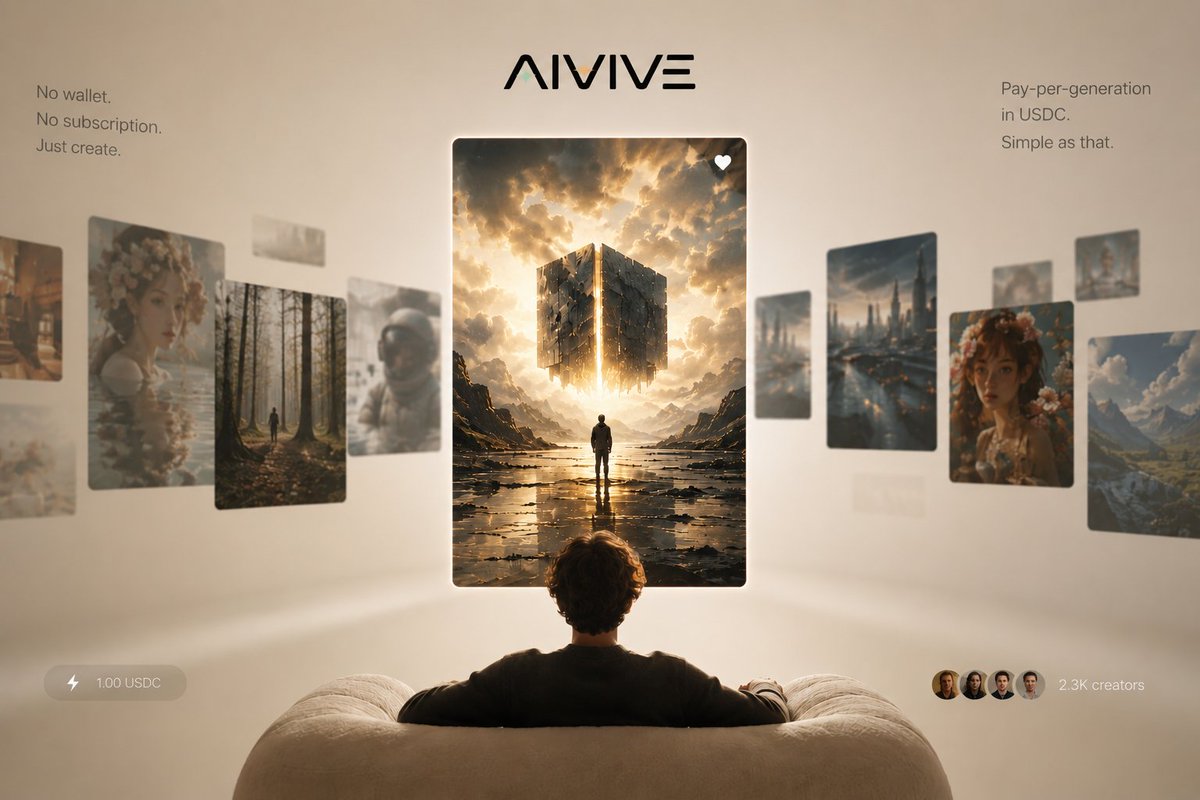
AIVIVE Immersive AI Gallery Hero
Generates a premium startup landing-page hero for an AI image generation platform with floating feed cards, USDC pricing, and minimalist onboarding messaging.
Questo è un esempio di prompt GPT Image 2 per Prodotto e commerciale . Utilizza il prompt pronto per la copia qui sotto per generare immagini simili e verifica l'attribuzione Awesome GPT Image 2 Prompts e i diritti di utilizzo commerciale prima del riutilizzo.
Hai bisogno del set completo di prompt? Usa il Prodotto e commerciale hub tematico per ulteriori esempi correlati oppure apri il GPT Image 2 catalogo rapido per l'indice completo degli esempi, le strutture riutilizzabili e l'attribuzione delle fonti.
Free 1K preview
Generate one preview image instantly, no sign-up required.
3064/4000
Richiesta
prompt pronto per la copia
Goal: Create a premium landing-page hero image for {argument name="brand name" default="AIVIVE"}, presenting an AI image-generation social feed as an immersive gallery viewed from behind a seated user.

Canvas: Wide 16:9 composition, 1200×768 style, warm beige studio background with soft vignette, shallow depth of field, cinematic lighting, minimal luxury tech aesthetic.

Layout: Center the stylized black {argument name="brand name" default="AIVIVE"} logo at the top. Below it, place one large vertical featured image card in the exact center, floating in front of the viewer. Show the back of a person seated on a cream, rounded sofa in the bottom foreground, arms resting along the couch, looking toward the central card. Arrange a curved horizontal carousel of floating image cards receding into depth on both sides, with the side cards slightly blurred and angled to imply a social feed gallery.

Text content: Add a small left copy block near the upper left reading exactly: “No wallet. / No subscription. / Just create.” Add a small right copy block near the upper right reading exactly: “Pay-per-generation / in USDC. / Simple as that.” Add a bottom-left translucent pill with a lightning icon and the text “1.00 USDC”. Add a bottom-right social proof element with four small circular creator avatars and the text “2.3K creators”.

Image card count and subjects: Use exactly 14 floating image cards total: 1 central featured card, 7 left-side cards, and 6 right-side cards. The central featured card is a crisp vertical fantasy/sci-fi image of a lone figure standing in a reflective rocky landscape beneath a glowing fragmented cube suspended in dramatic golden clouds, with a small white heart icon in the top-right corner of the card. The 7 left-side cards are: 1 partial warm city/street image at the far left edge, 1 large floral portrait card, 1 forest path card with a tiny walking figure, 1 small pale abstract card near the upper middle, 1 blurred pale landscape card behind the forest, 1 astronaut helmet portrait card, and 1 faint low blurred card near the lower left. The 6 right-side cards are: 1 tall futuristic rainy city skyline card, 1 small blurred vertical card behind it, 1 large floral portrait card, 1 mountain valley landscape card at the far right, 1 small card near the upper right edge, and 1 faint small distant card between the city and portrait cards.

Visual style: Photorealistic 3D product advertising render, warm cream and gold palette, soft global illumination, floating glassy cards with rounded corners and subtle shadows, elegant minimal typography, slight background blur, premium startup launch campaign look. The central card should be the sharpest and brightest element, while surrounding cards are softer and more atmospheric.

Constraints: No clutter, no browser chrome, no visible app interface beyond the logo, text blocks, price pill, creator avatars, and heart icon. Keep all text legible and spelled exactly. Avoid adding extra cards, extra buttons, watermarks, or decorative icons beyond those specified.
Variabili di richiesta
Segnaposto per gli argomenti modificabili presenti nel prompt, con i relativi valori predefiniti.
Variabile
brand name
Predefinito
AIVIVE
Best for
- - Prodotto e commerciale visual exploration
- - Image generation and reference-image edits
- - Reusable briefs that keep source attribution visible
Change these parts
- - Subject, product, character, or scene
- - Aspect ratio, camera, lighting, and background
- - Brand, text, color, and output constraints
Recommended model and settings
- - Model: gpt-image-2
- - Input mode: Testo in immagine
- - Aspect ratio: source
- - Commercial status: review original source
How to use this prompt
- 1. Copy the prompt and preserve its structure for the first test.
- 2. Replace the subject, context, and publishing channel.
- 3. Change one camera, lighting, or style variable per iteration.
- 4. Inspect the output, source, text, and rights before reuse.
Limitations, source, and reuse cautions
- - Generated output is an editable draft, not factual, legal, or rights evidence.
- - Review the linked source, people, brands, logos, text, and third-party media before commercial use.
Importato da Awesome GPT Image 2 Prompts . È richiesta l'attribuzione. Lo stato di utilizzo commerciale è allowed ; verificare i diritti della fonte prima dell'utilizzo a pagamento.
Altri casi in questa categoria
Prioritizzazione in base a categoria, compatibilità della modalità di input, qualità e minor rischio.

Transparent Earbuds on Stone Pedestal
Testo in immagine

Overhead Pepperoni Pizza Photo
Testo in immagine

Wet Transparent Earbud Macro
Testo in immagine

Fashion Studio Portrait with Blue Rim Lighting
Testo in immagine

Spring Editorial Fashion Collage
Testo in immagine

Surreal 3D Chess Match Artwork
Testo in immagine
Note sul riutilizzo e sulla fonte
Utilizza questo prompt in tutta sicurezza dopo aver visualizzato in anteprima il caso.
- 1.Copia il prompt oppure aprilo direttamente in Dovoo tramite il pulsante di generazione.
- 2.Regola le variabili, le proporzioni e le immagini di riferimento in base alle tue esigenze.
- 3.Prima della pubblicazione o dell'utilizzo a pagamento, verificare i diritti di fonte, i requisiti di attribuzione e i rischi relativi al marchio o all'immagine.